huashu-design
🌐 中文 · English
「打字。回车。一份能交付的设计。」 "Type. Hit enter. A finished design lands in your lap."



在你的 agent 里打一句话,拿回一份能交付的设计。
3 到 30 分钟,你能 ship 一段产品发布动画、一个能点击的 App 原型、一套能编辑的 PPT、一份印刷级的信息图。
不是「AI 做的还行」那种水平——是看起来像大厂设计团队做的。给 skill 你的品牌资产(logo、色板、UI 截图),它会读懂你的品牌气质;什么都不给,六张缩略图里挑出的三个真实方向 + 84 种带样张的风格库也能兜底到不出 AI slop。
你看到这篇 README 里的每一页设计,都是 huashu-design 自己做的。 不是 Figma,不是 AE,就是一句话 prompt + skill 跑通。下次产品发布要做宣传片?现在你也能做。
npx skills add alchaincyf/huashu-design
跨 agent 通用——Claude Code、Cursor、Codex、OpenClaw、Hermes 都能装。
📣 已改为 MIT 协议。 自 2026-05-14 起本 skill 完全开源(MIT License),个人和商用都免费,无需事先授权。原「个人使用免费、企业商用需授权」的条款已作废。(查看变更)
🆕 3.0:三个方向更敢,项目之间也不再长一个样。 先出六张缩略图再挑三版做成真稿;风格库扩到 84 种(新增 App、中文与东亚两个分区),每种都有样张;参照作品先截图再动手;带一个只量事实的设计体检,和一本记住你做过什么样子的外观账本。详见核心机制
看效果 · 安装 · 能做什么 · 核心机制 · 和 Claude Design 的关系

▲ 3.0 发布片 · 32 秒 · 片里每一页设计都是 3.0 自己做的,剪辑用的是 huashu-motion
👉 下载 MP4(1080p · 含配乐 · 24MB) ·
2.0 的带音效 HTML 互动版
3.0 案例
下面这些都是 3.0 跑出来的。前五个是从发布时新跑的 6 道题里挑的,每道只给一句话需求,方向是 agent 自己挑的,作者没插手;后两个一个是第三轮盲选赢下来的那版,一个是发布后作者拿它做的真实项目。
网页 · 《富岳三十六景》线上展
「给葛饰北斋的《富岳三十六景》做一个线上展览网站」
三版分别是 Rijksmuseum 官网式的暗场展厅、田中一光式的三角窗、民国书衣式的题签框。设计体检报过一次撞车:两版首屏都用了《神奈川冲浪里》,它就把暗场那版换成了《山下白雨》。

往下一章讲普鲁士蓝,依据是大都会博物馆的光谱研究;全 46 幅都来自芝加哥艺术博物馆和大都会的开放馆藏。


App · 鸣迹(观鸟记录)
「做一个观鸟记录 App 的原型」
现实参照找的是拿了 2025 年苹果设计奖的 CapWords,ref_board.py 先把它截成参考板,agent 亲眼看过再动手。借来的是「从照片里撕下一张贴纸」:每只鸟都从 Wikimedia 的真实照片里分割出来,贴进一年的本子里,叫声波形是拿真实录音算的。

App · 今晚吃啥(家常菜谱)
「做一个家常菜谱 App」
秒数轮盘恰好抽到吕敬人书籍设计,最后做成了一本菜谱:一道菜一页方子,切口旁边留一条旁注栏,写「擦干再煎才不溅油」「老抽只要几滴」,朱砂只给「开做」这一方印。外观账本看到最近 6 个交付里 5 个是无衬线标题,这一版挑了宋体。

PPT · 《千里江山图》讲座
走的是最佳设计师 Abbott Miller 式的暗场展柜,暗底取的是绢地最暗处的颜色。封面底下那条细长的位置条就是整卷缩略图,框出这一页在 11.9 米长卷的哪一段。


PPT · 黑洞的照片是怎么拍出来的
现实参照是 Jonathan Corum 的讲座幻灯片:黑底、照片做主角、标注直接写在图上。每页都标了出处,事实先过核查再上页面。

App · 绿拇指(第三轮盲选赢的那版)
把植物当成会呼吸的生命体征来读。App 原型做成一张有构图的展示板,几台手机错落排开。

网页 · 旅居档案(作者自己的项目)
三年里所有旅行照片的地图。选的是葛西薰式的白纸明朝体长卷,开头一张卫星地图串起所有旅程,往下一段旅程一章。选完作者顺口说了句「尽量不要遗漏」,它就记进了经验:个人回忆类档案照片要全,而且注明只适用于照片档案,不外溢到产品界面。

📺 新手教程(花叔亲录)
不知道怎么用?看花叔录的 huashu-design 上手教程:
装上就能用
npx skills add alchaincyf/huashu-design
装完先自检:这个 skill 不只是 SKILL.md 一个文件,
references/、assets/、scripts/、demos/四个子目录里有 99 处被引用的配方、脚本、素材,缺一不可。装完看一眼安装目录(如~/.claude/skills/huashu-design/),如果只有 SKILL.md、没有那几个子目录,说明你的skillsCLI 版本太旧(≤1.5.15 有个只同步单文件的 bug,已在 1.5.19 修复)。升级后再装一次即可:npm i -g skills@latest # 或 npx skills@latest add alchaincyf/huashu-design升级后仍异常,就用
git clone兜底安装,把仓库克隆到任意 skills 目录即可:git clone https://github.com/alchaincyf/huashu-design.git ~/.claude/skills/huashu-design
然后在 Claude Code / Codex / Cursor 等任意支持 skills 的 agent 里直接说话:
「做一份 AI 心理学的演讲 PPT,推荐 3 个风格方向让我选」
「做个 AI 番茄钟 iOS 原型,4 个核心屏幕要真能点击」
「把这段逻辑做成 60 秒动画,导出 MP4 和 GIF」
「帮我对这个设计做一个 5 维度评审」
没有按钮、没有面板、没有 Figma 插件。
Star 趋势
能做什么
| 能力 | 交付物 | 典型耗时 |
|---|---|---|
| 交互原型(App / Web) | 单文件 HTML · 真 iPhone bezel · 可点击 · Playwright 验证 | 10–15 min |
| 演讲幻灯片 | HTML deck(浏览器演讲)+ 可编辑 PPTX(文本框保留) | 15–25 min |
| 时间轴动画 | MP4(25fps / 60fps 插帧)+ GIF(palette 优化)+ BGM | 8–12 min |
| 设计变体 | 3+ 并排对比 · Tweaks 实时调参 · 跨维度探索 | 10 min |
| 信息图 / 可视化 | 印刷级排版 · 可导 PDF/PNG/SVG | 10 min |
| 设计方向顾问 | 三套逻辑各出两个候选(最佳设计师 + 同媒介获奖作品 + 秒数轮盘)· 六张缩略图挑三版真实视觉,另三张作备选 | 10 min |
| 5 维度专家评审 | 雷达图 + Keep/Fix/Quick Wins · 可操作修复清单 | 3 min |
Demo 画廊
设计方向顾问
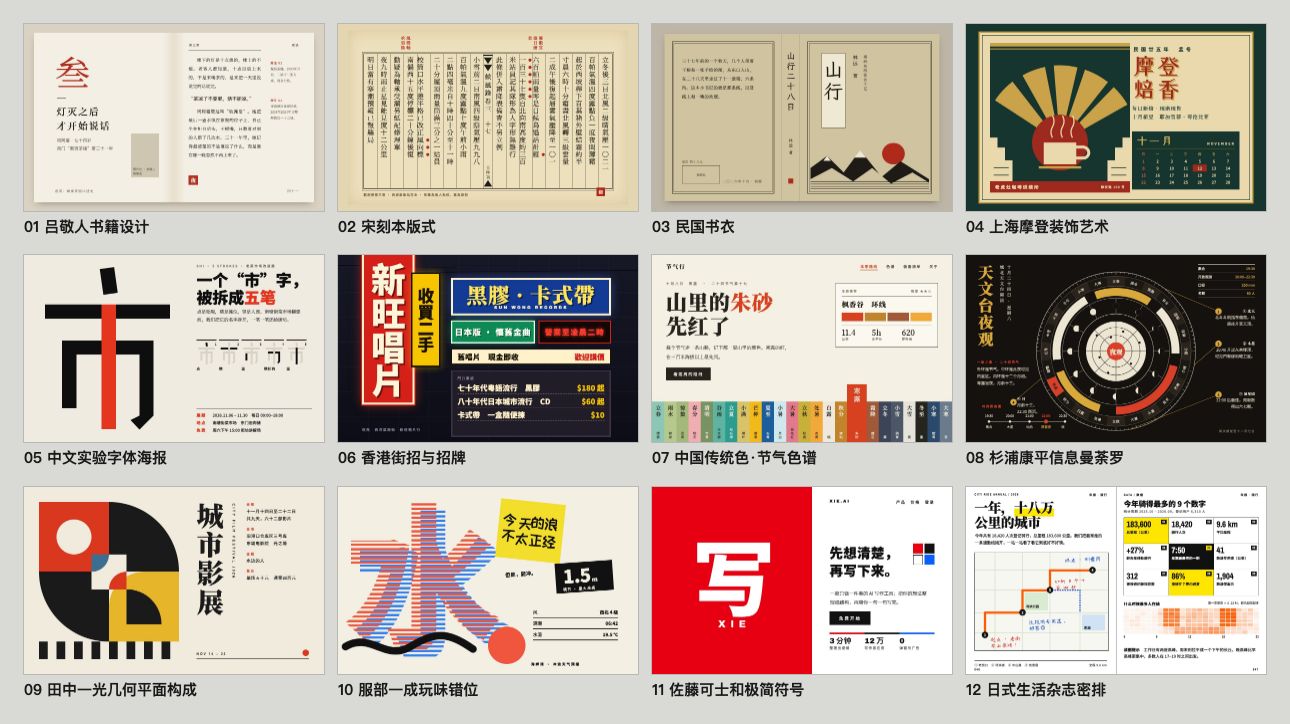
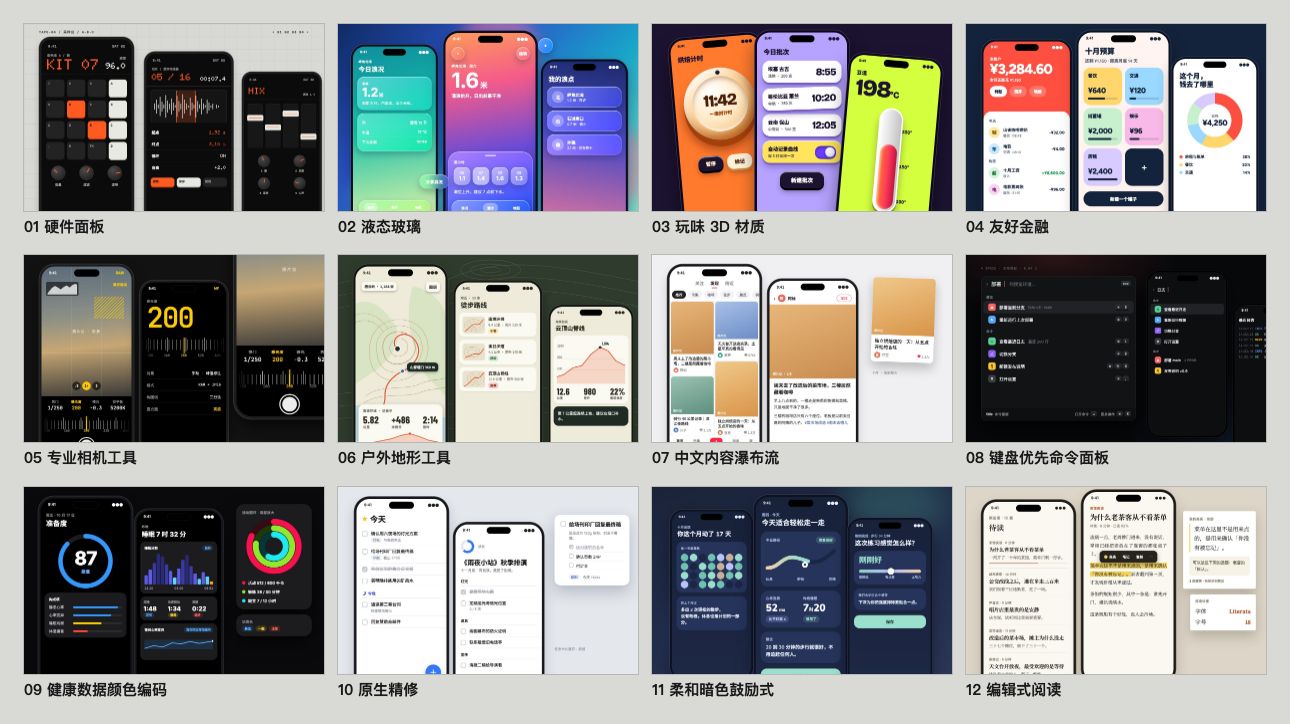
模糊需求时的 fallback:三套互补逻辑各出两个候选——最佳设计师(预算无上限时最适合的设计师)+ 现实参照(同媒介的获奖作品,先截图亲眼看)+ 秒数轮盘(从风格库随机抽,打破惯性)。六个候选先画成一页缩略图,挑最强、最不一样的三版做成真实视觉让你看着选,另外三张作为备选一起给你。背后是 84 种 HTML 原生风格库(网页 20 + PPT 20 + 信息图 20 + App 12 + 中文与东亚 12,纯 CSS 无需生图),每种都有一张样张。

动图为 2.0 流程(三套逻辑直接各出一版)
3.0 新增的两个分区,每格都是一张样张(全部纯 HTML/CSS,题材与数字虚构):
iOS App 原型
iPhone 15 Pro 精确机身(灵动岛 / 状态栏 / Home Indicator)· 状态驱动多屏切换 · 真图从 Wikimedia/Met/Unsplash 取 · Playwright 自动点击测试。

Motion Design 引擎
Stage + Sprite 时间片段模型 · useTime / useSprite / interpolate / Easing 四 API 覆盖所有动画需求 · 一条命令导出 MP4 / GIF / 60fps 插帧 / 带 BGM 的成片。

HTML Slides → 可编辑 PPTX
HTML deck 浏览器演讲 · html2pptx.js 读 DOM 的 computedStyle 逐元素翻译成 PowerPoint 对象 · 导出的是真文本框,PPT 里双击即可编辑。

Tweaks · 实时变体切换
配色 / 字型 / 信息密度等参数化 · 侧边面板切换 · 纯前端 + localStorage 持久化 · 刷新不丢。

信息图 / 数据可视化
杂志级排版 · CSS Grid 精准分栏 · text-wrap: pretty 排印细节 · 真数据驱动 · 可导 PDF 矢量 / PNG 300dpi / SVG。

5 维度专家评审
哲学一致性 · 视觉层级 · 细节执行 · 功能性 · 创新性 各 0–10 分 · 雷达图可视化 · 输出 Keep / Fix / Quick Wins 清单。

Junior Designer 工作流
不闷头做大招:先写 assumptions + placeholders + reasoning,尽早 show 给你,再迭代。理解错了早改比晚改便宜 100 倍。

品牌资产协议 5 步硬流程
涉及具体品牌时强制执行:问 → 搜 → 下载(三条兜底)→ grep 色值 → 写 brand-spec.md。

Showcase · 2.0 时期的真实案例
鹦鹉进化史网站 · 设计方向顾问三套逻辑实战(2.0)
Live demo · https://www.huasheng.ai/parrots/
一句「做个介绍鹦鹉进化史的网站」、零额外要求,skill 自动跑完整 2.0 顾问流程:先判断图片是内容必需 → 抓公共领域博物插画(Edward Lear / John Gould 的鹦鹉图录)→ 三套逻辑并行(秒数轮盘 + 现实参照获奖站 + 原研哉「白」哲学)各出一版真实视觉。素材齐了再设计,不是边设计边用色块占位。
「聊聊 skill」 · PM after-party 演讲 deck
Live demo · https://skill-huasheng.vercel.app
13 页 HTML deck,全部用 huashu-design 完成:
- 黑底极简衬线视觉系统(cover / about / hook / what / why / closing)
- 2 个带 BGM + SFX 的 22 秒 cinematic demo(Nuwa skill workflow + Darwin skill workflow),各采用完全独立的视觉语言:
- Nuwa:3D 知识 orbit + Pentagon 提炼 + SKILL.md typewriter + 「21 分钟」hero reveal
- Darwin:autoresearch loop spin + v1/v5 并列 diff + Hill-Climb 全屏曲线 + Ratchet gear lock
- 每个 cinematic 默认显示完整静态 workflow dashboard(观众随时能看清 skill 怎么跑),点 ▶ 才触发动画,跑完自动 fade 回 dashboard
- 嵌入 huasheng.ai 的 25 秒 hero 动画(iframe 本地化兜底)
- 真实数据:14,495 stargazers 真实曲线(gh API 拉取)+ DeepSeek V4 真实 specs(WebSearch 验证)
- 真实 AI 素材:用
huashu-gpt-image跑 4×2 grid 大图,extract_grid.py抠出 8 张独立透明 PNG,做 3D orbit 漂浮
适合参考的页面:
/slides/slide-04b-nuwa-flow.html· 静态 dashboard + cinematic overlay 双层架构/slides/slide-06b-darwin-flow.html· 完全独立视觉语言的对照案例/slides/slide-03b-deepseek-cover.html· AI slop vs 真实设计师视角的对比页
详细 cinematic patterns 见 references/cinematic-patterns.md。
核心机制
品牌资产协议
skill 里最硬的一段规则。涉及具体品牌(Stripe、Linear、Anthropic、自家公司等)时强制执行 5 步:
| 步骤 | 动作 | 目的 |
|---|---|---|
| 1 · 问 | 用户有 brand guidelines 吗? | 尊重已有资源 |
| 2 · 搜官方品牌页 | <brand>.com/brand · brand.<brand>.com · <brand>.com/press |
抓权威色值 |
| 3 · 下载资产 | SVG 文件 → 官网 HTML 全文 → 产品截图取色 | 三条兜底,前一条失败立刻走下一条 |
| 4 · grep 提取色值 | 从资产里抓所有 #xxxxxx,按频率排序,过滤黑白灰 |
绝不从记忆猜品牌色 |
| 5 · 固化 spec | 写 brand-spec.md + CSS 变量,所有 HTML 引用 var(--brand-*) |
不固化就会忘 |
A/B 测试(v1 vs v2,各跑 6 agent):v2 的稳定性方差比 v1 低 5 倍。稳定性的稳定性,这是 skill 真正的护城河。
设计方向顾问(Fallback)
当用户需求模糊到无法着手时触发(3.0 重做):
- 先对话澄清 + 主动索要参考(名字 / logo / 品牌色 / 喜欢的参考站),只问一轮
- 取齐内容必需的真图(公共领域 / 免版权,脚本一键抓),再开工
- 三套逻辑各出两个候选,共六个:① 最佳设计师(两位气质不同的设计师,用他们的思维从头做)② 现实参照(两件同媒介的获奖作品——做 App 找 App、做 deck 找出版物;
scripts/ref_board.py先截图亲眼看,再拆网格、字号比和色彩比例)③ 秒数轮盘(date +%S取秒,在产出形态对应的分区和中文东亚分区各抽一号,先看样张再动手) - 六张缩略图 → 挑三版做完整稿:单看够好、彼此不一样、不撞你最近的项目;没选上的三张作为备选一起给你,看中哪张再做
- 绝不让你在没看到视觉时盲选风格——摆出来就停,看着选
- 底层是 84 种 HTML 原生风格库,每种配一张样张和源码(
assets/style-specimens/),作弹药,不是教条
为什么这样做:我们拿固定题目做了三轮改前改后盲选(内部测试)。第一轮强制每版套一个大隐喻,页面被做成道具,4 题只赢 1 题;第二轮为了躲 AI 默认外观加了一堆禁令,三版一起变得「太规整,太无聊」,2 题全输;第三轮改成加选项、不加禁令——多出候选、给看得见的样张、看真参考——同两道题都赢了。
越用越懂你:经验、外观账本与设计体检
- 经验:
scripts/learn.py开工前带出你说过的品味原话(「太素了」「A 的结构加 C 的颜色」)和过去的教训,收工时把值得记的记下来;记录前会告诉你,不想记可以拒绝 - 外观账本:每次交付记一笔「长什么样」(底色、色板、字体、版式骨架,连同项目名和所在路径),下个项目主动避开——单个项目看都不错、放在一起却长得像,这种单调靠它管
- 设计体检:
scripts/design_lint.py只量能核对的事实——图裂了、字小到读不了、对比度不够、控制台报错是红灯;全大写小标签、「A · B · C」这类顺手的模板装饰是黄灯;三版是不是换皮、和最近的项目撞没撞,compare和ledger check来查。好不好看归你判断,它不打分 - 这些记录只存在你本机的
~/.huashu-design/,不随 skill 分发,删掉文件夹就全部忘记
Junior Designer 工作流
默认工作模式,贯穿所有任务:
- 开工前 show 问题清单一次性发给用户,等批量答完再动手
- HTML 里先写 assumptions + placeholders + reasoning comments
- 尽早 show 给用户(哪怕只是灰色方块)
- 填充实际内容 → variations → Tweaks 这三步分别再 show 一次
- 交付前用 Playwright 肉眼过一遍浏览器
反 AI slop 规则
避免一眼 AI 的视觉最大公约数:紫渐变、emoji 图标、圆角+左 border accent、SVG 画人脸、Inter 做 display,以及 2026 年的新一代模板装饰(每个标题上一行全大写小标签、「A · B · C」中点连接、按钮尾巴的「→」、标题只给一个词换色)。不编造数据、评价和 logo 墙。
暖纸衬线、深底单点缀这类「外观家族」不在禁令里:盲选里被用户认可的几版,恰好就有这两类。真正要避免的是三版挤在同一个家族、每个项目都长一个样——那交给外观账本。
和 Claude Design 的关系
我大方承认:品牌资产协议的哲学是从 Claude Design 流传出来的提示词里偷师的。那份提示词反复强调好的高保真设计不是从白纸开始,而是从已有的设计上下文长出来。这个原则是 65 分作品和 90 分作品的分水岭。
定位差异:
| Claude Design | huashu-design | |
|---|---|---|
| 形态 | 网页产品(浏览器里用) | skill(Claude Code 里用) |
| 配额 | 订阅 quota | API 消耗 · 并行跑 agent 不受 quota 限 |
| 交付物 | 画布内 + 可导 Figma | HTML / MP4 / GIF / 可编辑 PPTX / PDF |
| 操作方式 | GUI(点、拖、改) | 对话(说话、等 agent 做完) |
| 复杂动画 | 有限 | Stage + Sprite 时间轴 · 60fps 导出 |
| 跨 agent | 专属 Claude.ai | 任意 skill 兼容 agent |
Claude Design 是更好的图形工具,huashu-design 是让图形工具这层消失。两条路,不同受众。
安全与数据流
核心链路(设计→渲染→MP4/PDF/PPTX 导出)100%本地运行,零网络零 key。云能力(豆包 TTS 配音、AI 看片评审)全部隔离在 scripts/cloud/,完全可选:用你自己的 key、只发对应厂商官方 API、首次调用需 --yes 显式确认。无 telemetry,没有任何数据发往作者服务器。3.0 新增的本机记录(品味经验、外观账本)只写在 ~/.huashu-design/,从不上传;参考板只在你让 agent 截参考作品时访问那些网址。全部出站域名、密钥处理、删除边界的穷举声明见 SECURITY.md,欢迎用你的 agent 对着代码逐条核验。
Limitations
- 不支持图层级可编辑的 PPTX 到 Figma。产出 HTML,可截图、录屏、导图,但不能拖进 Keynote 改文字位置。
- Framer Motion 级别的复杂动画不行。3D、物理模拟、粒子系统超出 skill 边界。
- 完全空白的品牌从零设计质量会掉到 60–65 分。凭空画 hi-fi 本来就是 last resort。
这是一个 80 分的 skill,不是 100 分的产品。对不愿意打开图形界面的人,80 分的 skill 比 100 分的产品好用。
仓库结构
huashu-design/
├── SKILL.md                 # 主文档(给 agent 读)
├── README.md                # 中文 README(默认,本文件)
├── README.en.md             # 英文 README
├── assets/                  # Starter Components
│   ├── animations.jsx       # Stage + Sprite + Easing + interpolate
│   ├── ios_frame.jsx        # iPhone 15 Pro bezel
│   ├── android_frame.jsx
│   ├── macos_window.jsx
│   ├── browser_window.jsx
│   ├── deck_stage.js        # HTML 幻灯片引擎
│   ├── deck_index.html      # 多文件 deck 拼接器
│   ├── design_canvas.jsx    # 并排变体展示
│   ├── showcases/           # 24 个预制样例(8 场景 × 3 风格)
│   ├── style-specimens/     # 84 种风格的样张(html 源码 + jpg)与分区总览
│   └── bgm-*.mp3            # 6 首场景化背景音乐
├── references/              # 按任务深入读的子文档
│   ├── animation-pitfalls.md
│   ├── directions.md        # 三方向:六个候选 → 缩略图 → 挑三版
│   ├── design-styles.md     # 84 种 HTML 原生风格库(网页 20 + PPT 20 + 信息图 20 + App 12 + 中文与东亚 12)
│   ├── modules/             # 网页 / deck / 信息图 / 动画 四个模块手册
│   ├── slide-decks.md
│   ├── editable-pptx.md
│   ├── critique-guide.md
│   ├── video-export.md
│   └── ...
├── scripts/                 # 导出工具链
│   ├── render-video.js      # HTML → MP4
│   ├── convert-formats.sh   # MP4 → 60fps + GIF
│   ├── add-music.sh         # MP4 + BGM
│   ├── export_deck_pdf.mjs
│   ├── export_deck_pptx.mjs
│   ├── html2pptx.js
│   ├── design_lint.py       # 设计体检、三版撞色撞骨架、外观账本
│   ├── learn.py             # 品味经验的读写
│   ├── ref_board.py         # 把参考作品截成参考板
│   ├── capabilities.py      # 探测本机能力(生图、兄弟 skill、Node、ffmpeg)
│   └── verify.py
└── demos/                   # 9 个能力演示 (c*/w*),中英双版 GIF/MP4/HTML + hero v10
起源
Anthropic 发布 Claude Design 那天我玩到凌晨四点。几天之后发现自己再也没点开过它,不是它不好——它是这个赛道目前最成熟的产品——是我宁愿让 agent 在终端里帮我干活,也不愿意打开任何图形界面。
于是让 agent 拆解 Claude Design 本身(包括社区流传的系统提示词、品牌资产协议、组件机制),蒸馏成结构化 spec,再写成 skill 装进自己的 Claude Code。
感谢 Anthropic 把 Claude Design 的提示词写得清晰。这种基于其他产品灵感的二次创作,是开源文化在 AI 时代的新形态。
用 huashu-design 做的产品
FanBox · Coding Agent 的驾驶舱 的三套界面皮肤,就是用 huashu-design 设计的。指挥 Claude Code / Codex 干活,看清它碰过的每个文件、每一行改动。

社区翻译版本
社区维护的翻译版本。翻译质量与各版本 license 条款由对应维护者负责,使用前请先确认。
| 语言 | 维护者 | 仓库 |
|---|---|---|
| English | @namandhakad712 | namandhakad712/huashu-design-en |
| 한국어(韩语) | @ktkarchive | ktkarchive/ktk-design |
| Tiếng Việt(越南语) | @letrquan | letrquan/huashu-design |
想加你的语言?fork 仓库、翻译 SKILL.md + README.md,然后回这边开个 issue,我会把链接加进来。
License
2026-05-14 起改为 MIT 协议。 此前版本采用「个人使用免费、企业商用需授权」的 Personal Use License,对商用做了限制——现在这层限制完全解除。
按 MIT License,你可以自由使用、修改、分发本 skill,包括商业用途——公司内部用、客户商单交付、做成付费产品对外卖,都没问题。无需事先授权、无需付费、无需打招呼。注明出处不强制,但欢迎。
Connect · 花生(花叔)
花生是 AI Native Coder、独立开发者、AI 自媒体博主。代表作:小猫补光灯(AppStore 付费榜 Top 1)、《一本书玩转 DeepSeek》、女娲 .skill(GitHub 3 万+ star)。自媒体全平台 30 万+ 粉丝。
| 平台 | 账号 | 链接 |
|---|---|---|
| X / Twitter | @AlchainHust | https://x.com/AlchainHust |
| 公众号 | 花叔 | 微信搜索「花叔」 |
| B 站 | 花叔 | https://space.bilibili.com/14097567 |
| YouTube | 花叔 | https://www.youtube.com/@Alchain |
| 小红书 | 花叔 | https://www.xiaohongshu.com/user/profile/5abc6f17e8ac2b109179dfdf |
| 官网 | huasheng.ai | https://www.huasheng.ai/ |
| 开发者主页 | bookai.top | https://bookai.top |
合作咨询、自媒体约稿 → 以上任一平台私信花生即可。