memind

Memind
Memory that thinks. Context that evolves.
The memory layer that lets AI systems learn from every conversation, tool call, document, and resolved task.
Memind turns raw context into structured memory and reusable experience, continuously organizes it into memory graphs, threads, and evolving Insight Trees, then recalls the right context through REST, MCP, SDKs, and first-party plugins for popular agents.











Highlights · Quick Start · Integrations · Benchmark
Memind achieves state-of-the-art results across all three mainstream long-memory benchmarks: LoCoMo, LongMemEval, and PersonaMem.
- ☕ The first Java-native SOTA memory and context engine for AI agents: built natively in Java, memind brings benchmark-leading long-memory performance into the Java ecosystem.
- 🚀 Highest reported results across all three benchmarks: under aligned MemOS / EverMemOS-style evaluation, memind ranks #1 among the listed baselines on LoCoMo, LongMemEval, and PersonaMem, surpassing EverMemOS on LoCoMo and LongMemEval and exceeding MemOS on PersonaMem. See Benchmark for full scores, category-level comparisons, context tokens, and evaluation protocol.
- 🧩 One memory engine for users and agents: memind separates USER memory from AGENT memory, letting the same system remember user profiles, preferences, and life context while also preserving agent directives, tool experience, playbooks, and resolved-task knowledge across coding agents, local harness agents, chatbots, companions, copilots, and workflow agents.
- 🌳 Insight Tree turns memory into evolving intelligence: instead of storing isolated facts, memind continuously distills raw memories into Leaf → Branch → Root insights, revealing patterns, preferences, causal signals, and high-level understanding that flat memory cannot capture. See docs.openmemind.com.
- 🔎 Multi-layer retrieval recalls the right context: memind retrieves across Insight Trees, Memory Items, raw source data, Memory Graphs, Memory Threads, vector search, BM25 keyword search, temporal signals, and optional Deep Retrieval with query expansion, sufficiency checking, and reranking.
- 📥 Memory for every kind of context: memind can ingest conversations, documents, images, audio, tool calls, and agent timelines, then uses typed processors, parsers, chunkers, captioners, and plugin-specific extraction strategies to turn them into searchable memory.
- 🕸️ Memory Graph connects scattered context: memind materializes entities, mentions, semantic links, temporal links, causal links, aliases, and co-occurrence signals from extracted memories, then uses graph expansion to recover related context that pure vector similarity can miss.
- 🧵 Memory Thread preserves evolving tasks and episodes: memind groups related memory items into durable threads with timeline events, memberships, lifecycle state, enrichment, and retrieval-time thread assist, helping agents continue unfinished work and reuse resolved task history.
Overview
What is Memind?
Memind is an open-source, self-evolving memory and context engine for AI applications and agents.
It is not a vector-store wrapper. Memind captures raw context from conversations, documents, images, audio, tool calls, agent timelines, and resolved tasks, then turns it into structured user memory, reusable agent experience, evolving insights, connected memory graphs, and task-aware memory threads.
At retrieval time, Memind assembles the right context across these memory layers and exposes it through REST APIs, HTTP MCP tools, SDKs, Java runtime APIs, and first-party agent integrations.
How Memind Works
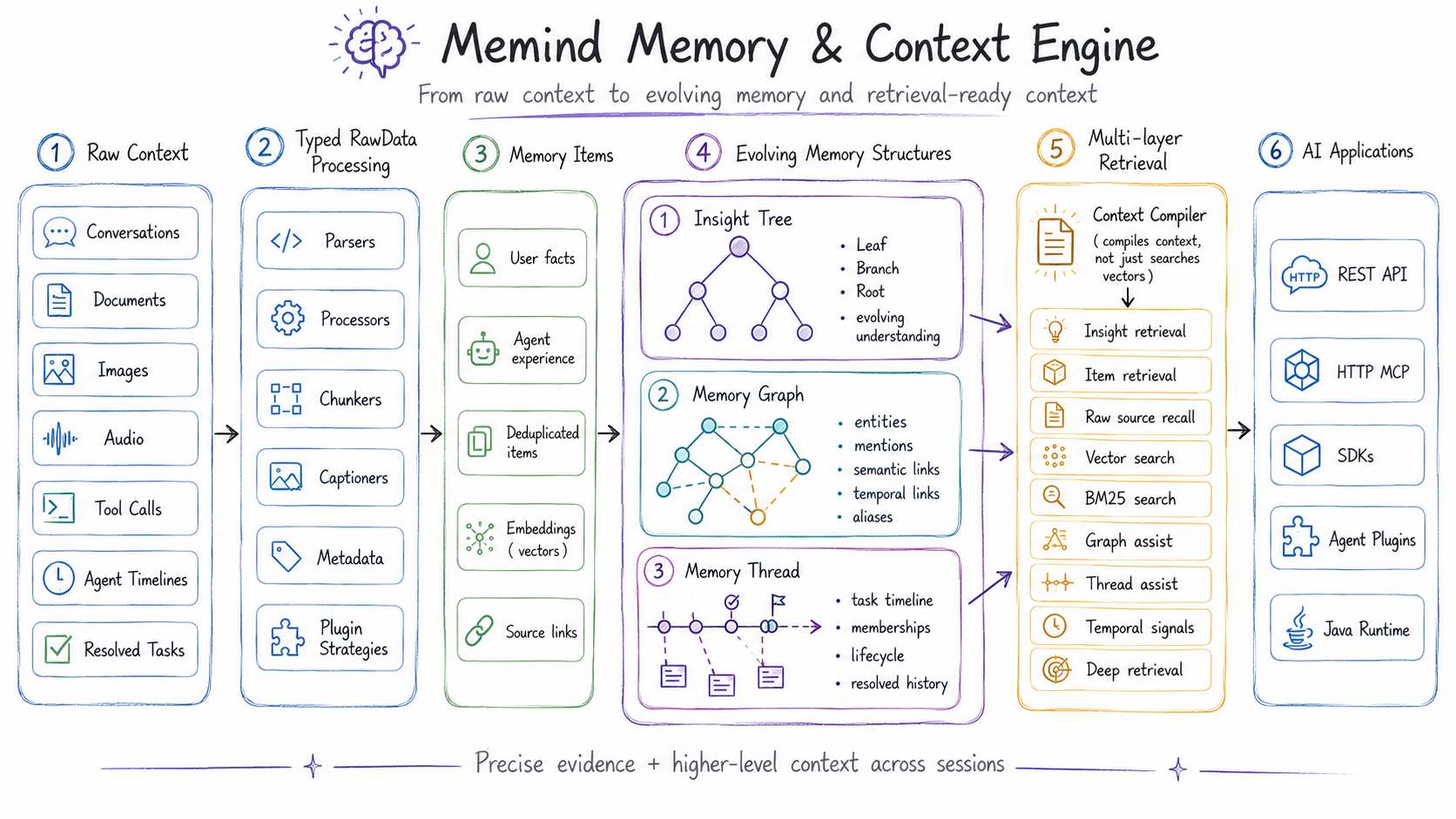
Memind keeps the raw source, extracted memory, structured understanding, graph relationships, and task timelines connected. This lets AI systems retrieve both precise evidence and higher-level context instead of relying on flat snippets alone.
Use Memind for
Memind is a general memory and context layer for almost any AI system that needs long-term context. Common use cases include:
| Scenario | What Memind remembers |
|---|---|
| Coding agents | Project context, tool experience, resolved tasks, durable instructions |
| Local personal agents | User preferences, long-running timelines, local workflows |
| Chatbots and companions | User profiles, relationships, behavior patterns, life events |
| Workflow agents | Directives, playbooks, operational context, task history |
These are only examples. Memind can also support copilots, enterprise assistants, support automation, research tools, knowledge workers, and any AI application that needs to remember users, tasks, documents, decisions, tools, timelines, and previous outcomes across sessions.
For deeper architecture, configuration, rawdata plugins, MCP tools, SDKs, and agent integrations, see docs.openmemind.com.
Quick Start
Choose the path that matches how you want to use Memind:
- Docker Compose (Recommended): start
memind-serverand the admin UI with one command. - Local development: run
memind-serverandmemind-uidirectly from source. - Embedded Java runtime: run Memind inside your own Java or Spring Boot application.
Option 1: Docker Compose (Recommended)
Prerequisites
- Docker with the Compose plugin
- A model provider key for the chat and embedding models you want to use
Configure .env
Create a local .env file:
cp .env.example .env
For the default setup, edit these values first:
OPENAI_API_KEY=your-api-key
OPENAI_BASE_URL=https://openrouter.ai/api
OPENAI_CHAT_MODEL=openai/gpt-4o-mini
OPENAI_EMBEDDING_MODEL=openai/text-embedding-3-small
The default Spring AI OpenAI configuration can point to OpenAI or any OpenAI-compatible endpoint by
changing OPENAI_BASE_URL and the model names. OpenRouter, DeepSeek, GLM, SiliconFlow, and similar
providers can be used through Spring AI's OpenAI provider path when they expose an OpenAI-compatible
API.
Model names are provider-specific. The default values use OpenRouter-style model names. If you use
OpenAI directly, use OpenAI model names such as gpt-4o-mini and text-embedding-3-small.
Start Memind
docker compose up -d --build
After the containers start:
- Admin UI:
http://localhost:8080 - Server health check:
http://localhost:8366/open/v1/health - Open API base path:
http://localhost:8366/open/v1 - Admin API base path:
http://localhost:8366/admin/v1 - HTTP MCP endpoint:
http://localhost:8366/mcp
Verify
curl http://localhost:8366/open/v1/health
The health endpoint verifies that the server is running. Model credentials are validated when Memind performs extraction, retrieval, embedding, or rerank calls.
The UI container proxies /open/* and /admin/* to memind-server, so the browser can use the
UI as a same-origin local admin console.
Common commands
# View logs
docker compose logs -f memind-server
docker compose logs -f memind-ui

# Stop containers but keep persisted memory data
docker compose down

# Stop containers and remove persisted memory data
docker compose down -v
By default, memind-server stores SQLite data and the fallback file vector store in the Docker
volume memind-data, mounted at /app/data inside the container.
The Compose setup is intended for local development and inspection. The admin UI has no built-in authentication, so do not expose it directly to public networks.
Advanced: configure model routing
Memind uses Spring AI for provider initialization and keeps only memory-pipeline routing in
memind.ai.*:
| Layer | Purpose |
|---|---|
spring.ai.* |
Provider defaults, API keys, base URLs, and model options |
memind.ai.* |
Select existing Spring AI beans for the default chat/embedding model and slot routing |
The default server configuration points memind at the Spring AI OpenAI beans:
memind:
  ai:
    chat:
      default: openAiChatModel
    embedding:
      default: openAiEmbeddingModel
For advanced routing, define provider-specific ChatModel, ChatClient, or EmbeddingModel
beans with Spring AI, then reference those bean names from
application.yml:
memind:
  ai:
    chat:
      default: defaultChatClient
      slots:
        ITEM_EXTRACTION: extractionChatClient
        INSIGHT_GENERATOR: reasoningChatClient
        THREAD_ENRICHMENT: threadEnrichmentChatClient
    embedding:
      default: openAiEmbeddingModel
Unconfigured slots automatically use chat.default.
When using Docker Compose, rebuild the image after changing application.yml:
docker compose up -d --build
Full configuration details are available at docs.openmemind.com.
Option 2: Local Development
Use this path when you want to develop Memind itself or run the server and UI directly from source.
Prerequisites
- Java 21
- Maven
- Node.js 20.19+ or 22+
- pnpm
- A valid model provider key
Start memind-server
OPENAI_API_KEY=your-key \
mvn -pl memind-server -am spring-boot:run
The server starts at:
- Server health check:
http://localhost:8366/open/v1/health - Open API base path:
http://localhost:8366/open/v1 - Admin API base path:
http://localhost:8366/admin/v1 - HTTP MCP endpoint:
http://localhost:8366/mcp
Start memind-ui
In another terminal:
cd memind-ui
pnpm install
pnpm dev
The Vite dev server starts at http://localhost:5173 and proxies /admin/* requests to
memind-server on port 8366.
Option 3: Embedded Java Runtime
Use this path when you want Memind as an in-process Java memory engine instead of calling a separate
memind-server.
| Runtime style | Best for |
|---|---|
| Spring Boot starter | Using Spring configuration and auto-configured AI/JDBC beans in a Boot application |
| Plain Java | Full control over Memory.builder(), model clients, storage, vector search, and runtime options |
Add dependencies
Import the Memind BOM first, then add the core runtime, the Spring AI plugin, and one JDBC dialect plugin.
The dependency snippet below shows the plain-Java path. For Spring Boot, use
memind-plugin-ai-spring-ai-starter, memind-plugin-jdbc-starter, and Spring configuration.
For the default SQLite setup:
<dependencyManagement>
  <dependencies>
    <dependency>
      <groupId>com.openmemind.ai</groupId>
      <artifactId>memind-dependencies</artifactId>
      <version>0.2.0</version>
      <type>pom</type>
      <scope>import</scope>
    </dependency>
  </dependencies>
</dependencyManagement>

<dependencies>
  <dependency>
    <groupId>com.openmemind.ai</groupId>
    <artifactId>memind-core</artifactId>
  </dependency>
  <dependency>
    <groupId>com.openmemind.ai</groupId>
    <artifactId>memind-plugin-ai-spring-ai</artifactId>
  </dependency>
  <dependency>
    <groupId>com.openmemind.ai</groupId>
    <artifactId>memind-plugin-jdbc-sqlite</artifactId>
  </dependency>
</dependencies>
If you use MySQL or PostgreSQL, replace memind-plugin-jdbc-sqlite with
memind-plugin-jdbc-mysql or memind-plugin-jdbc-postgresql.
Minimal usage
Once the Memory runtime is assembled, the core API is small:
var memoryId = DefaultMemoryId.of("user-1", "my-agent");

// messages = your conversation history
memory.addMessages(memoryId, messages).block();

var retrieval = memory.retrieve(
        memoryId,
        "What does the user prefer?",
        RetrievalConfig.Strategy.SIMPLE).block();
For a complete plain-Java runtime assembly with centralized defaults, start with
ExampleSettings.java.
Full runnable Java examples
The maintained Java examples live in
memind-examples/memind-example-java.
| Example | What it shows |
|---|---|
quickstart |
Basic addMessages and retrieval flow |
agent |
Agent-scoped memory, reusable task experience, and agent retrieval |
insight |
Multi-batch extraction and Insight Tree retrieval |
document |
Document rawdata ingestion and searchable document memory |
foresight |
Foresight extraction and forward-looking context retrieval |
tool |
Tool-call reporting, tool memory, and tool statistics |
Run the default quickstart example:
OPENAI_API_KEY=your-key \
mvn -pl memind-examples/memind-example-java -am -DskipTests \
  -Dexec.mainClass=com.openmemind.ai.memory.example.java.quickstart.QuickStartExample \
  exec:java
Integrations
Memind can be integrated through first-party agent plugins, SDKs, REST APIs, or the built-in HTTP MCP server. Choose the path that matches where your AI system runs.
Connect Memind to Any Agent
Use first-party integrations when you want Memind to automatically recall context, inject memory, and capture agent activity across sessions.
Memind provides official integrations for popular agents:
Claude Code: persistent project memory, session-start continuity context, tool-aware context injection, and coding-agent timeline ingestion.Codex: persistent project memory, prompt/tool context injection, retry-backed timeline ingestion, and source tagging for Codex sessions.OpenClaw: prompt-time Memind recall plus completed OpenClaw agent activity ingestion asagent_timelineraw data.Hermes: a native Hermes memory provider that retrieves relevant context before turns and captures completed Hermes activity after responses.
SDKs and REST APIs
Use SDKs and REST APIs when you want to connect Memind to an application, backend service, chatbot, workflow system, or custom agent.
Open API base path:
http://localhost:8366/open/v1
Official API clients:
- TypeScript:
memind-clients/typescript - Python:
memind-clients/python - Java:
memind-clients/java - Go:
github.com/openmemind/memind/memind-clients/go - Rust:
memind-clients/rust
Use REST or SDK clients when your system already runs its own application process and wants Memind as a memory service.
Open API ingestion semantics
The default ingestion endpoints (/open/v1/memory/extract, /open/v1/memory/add-message, and /open/v1/memory/commit) are
fire-and-forget: a successful HTTP response means Memind accepted and dispatched the work, not that extraction
completed. Retry-aware clients should use /open/v1/memory/sync/extract with a caller-owned raw-content payload
and clear their local retry state only when the returned extraction status is SUCCESS.
/open/v1/memory/sync/add-message and /open/v1/memory/sync/commit report immediate server-buffer success or
failure, but they are not durable replay boundaries because the server owns the buffered conversation state.
HTTP MCP Server
Use MCP when your agent supports Model Context Protocol and should call Memind as a tool server.
memind-server includes a stateless HTTP MCP server at /mcp, enabled by default. It exposes
Memind memory tools for MCP-compatible agents and uses the same runtime, database, configuration,
and logs as the REST APIs.
Claude Code can connect to the local server with:
claude mcp add --transport http memind http://localhost:8366/mcp
Default MCP tools:
- Retrieval and context:
memind_compile_context,memind_retrieve,memind_recent. - Write flows:
memind_extract_text,memind_extract_rawdata,memind_add_message,memind_commit. - Memory item inspection:
memind_items_search,memind_items_get,memind_items_sources. - Rawdata inspection:
memind_rawdata_search,memind_rawdata_get.
Use memind_compile_context when an agent needs a concise, sectioned context pack. Use
memind_retrieve when it needs the structured retrieval response. Use memind_extract_text for
one-off text memory, memind_extract_rawdata for typed rawdata payloads, and
memind_add_message followed by memind_commit for conversation-style memory.
The optional governance tool memind_forget is disabled by default. Enable it with
MEMIND_MCP_GOVERNANCE_ENABLED=true; it defaults to dry-run mode, requires a non-blank reason,
and deletes only ITEM or RAWDATA records that match the supplied userId and agentId.
To disable the MCP endpoint, set MEMIND_MCP_ENABLED=false before starting memind-server.
Do not expose /mcp directly to public networks without an authentication gateway or equivalent
network controls. MCP tools can read and write scoped memory.
Benchmark
Memind is evaluated on three mainstream long-memory benchmarks: LoCoMo, LongMemEval, and PersonaMem.
Evaluation protocol: benchmark responses are evaluated with GPT-4o-mini under the LLM-as-a-Judge setup used by MemOS and EverMemOS. Baseline results are reproduced or quoted from published systems under aligned settings where possible.
Summary
| Benchmark | What it tests | Memind result | Rank | Best listed baseline | Context tokens |
|---|---|---|---|---|---|
| LoCoMo | Multi-session dialogue memory | 86.88% | #1 | EverMemOS 86.76% | 1616.68 |
| LongMemEval | Long-term assistant memory | 84.20% | #1 | EverMemOS 83.00% | 1615.11 |
| PersonaMem | User persona and preference memory | 67.91% | #1 | MemOS 61.17% | 1665.33 |
Memind ranks #1 among the listed baselines on all three benchmarks under aligned MemOS / EverMemOS-style evaluation, while keeping retrieved context compact enough for production agent workflows.
Deltas in the Memind row compare against the best non-Memind score in the same metric column. Context Tokens are reported as average retrieved context per answered question.
Detailed Results
LoCoMo
| Model | Single Hop | Multi Hop | Temporal | Open Domain | Overall | Context Tokens |
|---|---|---|---|---|---|---|
| MIRIX | 68.22% | 54.26% | 68.54% | 46.88% | 64.33% | - |
| Mem0 | 73.33% | 58.75% | 52.34% | 45.83% | 64.57% | 1.17k |
| Zep | 66.23% | 52.12% | 54.82% | 33.33% | 59.22% | 2.7k |
| MemoBase | 73.12% | 64.65% | 81.20% | 53.12% | 72.01% | 2102 |
| Supermemory | 67.30% | 51.12% | 31.77% | 42.67% | 55.34% | 500 |
| MemU | 66.34% | 63.12% | 27.10% | 50.00% | 56.55% | 617 |
| MemOS | 81.09% | 67.49% | 75.18% | 55.90% | 75.80% | 2640 |
| ReMe | 89.89% | 82.98% | 83.80% | 71.88% | 86.23% | - |
| EverMemOS | 91.08% | 86.17% | 81.93% | 66.67% | 86.76% | 2.5k |
| Memind | 91.56% (+0.48%) | 83.33% (-2.84%) | 82.24% (-1.56%) | 71.88% (+0.00%) | 86.88% (+0.12%) | 1616.68 |
Takeaway: Memind achieves the highest LoCoMo overall score in this comparison, with strong open-domain QA performance and lower context usage than EverMemOS.
LongMemEval
| Model | single-session-preference | single-session-assistant | temporal-reasoning | multi-session | knowledge-update | single-session-user | overall | Context Tokens |
|---|---|---|---|---|---|---|---|---|
| MIRIX | 53.33% | 63.63% | 25.56% | 30.07% | 52.56% | 72.85% | 43.49% | - |
| Mem0 | 90.00% | 26.78% | 72.18% | 63.15% | 66.67% | 82.86% | 66.40% | 1066 |
| Zep | 53.30% | 75.00% | 54.10% | 47.40% | 74.40% | 92.90% | 63.80% | 1.6k |
| MemoBase | 80.00% | 23.21% | 75.93% | 66.91% | 89.74% | 92.85% | 72.40% | 1541 |
| Supermemory | 90.00% | 58.92% | 44.36% | 52.63% | 55.12% | 85.71% | 58.40% | 428 |
| MemU | 76.67% | 19.64% | 17.29% | 42.10% | 41.02% | 67.14% | 38.40% | 523 |
| MemOS | 96.67% | 67.86% | 77.44% | 70.67% | 74.26% | 95.71% | 77.80% | 1432 |
| EverMemOS | 93.33% | 85.71% | 77.44% | 73.68% | 89.74% | 97.14% | 83.00% | 2.8k |
| Memind | 95.56% (-1.11%) | 87.50% (+1.79%) | 79.45% (+2.01%) | 77.44% (+3.76%) | 88.46% (-1.28%) | 93.81% (-3.33%) | 84.20% (+1.20%) | 1615.11 |
Takeaway: Memind achieves the highest LongMemEval overall score in this comparison, with clear gains on multi-session and temporal-reasoning tasks.
PersonaMem
| Model | 4-Option Accuracy | Context Tokens |
|---|---|---|
| MIRIX | 38.30% | - |
| Mem0 | 43.12% | 140 |
| Zep | 57.83% | 1657 |
| MemoBase | 58.89% | 2092 |
| MemU | 56.83% | 496 |
| Supermemory | 53.88% | 204 |
| MemOS | 61.17% | 1423.93 |
| Memind | 67.91% (+6.74%) | 1665.33 |
Memind Category-Level Results on PersonaMem
| Metric | Score | Correct / Total |
|---|---|---|
| generalizing_to_new_scenarios | 75.44% | 43 / 57 |
| provide_preference_aligned_recommendations | 80.00% | 44 / 55 |
| recall_user_shared_facts | 71.32% | 92 / 129 |
| recalling_facts_mentioned_by_the_user | 76.47% | 13 / 17 |
| recalling_the_reasons_behind_previous_updates | 88.89% | 88 / 99 |
| suggest_new_ideas | 38.71% | 36 / 93 |
| track_full_preference_evolution | 60.43% | 84 / 139 |
Takeaway: Memind achieves the highest PersonaMem score in this comparison, especially on preference-aligned recommendations, user-shared fact recall, and reasoning over prior updates.
Reproduce the benchmark results
1. Download the datasets first
The raw benchmark datasets are not bundled in this repository. Download them first and place them under the expected paths below.
| Benchmark | Download | Expected local path |
|---|---|---|
| LoCoMo | Official LoCoMo repository | memind-evaluation/data/locomo/locomo10.json |
| LongMemEval | LongMemEval cleaned dataset | memind-evaluation/data/longmemeval/longmemeval_s_cleaned.json |
| PersonaMem | PersonaMem dataset | memind-evaluation/data/personamem/questions_32k.csv and memind-evaluation/data/personamem/shared_contexts_32k.jsonl |
LongMemEval and PersonaMem are converted automatically into the internal evaluation format at runtime.
2. Export credentials
export OPENAI_API_KEY=your-key
export OPENAI_BASE_URL=your-base-url
export OPENAI_CHAT_MODEL=openai/gpt-4o-mini

export EMBEDDING_API_KEY=your-key
export EMBEDDING_BASE_URL=your-base-url
export OPENAI_EMBEDDING_MODEL=openai/text-embedding-3-small

export RERANK_BASE_URL=your-rerank-base-url
export RERANK_API_KEY=your-rerank-key
export RERANK_MODEL=jina-reranker-v3
If you want a minimal dry run without rerank, append --evaluation.system.memind.retrieval.rerank.enabled=false to the commands below. It will not match the reported results.
3. Run a full benchmark
mvn -pl memind-evaluation -am -DskipTests spring-boot:run \
  -Dspring-boot.run.profiles=locomo \
  -Dspring-boot.run.arguments="--evaluation.run-name=locomo-readme --evaluation.stages=add,search,answer,evaluate --evaluation.clean-groups=true"

mvn -pl memind-evaluation -am -DskipTests spring-boot:run \
  -Dspring-boot.run.profiles=longmemeval \
  -Dspring-boot.run.arguments="--evaluation.run-name=longmemeval-readme --evaluation.stages=add,search,answer,evaluate --evaluation.clean-groups=true"

mvn -pl memind-evaluation -am -DskipTests spring-boot:run \
  -Dspring-boot.run.profiles=personamem \
  -Dspring-boot.run.arguments="--evaluation.run-name=personamem-readme --evaluation.stages=add,search,answer,evaluate --evaluation.clean-groups=true"
4. Run a smoke check first
mvn -pl memind-evaluation -am -DskipTests spring-boot:run \
  -Dspring-boot.run.profiles=locomo \
  -Dspring-boot.run.arguments="--evaluation.run-name=locomo-smoke --evaluation.stages=add,search,answer,evaluate --evaluation.smoke=true --evaluation.from-conv=0 --evaluation.to-conv=1 --evaluation.clean-groups=true"
5. Inspect the outputs
Each run writes artifacts to eval-data/results/<dataset>-<run-name>/:
report.txtsearch_results.jsonanswer_results.jsoneval_results.json
Re-running the same run-name resumes from checkpoints. Use a new run-name for an independent run.
Contributing
Contributions are welcome! Feel free to open an issue or submit a pull request.
