Agents your organization can own, approve, and audit.
OMA (Open Multi-Agent) is a self-hosted TypeScript agent runtime for coordinating agents, adding human approval gates, and inspecting runs offline.
No telemetry. No hosted control plane. Your keys, your models — cloud, local (Ollama, vLLM, llama-server), or Chinese providers — your environment. Nothing stops working when the people who built it leave.
Requires Node.js 20 or newer. For production, use a currently maintained
Node.js LTS release. Node.js 20 is upstream-EOL and retained only as a
migration compatibility window; OMA will remove it in the next major release,
no earlier than 2026-10-31.
Scaffold a PR review agent, security analysis agent, or teaching DAG:
npm create oma-app@latest my-oma
In an interactive terminal, that one command selects a starter and runtime, installs dependencies, and runs a deterministic local demo. The demo needs no API key and makes no model request: scripted model responses drive the real OMA scheduler, result aggregation, and offline dashboard.
Or add OMA to an existing backend:
npm install @open-multi-agent/core
import { OpenMultiAgent } from '@open-multi-agent/core'

const oma = new OpenMultiAgent({ defaultProvider: 'openai', defaultModel: 'gpt-5.4' })

const team = oma.createTeam('research-team', {
  name: 'research-team',
  agents: [
    { name: 'researcher', systemPrompt: 'Find the relevant facts.' },
    { name: 'analyst', systemPrompt: 'Compare evidence and identify tradeoffs.' },
  ],
  sharedMemory: true,
})

const result = await oma.runTeam(team, 'Compare three approaches and recommend one.')

// Nothing above declares a task graph. The coordinator planned one at runtime,
// and the finished run is data you can read back.
for (const task of result.tasks ?? []) {
  console.log(`[${task.status}] ${task.title} → ${task.assignee ?? 'unassigned'}`, task.dependsOn)
}

console.log(result.agentResults.get('coordinator')?.output)
console.log(result.totalTokenUsage)
Set OPENAI_API_KEY to run this example. Providers covers other hosted models, local servers, OpenAI-compatible endpoints, and AI SDK providers.
runAgent() runs a single agent, runTasks() executes an explicit pipeline, and runTeam() plans from a goal. The Core package guide walks through all three modes, provider and credential setup, and the production checklist. The example index lists every runnable example across basics, cookbook workflows, patterns, providers, and integrations.
Durable approvals
Pause before executing a plan, dispatching a task, or calling a tool for human approval. With persistent storage, a restarted process can continue from the reviewed content. Your application supplies the approval interface and notifications. Guide
Verifiable journal
Enable a run journal to record model inputs, tool calls, and results for later inspection. verifyRun() checks the recorded sources and content for consistency offline; it does not prove the journal was never edited. Guide
Governance floor
Declare required roles and their execution order, then check whether the actual run met those requirements. A successful run can still leave governance requirements unmet, so applications must check governanceConclusion separately. Guide
Runs where you run
No telemetry, no hosted control plane. A library with no OMA backend or account, and none planned. It makes no analytics, license, update, or phone-home request. Self-hosting
Your keys, your models. Built-in adapters for Anthropic, OpenAI, Azure OpenAI, Bedrock, Gemini, Grok, and Copilot, and for DeepSeek, Doubao, Hunyuan, MiniMax, MiMo, and Qiniu; Ollama, vLLM, and llama-server through baseURL; any OpenAI-compatible endpoint and Vercel AI SDK providers. Providers
Egress policy.offline or allowlist, checked before a built-in adapter connects. A child policy can only tighten its parent, an unenforceable transport fails closed, and process and ACP backends sit outside it. LLM egress policy
Built with OMA
open-multi-agent launched 2026-04-01 under MIT. Known users and integrations to date:
temodar-agent by Ali Sünbül. WordPress security analysis platform running OMA's built-in tools (bash, file_*, grep) inside a Docker runtime. Confirmed production use.
Mark Galyan runs OMA fully offline on local quantized models, using the coordinator and context compaction to keep autonomous agent loops alive under tight VRAM limits. Contributor since the framework's first month.
Engram: "Git for AI memory." Syncs knowledge across agents instantly and flags conflicts. (repo)
More users and integrations
Users
PR-Copilot by kidoom. AI pull-request review assistant running an OMA review team, with defineTool repo-context tools and a custom ContextStrategy for token-aware diff compression.
StuFlow by znc15. Terminal AI coding assistant on OMA's orchestration core, driving runAgent / runTasks / runTeam with a custom coordinator, paired with DeepSeek.
Reports to Charts Studio. Turns documents and research tables into slide-ready charts, using a five-role extraction council with structured outputs and deterministic validation.
OrchestrAI: Visual multi-agent workspace using OMA for task-graph execution and peer review, with PostgreSQL-backed checkpoints for restart recovery.
Integrations
@agentsonar/oma: Sidecar detecting cross-run delegation cycles, repetition, and rate bursts.
CodingScaffold: Agentic-coding scaffold that lists OMA as an optional orchestration backend, with a runTeam workflow template.
baize-oma: HTTP adapter exposing OMA runAgent() and runTeam() as Baize slot capabilities.
We build customer-owned systems on OMA for organizations that need one. Email jack@yuanasi.com.
Sponsors
Paid sponsors supporting open-multi-agent. Sponsorship does not affect technical decisions or model recommendations.
Providers
Atlas Cloud: Full-modal AI inference platform giving one API for video, image, and LLM across 300+ curated models. $5 credit vouchers for OMA users, first come first served. See the Atlas Cloud setup guide.
Optional coordinator
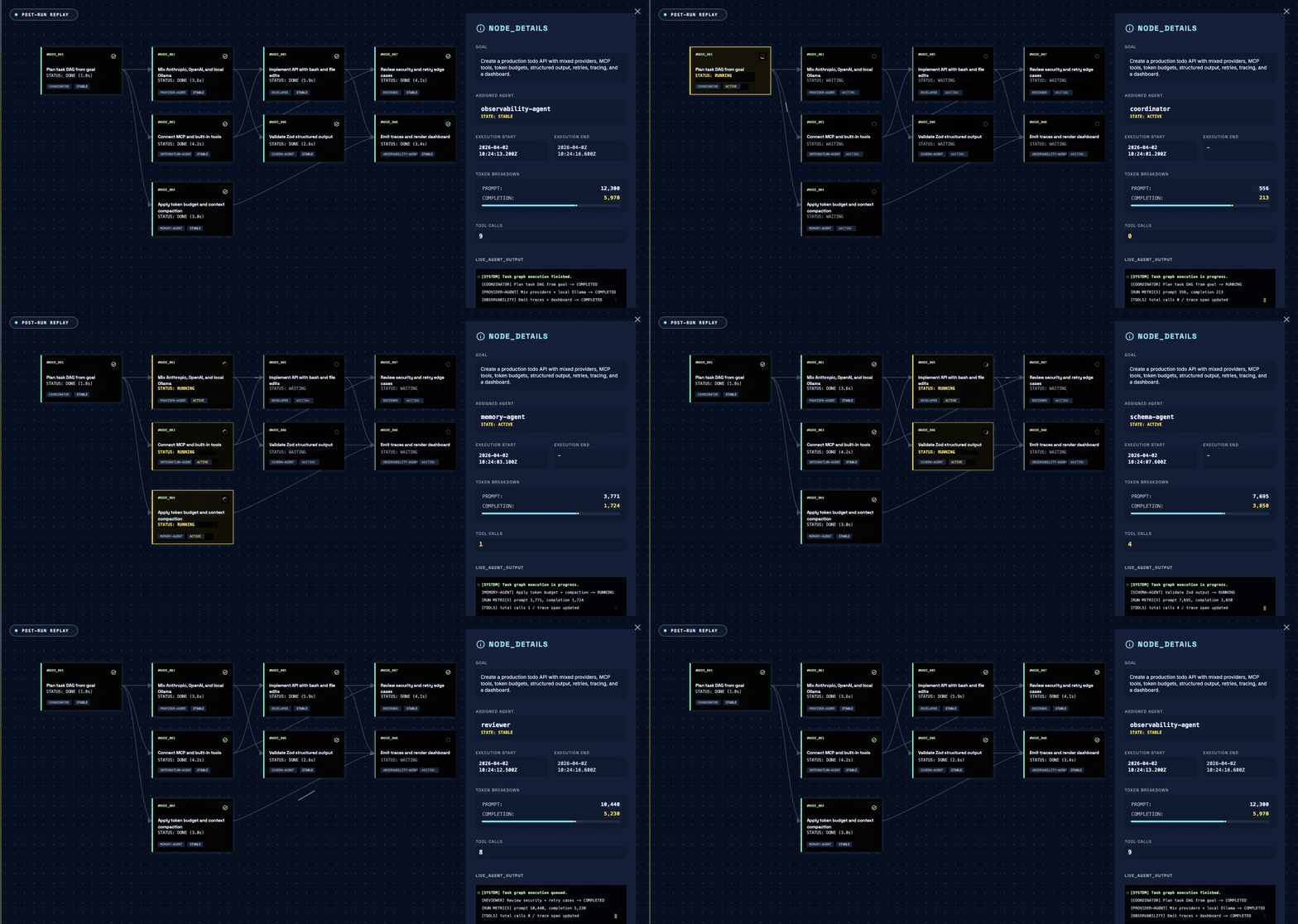
runTeam() decomposes a goal into a task graph across agents. One model call turns the goal into task specs with assignees and dependencies, a deterministic scheduler executes them, and a second call writes the final answer from the completed task outputs. The coordinator is never consulted mid-run, and the finished run is data you can read back. Use runAgent() or runTasks() when you already know the work.
The offline Run Viewer replaying a real run from the trace store: task DAG, span waterfall, and per-task evidence, with no hosted service involved.
Coordinator covers what it decides and what it is allowed to see. Plan replay freezes an approved plan, Consensus verifies outputs with independent judges, and External agents puts Claude Code, Gemini CLI, and Codex on the same task graph through process and ACP backends.
Packages
@open-multi-agent/core: Runtime, tools, memory, checkpoints, approvals, journal, traces, CLI, and offline Run Viewer.
@open-multi-agent/otel: Optional OpenTelemetry adapter for teams with a centralized OpenTelemetry stack.
create-oma-app: Scaffolder behind npm create oma-app; starter templates with a no-key local demo.
Core users can store traces locally and inspect them with the offline Run Viewer. Install the OTel package only when OMA traces should appear in the same monitoring system as the rest of your application.