Cloudy
Cloudy





Kotlin Multiplatform surface effects library for Compose — blur, liquid glass, and shader-driven looks — with GPU-accelerated rendering and CPU fallback for older devices. See documentation for more details.
Cloudy started as a backport of the blur effect for Jetpack Compose with cross-platform support, and has grown to cover liquid glass and open shader effects as well. The `Modifier.cloudy(radius = …)` blur path supports only Android 12 and higher without the deprecated `RenderScript` APIs; see Platform Support for the CPU fallback on older devices.
Cloudy ships four independent effects you can mix and match on any composable — pick the ones you need:
| Effect | Modifier | What it does |
|---|---|---|
| Self blur | Modifier.cloudy(radius = …) |
Blurs a composable's own content |
| Backdrop blur | Modifier.cloudy(sky = …) |
Blurs the content behind a composable (glassmorphism) |
| Liquid Glass | Modifier.liquidGlass(…) |
A realistic glass lens with refraction and chromatic dispersion |
| Mirage | Modifier.mirage { } |
An open shader-effect plan — thin-film / specular presets, or your own |
Table of contents
- Download
- Part I — Effects
- Part II — Going further
- Acknowledgements
- License

Version Catalog
If you're using Version Catalog, you can configure the dependency by adding it to your libs.versions.toml file as follows:
[versions]
#...
cloudy = "1.0.0-alpha01"

[libraries]
#...
compose-cloudy = { module = "com.github.skydoves:cloudy", version.ref = "cloudy" }
Gradle
Add the dependency below to your module's build.gradle.kts file:
dependencies {
    implementation("com.github.skydoves:cloudy:1.0.0-alpha01")

    // if you're using Version Catalog
    implementation(libs.compose.cloudy)
}
For Kotlin Multiplatform, add the dependency below to your module's build.gradle.kts file:
sourceSets {
    commonMain.dependencies {
        implementation("com.github.skydoves:cloudy:$version")
    }
}
Part I — Effects
Self blur
Cloudy offers two blur modes: Modifier.cloudy(radius = …) blurs a composable's own content (covered here), while Backdrop blur blurs the content behind a composable for glassmorphism surfaces.
Basic Usage
You can implement blur effect with Modifier.cloudy() composable function as seen below:
Text(
  modifier = Modifier.cloudy(),
  text = "This text is blurred"
)
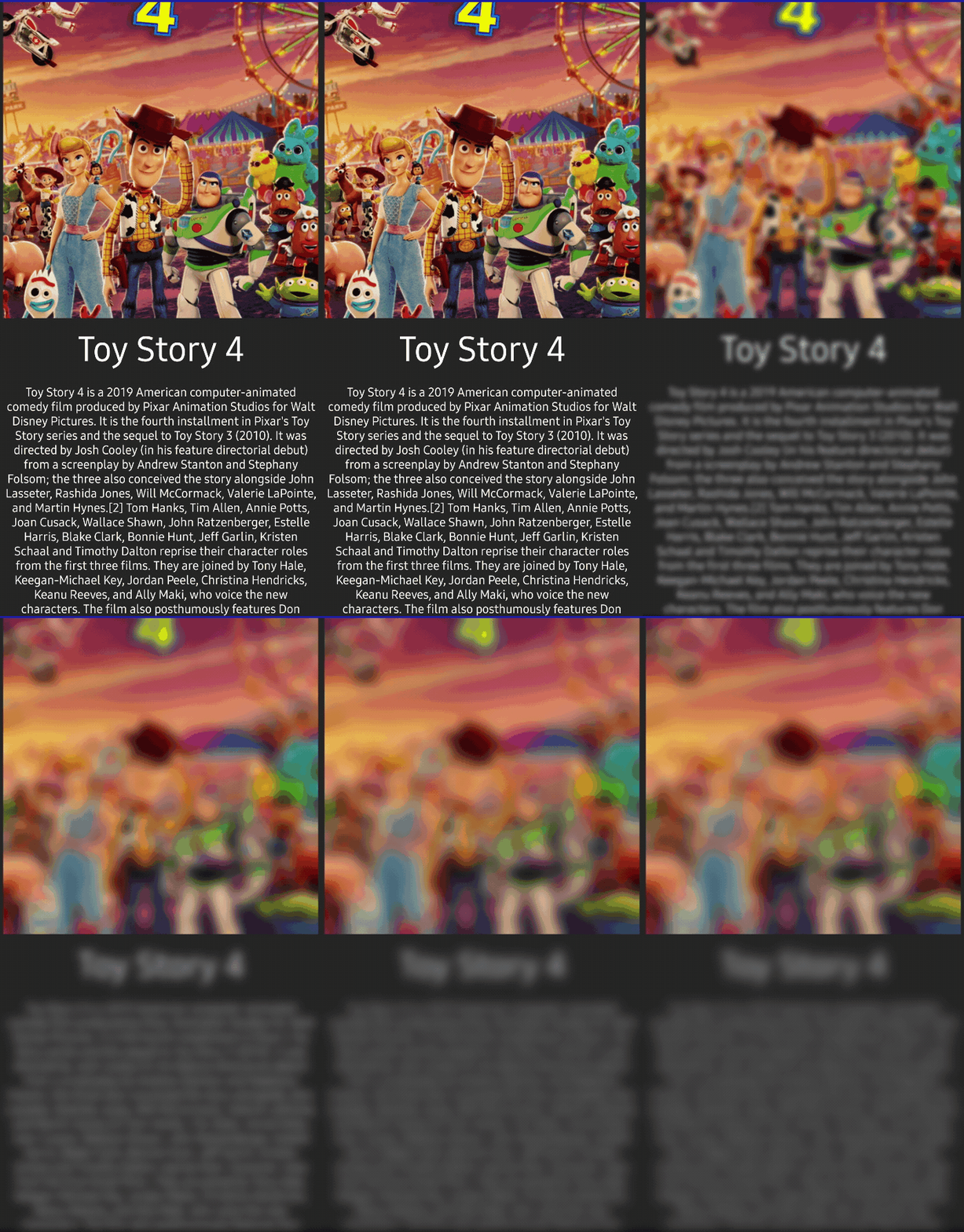
You can change the degree of the blur effect by changing the radius parameter of Modifier.cloudy() composable function.
Column(
  modifier = Modifier.cloudy(radius = 15)
) {
  Image(..)

  Text(
    modifier = Modifier
      .fillMaxWidth()
      .padding(8.dp),
    text = posterModel.name,
    fontSize = 40.sp,
    color = MaterialTheme.colors.onBackground,
    textAlign = TextAlign.Center
  )

  Text(
    modifier = Modifier
      .fillMaxWidth()
      .padding(8.dp),
    text = posterModel.description,
    color = MaterialTheme.colors.onBackground,
    textAlign = TextAlign.Center
  )
}
Observing Blurring Status
You can monitor the status of the blurring effect by using the onStateChanged parameter, which provides CloudyState. This allows you to observe and respond to changes in the blurring effect's state effectively.
GlideImage(
  modifier = Modifier
    .size(400.dp)
    .cloudy(
      radius = 25,
      onStateChanged = { state ->
        when (state) {
          is CloudyState.Success.Applied -> {
            // GPU blur applied (iOS, Android 31+)
            // No bitmap available - blur rendered directly
          }
          is CloudyState.Success.Captured -> {
            // CPU blur completed (Android 30-)
            // Blurred bitmap available: state.bitmap
            val blurredBitmap = state.bitmap
          }
          is CloudyState.Loading -> {
            // Blur processing in progress
          }
          is CloudyState.Error -> {
            // Handle error: state.throwable
          }
          CloudyState.Nothing -> {
            // Initial state
          }
        }
      }
    ),
  ..
)
CloudyState has the following types:
| State | Description | Bitmap Available |
|---|---|---|
Success.Applied |
GPU blur applied in rendering pipeline | No |
Success.Captured |
CPU blur completed with bitmap | Yes (state.bitmap) |
Success.Scrim |
Scrim overlay shown instead of blur (background blur on Android 30-) | No |
Loading |
Blur processing in progress | No |
Error |
Blur operation failed | No |
Nothing |
Initial state | No |
Maintaining Blurring Effect on Responsive Composable
The Modifier.cloudy captures the bitmap of the composable node under the hood.
LazyVerticalGrid(
  state = rememberLazyGridState(),
  columns = GridCells.Fixed(2)
) {
  itemsIndexed(key = { index, item -> item.id }, items = posters) { index, item ->
    HomePoster(poster = item)
  }
}

@Composable
private fun HomePoster(poster: Poster) {
    ConstraintLayout {
      val (image, title, content) = createRefs()
      GlideImage(
        modifier = Modifier
          .cloudy(radius = 15)
          .aspectRatio(0.8f)
          .constrainAs(image) {
            centerHorizontallyTo(parent)
            top.linkTo(parent.top)
          }
          ..
Platform Support (Self Blur)
| Platform | Implementation | Performance | State Type |
|---|---|---|---|
| Android 31+ | RenderEffect (GPU) | GPU-accelerated | Success.Applied |
| Android 30- | Native C++ (CPU) | NEON/SIMD optimized | Success.Captured |
| iOS | Skia BlurEffect (Metal GPU) | GPU-accelerated | Success.Applied |
| macOS | Skia BlurEffect (Metal GPU) | GPU-accelerated | Success.Applied |
| Desktop (JVM) | Skia BlurEffect (GPU) | GPU-accelerated | Success.Applied |
| WASM (Browser) | Skia BlurEffect (WebGL) | GPU-accelerated | Success.Applied |
See Backdrop blur and Liquid Glass for their own platform support tables.
Backdrop blur
Background blur — also called backdrop blur — blurs the content that sits behind a composable, producing a glassmorphism / frosted-glass surface such as a translucent app bar, bottom navigation, or card. Unlike Modifier.cloudy(radius = …), which blurs a composable's own content, the backdrop API samples a shared snapshot of the background and renders it blurred underneath your overlay.
It is built from three pieces:
| API | Role |
|---|---|
rememberSky() |
Creates a Sky — the shared state holder for the captured background. |
Modifier.sky(sky) |
Marks the source container whose content is captured for blur. |
Modifier.cloudy(sky = sky, …) |
The overlay that draws the captured background, blurred and clipped to its bounds. |
https://github.com/user-attachments/assets/c22cb656-4415-471e-a30a-521d39344447
https://github.com/user-attachments/assets/faf67c77-cb1e-4b20-994b-bb8afe340087
Basic Usage
Put Modifier.sky(sky) on the background you want to blur, then overlay a composable with Modifier.cloudy(sky = sky, …):
val sky = rememberSky()

Box(modifier = Modifier.fillMaxSize()) {
  // 1) Source — the content captured for blur
  LazyVerticalGrid(
    columns = GridCells.Fixed(2),
    modifier = Modifier.sky(sky),
  ) {
    items(posters) { poster -> GridPosterItem(poster) }
  }

  // 2) Overlay — a frosted glass app bar that blurs the grid behind it
  Box(
    modifier = Modifier
      .fillMaxWidth()
      .height(56.dp)
      .cloudy(
        sky = sky,
        radius = 20,
        tint = MaterialTheme.colorScheme.surface.copy(alpha = 0.3f),
      )
  ) {
    Text("Frosted Glass App Bar")
  }
}
Clipping to a Shape
By default the blurred backdrop is clipped to a rectangle. Pass a shape so the blur follows rounded corners instead of leaving a hard rectangular box inside a rounded glass surface:
val barShape = RoundedCornerShape(36.dp)

Row(
  modifier = Modifier
    .clip(barShape)
    .cloudy(sky = sky, radius = 24, shape = barShape)
    .background(Color.White.copy(alpha = 0.15f)),
) {
  // tabs
}
Progressive (Gradient) Blur
Use the progressive parameter to fade the blur across the surface — ideal for scroll-edge fades or vignettes:
// Blur is strongest at the top and fades to clear toward the bottom
Modifier.cloudy(
  sky = sky,
  radius = 25,
  progressive = CloudyProgressive.TopToBottom(),
)
| Mode | Effect |
|---|---|
CloudyProgressive.None |
Uniform blur (default) |
CloudyProgressive.TopToBottom(start, end, easing) |
Blur fades from top → bottom |
CloudyProgressive.BottomToTop(start, end, easing) |
Blur fades from bottom → top |
CloudyProgressive.Edges(fadeDistance, easing) |
Blur at the edges, clear in the center (vignette) |
Progressive blur uses an AGSL shader on Android 33+ and Skia shaders on iOS/macOS/Desktop/WASM. On Android 32 and below it falls back to uniform blur.
Refreshing the Blur
The backdrop refreshes automatically while the background scrolls or animates, and parks at zero frames once it settles. When the background changes outside of a scroll/animation (for example, an image finishes loading or you swap content), call Sky.invalidate() to re-capture:
AsyncImage(
  model = imageUrl,
  modifier = Modifier.sky(sky),
  onSuccess = { sky.invalidate() },
)
For an animated change that lasts a known duration (e.g. a tab cross-fade), pass the duration so the blur tracks the whole transition instead of freezing once the short settle tail elapses:
LaunchedEffect(selectedTab) {
  sky.invalidate(durationMillis = 240) // matches the cross-fade duration
}
Parameters (Modifier.cloudy(sky = …))
| Parameter | Default | Description |
|---|---|---|
sky |
– | The Sky holding the captured background (required). |
radius |
20 (CloudyDefaults.BACKGROUND_RADIUS) |
Blur radius in pixels. Must be non-negative. |
progressive |
CloudyProgressive.None |
Gradient blur configuration. |
tint |
Color.Transparent |
Optional color blended over the blurred backdrop. |
light |
null |
Optional experimental LiquidGlassLight; when non-null, a moving specular highlight is drawn over the blurred backdrop. null leaves the blur unchanged. Requires Android API 33+ for the shader highlight (no-op below). |
enabled |
true |
When false, the effect is disabled (renders nothing). |
cpuBlurEnabled |
false (CloudyDefaults.CPP_BLUR_ENABLED) |
Enable CPU blur on Android 30-; otherwise a scrim is shown. |
shape |
RectangleShape |
Shape the blurred backdrop is clipped to. |
onStateChanged |
{} |
Callback for CloudyState changes. |
Platform Behavior (Background Blur)
| Platform | API Level | Implementation | Progressive Blur |
|---|---|---|---|
| Android | 33+ | AGSL RuntimeShader | Supported |
| Android | 31–32 | RenderEffect | Uniform only |
| Android | 30- | Bitmap + CPU (if cpuBlurEnabled) or scrim |
Uniform only |
| iOS / macOS / Desktop / WASM | – | Skia BlurEffect | Supported |
On Android 30 and below, CPU blur is disabled by default and a semi-transparent scrim (
CloudyState.Success.Scrim) is shown instead, following a performance-first approach. SetcpuBlurEnabled = trueto force CPU blur on those devices.
Liquid Glass
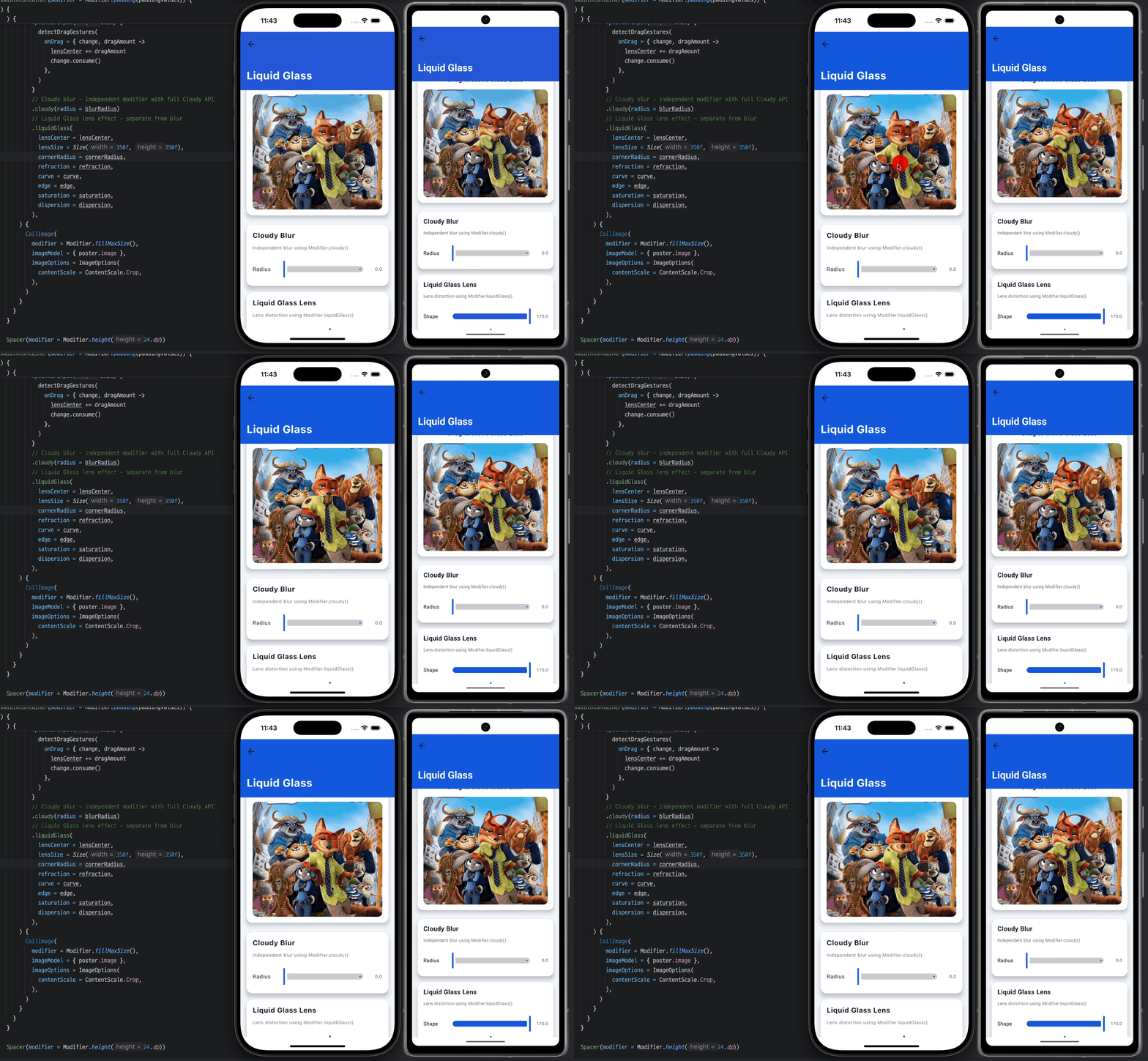
Cloudy provides a Modifier.liquidGlass() that creates a realistic glass lens effect with SDF-based crisp edges, normal-based refraction, and chromatic dispersion.
Note: For blur effects, use Modifier.cloudy() separately. The two modifiers are designed to work independently, giving you full control over each effect.
Basic Usage
var lensCenter by remember { mutableStateOf(Offset(100f, 100f)) }

Box(
  modifier = Modifier
    .fillMaxSize()
    .pointerInput(Unit) {
      detectDragGestures { change, _ ->
        lensCenter = change.position
      }
    }
    .cloudy(radius = 15) // Use Cloudy for blur (independent)
    .liquidGlass(lensCenter = lensCenter) // Lens distortion effect
) {
  Image(
    painter = painterResource(R.drawable.photo),
    contentDescription = null,
    modifier = Modifier.fillMaxSize()
  )
}
Combining with Cloudy Blur
The liquidGlass() and cloudy() modifiers are independent and composable:
// Blur only
.cloudy(radius = 20)

// Lens effect only
.liquidGlass(lensCenter = lensCenter)

// Both effects combined
.cloudy(radius = 15)
.liquidGlass(lensCenter = lensCenter)
This separation gives you full access to Cloudy's blur API (radius, onStateChanged, CloudyState) while using the liquid glass lens effect.
Customization
You can customize the liquid glass effect with various parameters:
.liquidGlass(
  lensCenter = lensCenter,
  lensSize = Size(350f, 350f),  // Size of the glass lens
  cornerRadius = 50f,           // Rounded corners
  refraction = 0.25f,           // Distortion amount
  curve = 0.25f,                // Lens curvature strength
  dispersion = 0.0f,            // Chromatic dispersion (RGB separation)
  saturation = 1.0f,            // Color saturation
  contrast = 1.0f,              // Light/dark contrast
  tint = Color.Transparent,     // Optional color tint
  edge = 0.2f,                  // Edge lighting width
)
Parameters
| Parameter | Default | Description | Fallback (Android 32-) |
|---|---|---|---|
lensCenter |
- | Center position of the glass lens (required) | Yes |
lensSize |
350x350 | Size of the lens in pixels | Yes |
cornerRadius |
50f | Corner radius for rounded rectangle shape | Yes |
refraction |
0.25f | Controls how much background distorts through lens | No (requires API 33+) |
curve |
0.25f | Controls how strongly lens curves at center vs edges | No (requires API 33+) |
dispersion |
0.0f | Chromatic dispersion/aberration intensity | No (requires API 33+) |
saturation |
1.0f | Color saturation (1.0 = normal) | Approximation |
contrast |
1.0f | Light/dark contrast (1.0 = normal) | Approximation |
tint |
Transparent | Optional color tint overlay | Yes |
edge |
0.2f | Edge lighting width (0 = none) | Yes (as stroke) |
light |
Fixed | Specular light source (see Motion-driven light sources) | No (requires API 33+) |
glow |
LiquidGlassDefaults.Glow |
Perceptual glint tuning: brightness (intensity) and focus (sharpness). Use LiquidGlassDefaults.NoGlow to remove the glint |
No (requires API 33+) |
enabled |
true | Enable/disable the effect | Yes |
Note: On Android 32 and below, the lens refraction effect is not available since it requires
RuntimeShader(API 33+). The fallback draws a visible lens shape with tint, edge lighting, and color adjustments. For blur effects, useModifier.cloudy()separately.
Platform Support (Liquid Glass)
| Platform | Implementation | Features |
|---|---|---|
| Android 33+ | RuntimeShader (AGSL) | Full effect |
| Android 32- | Fallback | Tint + edge + shape (no lens refraction) |
| iOS | Skia RuntimeEffect | Full effect |
| macOS | Skia RuntimeEffect | Full effect |
| Desktop (JVM) | Skia RuntimeEffect | Full effect |
| WASM | Skia RuntimeEffect | Full effect |
Liquid Glass also supports an optional, opt-in motion-driven light source — see Motion-driven light sources in Part II.
Mirage
Modifier.mirage { } applies an open shader-effect plan to any composable: one modifier runs a plan of typed Optics — either the bundled looks or optics you author yourself — against the content it wraps. It ships a family of thin-film / specular presets, and because an optic is just a kernel plus a typed uniform schema, consumers can add new effects without any library change.
Mirage is behind an experimental opt-in and is excluded from the stable ABI while its surface settles:
@OptIn(ExperimentalMirage::class)
@Composable
fun Poster() { /* ... */ }
Basic Usage
Apply a preset by declaring a filter in the plan. Lens-shaped optics read a lensCenter (in the content's local pixels); it defaults to the content origin, so seed the pane center for a centered lens:
var lensCenter by remember { mutableStateOf(Offset.Zero) }

Box(
  modifier = Modifier
    .onSizeChanged { lensCenter = Offset(it.width / 2f, it.height / 2f) }
    .mirage {
      filter(MirageOptics.Specular) {
        lensCenter(lensCenter)
        lensSize(Size(520f, 520f))
        cornerRadius(120f)
      }
    },
) {
  Image(painter = painterResource(R.drawable.photo), contentDescription = null)
}
Presets
The bundled optics live in MirageOptics:
| Preset | Kind | Look |
|---|---|---|
Specular |
Composite | Lit-glass specular glint (matches the liquidGlass highlight) |
Chromatic |
Composite | Thin-film (Newton's-rings) iridescence — the default look |
OilSlick |
Composite | Saturated, dark-based rainbow with little wash-out |
SoapBubble |
Composite | Pale, pastel iridescence — few wide bands, high wash-out |
MetallicFoil |
Composite | Sharp metallic sheen with a Fresnel rim boost |
Pearl |
Composite | Soft, luminous, low-saturation lustre |
Foil |
Generate | Content-free overlay: glare + flowing rainbow + sparkle |
Duotone |
Colorize | Point-wise shadow→highlight duotone grade |
The five thin-film looks (Chromatic and friends) are one kernel expressed at different uniform defaults; Specular and the others are distinct programs.
Clock
Modifier.mirage(clock = …) controls the mirageTime uniform that time-driven optics (e.g. Foil's sparkle) read:
MirageClock.Auto(default) — advancesmirageTimefrom the frame loop.MirageClock.Paused— freezes it at the last value.MirageClock.Fixed(seconds)— pins it to a constant, for deterministic rendering.
Overlays
An overlay composites a content-free generator on top of the filtered result under a blend mode. Ordering follows declaration, regardless of where the overlay appears in the block:
Modifier.mirage {
  filter(MirageOptics.OilSlick) { lensCenter(center); lensSize(size); cornerRadius(120f) }
  overlay(MirageOptics.Foil) { lensCenter(center); lensSize(size); cornerRadius(120f) }
}
Platform Support (Mirage)
| Platform | Implementation | Behavior |
|---|---|---|
| Android 33+ | RuntimeShader (AGSL) | Full effect |
| Android 32- | — | Each stage is skipped; content passes through unchanged |
| iOS / macOS / Desktop (JVM) / WASM | Skia RuntimeEffect (SKSL) | Full effect |
Want to write your own preset instead of using the bundled ones? See Authoring your own Mirage optic in Part II.
Part II — Going further
The topics below extend an effect from Part I — an opt-in motion source for Liquid Glass, writing a custom Mirage optic, and using Cloudy with a network image loader. Read these once the basics above are working.
Motion-driven light sources
Extends: Liquid Glass
By default the rim highlight uses a fixed light direction that reproduces the direction of the old fixed light. The specular itself is a new multi-term model (a moving focal pool, body sheen, a Blinn rim, and a back-rim, screen-blended), so the highlight looks different from pre-release versions — an intended upgrade, not a bit-for-bit match. Opt in to gyro-driven specular to make the highlight sweep across the glass as the device tilts (à la iOS 26 "lights move in space"):
@OptIn(ExperimentalLiquidGlassMotion::class)
@Composable
fun GlassCard() {
  // Hoist once and share across items in a list — one call registers one sensor.
  val light = rememberGyroLightSource(enabled = true)

  Box(
    modifier = Modifier.liquidGlass(
      lensCenter = lensCenter,
      light = light,
    ),
  ) { /* ... */ }
}
- Opt-in & accessible: the default is a fixed light direction; motion is opt-in. Enabling gyro only changes where the light direction comes from — the specular model itself is the same whether the light is fixed or motion-driven. When Reduce Motion is enabled (Android animator scale
0, iOSisReduceMotionEnabled), the light is frozen and no sensors are registered — observed live. - Platform support: Android API 33+ (the fallback path has no shader → no-op), iOS, and any device with a motion sensor. Desktop/Web and sensorless devices keep a static light.
- Lists: call
rememberGyroLightSource()once above the list and pass the result to each item, so a single sensor listener is shared.
iOS: the consuming app's
Info.plistmust declareNSMotionUsageDescription, or recent iOS terminates the app on the first device-motion read. iOS v1 uses a portrait-oriented projection; landscape is not yet remapped.
Transform-driven light (no sensor)
rememberTransformLightSource is the sibling of rememberGyroLightSource. Instead of the device gyro, it drives the highlight from a composable's own rotationX / rotationY — the same values you apply through Modifier.graphicsLayer. It needs no sensor, no platform code, and works on every target including Desktop and Web:
@OptIn(ExperimentalLiquidGlassMotion::class)
@Composable
fun TiltCard() {
  var rx by remember { mutableFloatStateOf(0f) }
  var ry by remember { mutableFloatStateOf(0f) }
  val light = rememberTransformLightSource(rotationX = { rx }, rotationY = { ry })

  Box(
    modifier = Modifier
      .graphicsLayer { rotationX = rx; rotationY = ry; cameraDistance = 12f * density }
      .liquidGlass(lensCenter = lensCenter, light = light),
  ) { /* ... */ }
}
The rotations are read as lambdas (deferred reads) so per-frame updates invalidate the draw without recomposing the modifier, matching the gyro source's behavior.
Glint tuning
The glow parameter tunes the specular glint with two perceptual knobs: intensity (brightness) and sharpness (focus). Build one with the LiquidGlassGlow(intensity = …, sharpness = …) factory, or use LiquidGlassDefaults.NoGlow to switch the glint off. The full set of shader tunables — glowRimMix and glowWidthPx, alongside glowIntensity / glowSharpness — lives on the experimental Modifier.liquidGlassTuned overload, intended for live experimentation rather than the committed API surface.
Authoring your own Mirage optic
Extends: Mirage
An optic is a kernel plus a MirageParams subclass whose property names are the shader uniform identifiers. A composite optic authors a full half4 main(float2 xy) and samples the content through the compiler-provided content shader:
class VignetteParams : MirageParams() {
  val strength by uniform(0.6f)
}

val Vignette = Optic.composite(
  name = "vignette",
  paramsFactory = ::VignetteParams,
  agsl = VIGNETTE_SRC,
  sksl = VIGNETTE_SRC, // AGSL and SKSL are the same text here
)

private const val VIGNETTE_SRC = """
half4 main(float2 xy) {
    half4 src = content.eval(xy);
    float2 uv = xy / mirageResolution;          // standard uniform, auto-declared when referenced
    float d = distance(uv, float2(0.5));
    float v = 1.0 - strength * smoothstep(0.3, 0.75, d);
    return half4(src.rgb * half(v), src.a);
}
"""
Apply it exactly like a preset: Modifier.mirage { filter(Vignette) { strength(0.8f) } }.
The other factories are Optic.colorize (a point-wise half4 kernel(float2 p, half4 src) that never reaches content directly), Optic.generate (a content-free overlay), and Optic.raw (an escape hatch that emits your source verbatim). The compiler declares the standard uniforms (mirageResolution / mirageTime / mirageDensity) only when the kernel references them, and rejects kernels that use derivative builtins, preprocessor directives, or the raw fragment-coord builtin (none of which compile as a runtime shader).
Blur effect with network images
Extends: Self blur
You can easily implement blur effect with Landscapist, which is a Jetpack Compose image loading library that fetches and displays network images with Glide, Coil, and Fresco. For more information, see the Transformation section.
Find this repository useful? :heart:
Support it by joining stargazers for this repository. :star:
Also, follow me on GitHub for my next creations! 🤩
Acknowledgements
The liquid glass shader implementation was inspired by FletchMcKee/liquid.
License
Designed and developed by 2022 skydoves (Jaewoong Eum)

Licensed under the Apache License, Version 2.0 (the "License");
you may not use this file except in compliance with the License.
You may obtain a copy of the License at

   http://www.apache.org/licenses/LICENSE-2.0

Unless required by applicable law or agreed to in writing, software
distributed under the License is distributed on an "AS IS" BASIS,
WITHOUT WARRANTIES OR CONDITIONS OF ANY KIND, either express or implied.
See the License for the specific language governing permissions and
limitations under the License.
