GhidrAssistMCP
A powerful Ghidra extension that provides an MCP (Model Context Protocol) server, enabling AI assistants and other tools to interact with Ghidra's reverse engineering capabilities through a standardized API.
Overview
Version 3.0.0 introduces the explicit tool catalog and application-owned runtime. Clients should refresh their tool definitions after upgrading.
GhidrAssistMCP bridges the gap between AI-powered analysis tools and Ghidra's comprehensive reverse engineering platform. By implementing the Model Context Protocol, this extension allows external AI assistants, automated analysis tools, and custom scripts to seamlessly interact with Ghidra's analysis capabilities.
Key Features
- MCP Server Integration: Full Model Context Protocol server implementation using official SDK
- Dual HTTP Transports: Supports SSE and Streamable HTTP transports for maximum client compatibility
- 100 Explicit Tools: Discoverable operation names with precise input contracts and read/write annotations (93 enabled by default)
- 6 MCP Resource Templates: Program-specific data resources for program info, functions, strings, imports, exports, and segments
- 7 MCP Prompts: Pre-built analysis prompts for common reverse engineering tasks
- Result Caching: Intelligent caching system to improve performance for repeated queries
- Async Task Support: Long-running operations execute asynchronously with task management
- Multi-Program Support: Work with multiple open programs simultaneously using
program_name; uselist_open_programsproject paths to disambiguate duplicate filenames - Application Startup: MCP is available as soon as the project manager opens, before CodeBrowser
- Shared Views: Every CodeBrowser shares the runtime configuration and bounded request log
- Multi-Window Support: Single MCP server shared across all CodeBrowser windows with intelligent focus tracking
- Active Context Awareness: Automatic detection of which binary window is in focus, with context hints in all tool responses
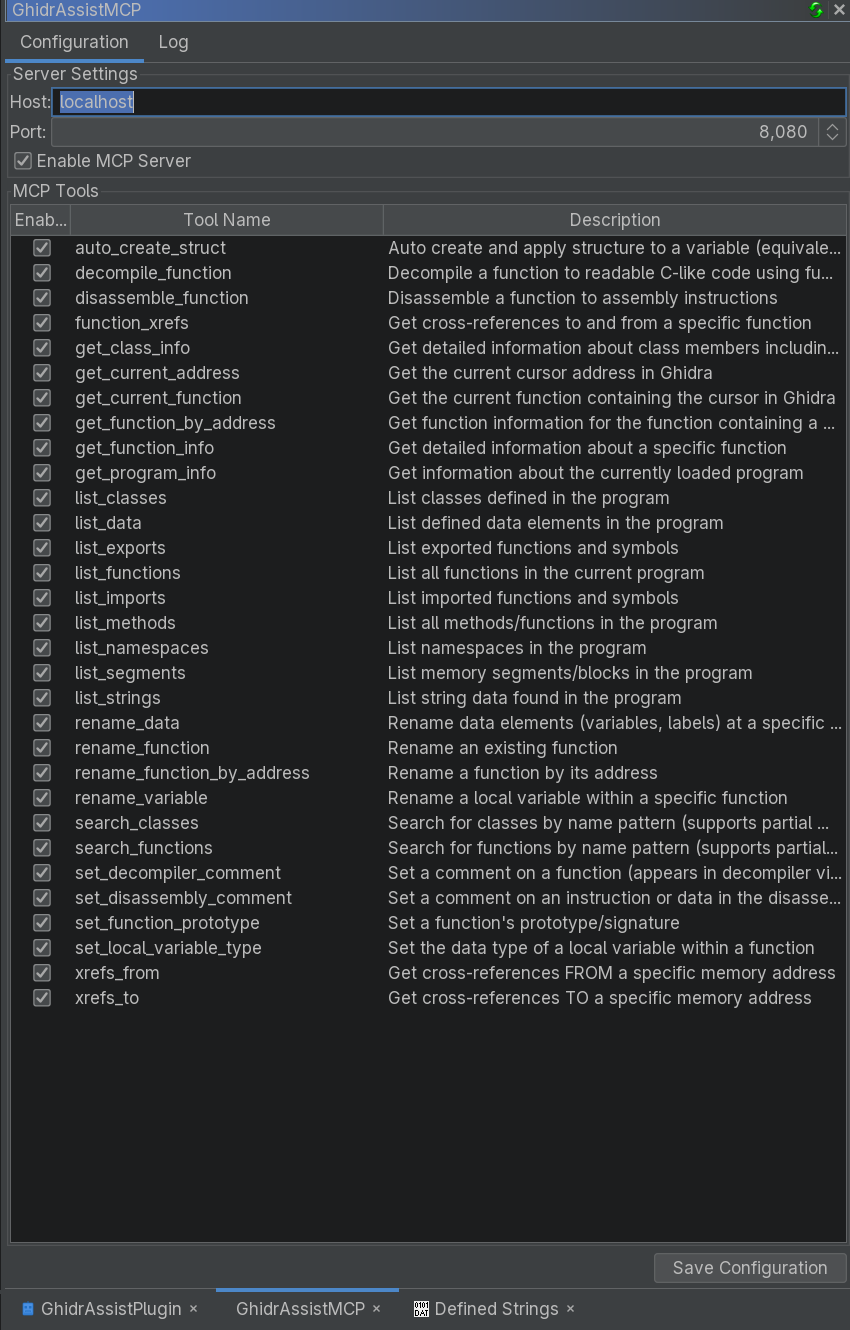
- Configurable UI: Easy-to-use interface for managing tools and monitoring activity
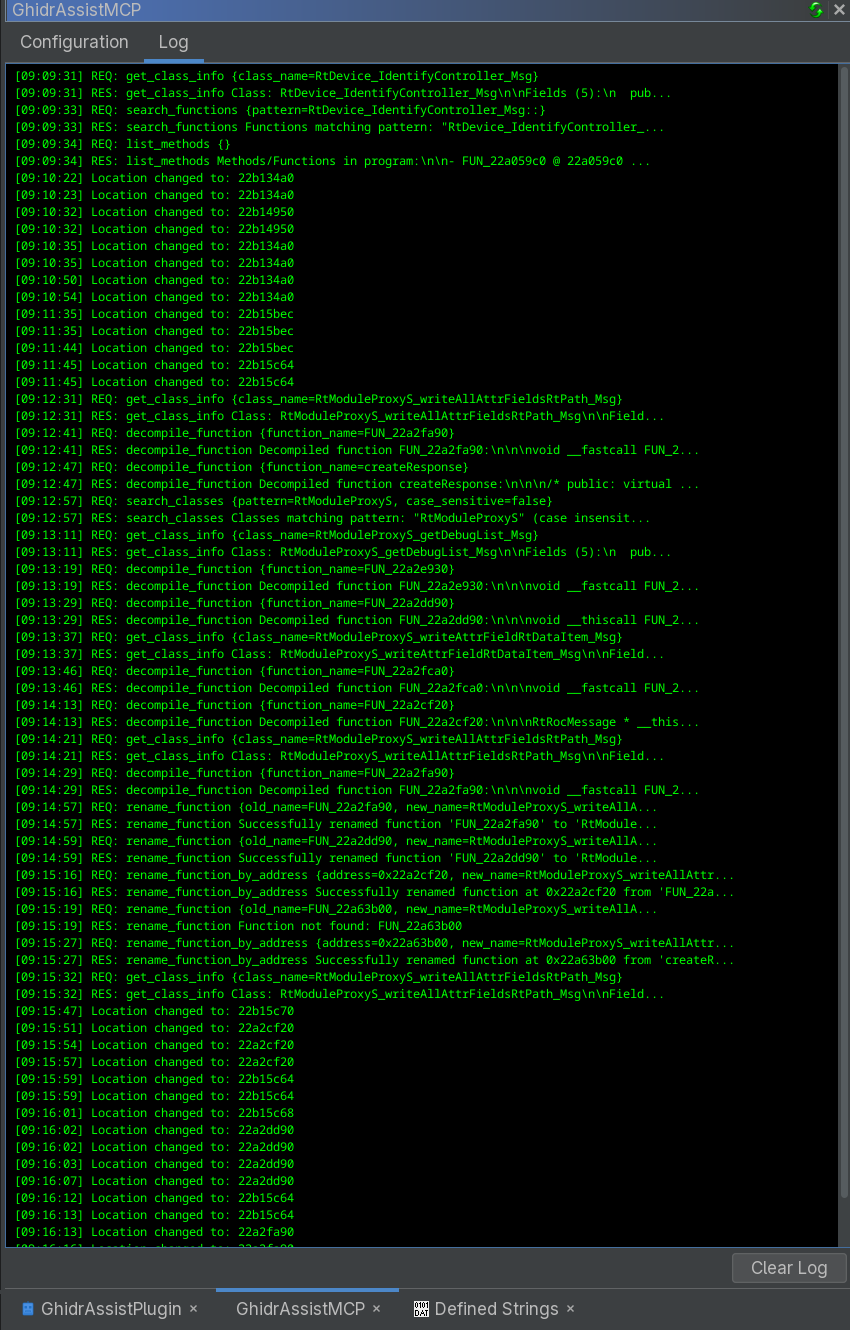
- Real-time Logging: Track all MCP requests and responses with detailed logging
- Dynamic Tool Management: Enable/disable tools individually with persistent settings
Clients
Shameless self-promotion: GhidrAssist supports GhidrAssistMCP right out of the box.
Screenshots
Installation
Prerequisites
- Ghidra 12.0 or 12.1 Public, running with Java 25 or newer (extension ZIPs are specific to the selected Ghidra version)
- An MCP Client (Like GhidrAssist)
Binary Release (Recommended)
Download the latest release:
- Go to the Releases page
- Download the latest
.zipfile (e.g.,ghidra_12.1_PUBLIC_20261009_GhidrAssistMCP-3.0.0.zip)
Install the extension:
- In Ghidra: File → Install Extensions → Add Extension
- Select the downloaded ZIP file
- Restart Ghidra when prompted
Start Ghidra:
- The MCP runtime starts in the project manager automatically.
- CodeBrowsers receive a shared MCP view when opened.
- Open Window → GhidrAssistMCP to configure or disable the server.
Building from Source
Source builds require Java 25 or newer. The included Gradle wrapper pins the supported Gradle release; use it instead of a system Gradle installation.
Clone the repository:
git clone <repository-url>
cd GhidrAssistMCP
Point Gradle at your Ghidra install:
- Set
GHIDRA_INSTALL_DIR(environment variable), or pass-PGHIDRA_INSTALL_DIR=<path>when you run Gradle.
- Set
Build + install:
Ensure Ghidra isn't running and run:
./gradlew installExtensionThis copies the built ZIP into your Ghidra install (
[GHIDRA_INSTALL_DIR]/Extensions/Ghidra) and extracts it into your Ghidra user Extensions folder (replacing any existing extracted copy).If you need to override that location, pass
-PGHIDRA_USER_EXTENSIONS_DIR=<path>.Restart / verify:
- Restart Ghidra.
- If the plugin doesn't appear, enable it via File → Configure → Configure Plugins (search for "GhidrAssistMCP").
Configuration
Initial Setup
Open the Control Panel:
- Window → GhidrAssistMCP
Configure Server Settings:
- Host: Default is
localhost - Port: Default is
8080 - Enable/Disable: Toggle the MCP server on/off
- Host: Default is
Tool Management
The Configuration tab allows you to:
- View all public tools (100 total)
- Enable/disable individual tools using checkboxes
- Save configuration to persist across sessions
- Monitor tool status in real-time
Headless Mode Quickstart
GhidrAssistMCP can also be started from Ghidra's analyzeHeadless launcher. This is useful when you want MCP access to a program loaded in headless Ghidra without opening the CodeBrowser UI.
First, build and install the extension so Ghidra can load the compiled classes and bundled dependencies:
cd /path/to/GhidrAssistMCP

export GHIDRA_INSTALL_DIR=/path/to/ghidra_12.1_PUBLIC
./gradlew installExtension
Set paths for your Ghidra install and extracted user extension. On Linux, Ghidra user extensions usually live under ~/.config/ghidra/<ghidra_profile>/Extensions:
export GHIDRA_INSTALL_DIR=/path/to/ghidra_12.1_PUBLIC
export GHIDRA_USER_EXTENSIONS_DIR="$HOME/.config/ghidra/ghidra_12.1_PUBLIC/Extensions"
export GHIDRASSISTMCP_EXT="$GHIDRA_USER_EXTENSIONS_DIR/GhidrAssistMCP"
Import a binary and start the MCP server as a headless pre-script:
"$GHIDRA_INSTALL_DIR/support/analyzeHeadless" /tmp/ghidra-projects McpHeadless \
  -import /path/to/binary \
  -scriptPath "$GHIDRASSISTMCP_EXT/ghidra_scripts" \
  -preScript GAMCPStartServerScript.java "host=127.0.0.1" "port=8080"
For a binary that is already imported into the project, use -process instead:
"$GHIDRA_INSTALL_DIR/support/analyzeHeadless" /tmp/ghidra-projects McpHeadless \
  -process binary_name \
  -scriptPath "$GHIDRASSISTMCP_EXT/ghidra_scripts" \
  -preScript GAMCPStartServerScript.java "host=127.0.0.1" "port=8080"
To keep a headless MCP session open after analysis completes, run the server as a post-script with wait mode:
"$GHIDRA_INSTALL_DIR/support/analyzeHeadless" /tmp/ghidra-projects McpHeadless \
  -process binary_name \
  -scriptPath "$GHIDRASSISTMCP_EXT/ghidra_scripts" \
  -postScript GAMCPStartServerScript.java "host=127.0.0.1" "port=8080" "wait=true"
MCP clients can connect to:
SSE:             http://127.0.0.1:8080/sse
SSE messages:    http://127.0.0.1:8080/message
Streamable HTTP: http://127.0.0.1:8080/mcp
The headless MCP server runs inside the analyzeHeadless JVM and uses the loaded currentProgram. The server holds a program consumer while it is running so MCP requests do not race against program database closure. Use wait=true when you want analyzeHeadless to stay open for interactive MCP clients. A harness can also pass completion_file=/workspace/control/session.complete; creating that file closes the MCP server cleanly and lets Ghidra save and exit normally.
Disposable static-analysis labs may pass tool_profile=agent_lab. This enables sandbox-local program export while arbitrary path import and Ghidra scripts remain disabled because they can expose process secrets or spawn processes. The harness owns artifact imports. Unknown profiles are rejected.
Available tools
The public catalog contains 100 explicit tools, 93 enabled by default. The modernization review maps every previous tool to its current name and explains the architecture and remaining improvements. Fetch tools/list for authoritative parameter schemas; clients should reconnect after upgrading.
| Purpose | Representative tools |
|---|---|
| Project lifecycle | create_project, open_project, save_project, close_project |
| Programs and project files | get_program_info, list_open_programs, list_project_files, open_program, close_program |
| Code and functions | list_functions, search_functions, get_function_info, get_pseudocode, get_disassembly, get_pcode, get_control_flow_graph |
| Function identity | get_function_hash (SHA-256), get_function_byte_pattern (masked prefix), get_function_prototype (C declaration) |
| Binary data | list_imports, list_exports, list_strings, list_memory_blocks, list_entry_points, get_hexdump |
| References | get_xrefs_to, get_xrefs_from, get_callers, get_callees, get_call_graph |
| Comments | get_comment, get_function_comment, list_function_comments, set_comment, set_function_comment, remove_comment |
| Variables and types | list_function_variables, rename_local_variable, set_local_variable_type, set_function_prototype, list_data_types, get_data_type, set_data_type |
| Structures and classes | create_structure, set_structure_field, infer_structure_from_variable, get_structure_field_xrefs, list_classes, get_class_info |
| Analysis | list_analysis_options, set_analysis_options, analyze_program, get_analysis_status, cancel_analysis |
| Jobs | list_tasks, get_task_status, cancel_task |
Names express the operation. Public code readers do not require a format selector, and comment/type/script operations do not require an action selector. get_disassembly reads existing instructions; disassemble_bytes changes the listing. Read and write tools have their own MCP annotations.
import_file, export_program, and the five script tools are disabled by default. Enable the specific operations in the shared Configuration view when needed. Old consolidated names are no longer exposed over HTTP; saved enabled states migrate to their replacement operations.
Opening a program from the project manager
The MCP server starts when Ghidra's project manager opens, before a CodeBrowser exists. Start with:
{"method":"tools/call","params":{"name":"list_project_files","arguments":{"recursive":true}}}
Then open a program using its project path. This launches CodeBrowser when needed:
{"method":"tools/call","params":{"name":"open_program","arguments":{"name":"/binaries/example"}}}
Creating, opening, saving, and closing a project
Project lifecycle tools work while only the project manager is open and return structured project identity/status fields. They require the GUI project manager; the headless launcher manages its own project.
Create a local project in an existing absolute parent directory, with a simple name that omits .gpr and .rep:
{"method":"tools/call","params":{"name":"create_project","arguments":{"location":"/workspace/projects","name":"review"}}}
To open an existing project, use its absolute .gpr marker path:
{"method":"tools/call","params":{"name":"open_project","arguments":{"path":"/workspace/projects/review.gpr"}}}
Neither operation replaces an active project. Opening the same project again returns already_open; close a different active project explicitly before creating or opening another one. restore_state defaults to false; set it to true to restore the saved session's tools and views. Use open_program to launch CodeBrowser for a project program.
Save changed open project files and session state:
{"method":"tools/call","params":{"name":"save_project","arguments":{}}}
Close the project after saving:
{"method":"tools/call","params":{"name":"close_project","arguments":{"save":true}}}
close_project defaults to save=false and discard_changes=false; it refuses unsaved changes unless one is explicitly enabled. These options are mutually exclusive. discard_changes=true permits losing unsaved changes. A save failure leaves the project open and reports any files already saved. Closing with no active project returns already_closed. Unsaved tool configuration and plugin data may need saving in Ghidra before a safe close, even with save=true; explicit discard permits dropping them. Running tool commands and busy project data prevent saving or closing, including closure with discard. The server stays reachable while the project manager remains open, so a client can open the next project using the same connection.
Reading pseudocode and function identity
{"method":"tools/call","params":{"name":"get_pseudocode","arguments":{"function":"main","program_name":"/binaries/example"}}}
Use get_disassembly with the same arguments for assembly. get_function_hash computes SHA-256 over the function's body bytes; get_function_byte_pattern preserves the previous masked-prefix representation. get_function_prototype returns the declaration and calling convention.
Long-running operations return a job ID when async execution is enabled. Poll get_task_status with task_id to retrieve the result, or cancel_task to cancel. These tools are an application job API, separate from the optional MCP Tasks extension.
Program and cursor context
Use list_open_programs to obtain exact project paths for program_name. Missing or ambiguous explicit targets return an error. Cursor queries refer to the focused CodeBrowser and do not accept a separate program selector. Project operations do not need a loaded program; import_file.program_name names the imported program.
Responses carry context information while preserving MCP error flags, structured data, and other content. For example:
[Context] Operating on: example | Active window: another_program

<tool result>
Shared runtime and views
One application runtime owns the server, backend, configuration, and bounded log. Ghidra requires a plugin adapter and UI provider per window; each is a view of that same runtime. Views replay the shared log when opened, configuration saves refresh every view, and “Clear Shared Log” clears it everywhere. Closing any or all CodeBrowsers leaves the server running while the project manager remains open.
The module initializer attaches the project-manager application plugin, including for existing saved profiles. It skips headless Ghidra, which uses the launcher described above. The application plugin automatically attaches MCP views to CodeBrowsers, and open_program uses public Ghidra ToolServices and ProgramManager APIs to launch or reuse a browser.
MCP protocol support
The extension uses Java SDK 2.0.1. Streamable HTTP at http://localhost:8080/mcp supports protocol 2025-11-25 and is the preferred endpoint. Legacy SSE at /sse and messages at /message use protocol 2024-11-05. Tool availability changes are delivered without restarting the transport, and resource URI patterns are registered as resource templates.
The latest MCP revision is 2026-07-28; full support depends on the Java SDK's next major line. See the official SDK roadmap. The implementation and follow-up plan are detailed in the review.
Six program resource templates expose metadata, functions, strings, imports, exports, and segments. Seven prompts cover function analysis, documentation, data flow, network data, defensive vulnerability review, comparison, and structure inference. Prompt guidance uses the explicit tool catalog.
Development
Project Structure
src/main/java/ghidrassistmcp/
├── GhidrAssistMCPInitializer.java # Application bootstrap
├── GhidrAssistMCPApplicationPlugin.java # Project-manager owner
├── GhidrAssistMCPPlugin.java      # CodeBrowser adapter
├── GhidrAssistMCPManager.java     # Singleton coordinator
├── GhidrAssistMCPProvider.java    # UI provider with tabs
├── GhidrAssistMCPServer.java      # MCP server implementation
├── GhidrAssistMCPBackend.java     # Backend tool/resource/prompt management
├── McpBackend.java                # Backend interface
├── McpTool.java                   # Tool interface
├── McpEventListener.java          # Event notification interface
├── cache/                         # Caching system
├── project/                       # GUI project lifecycle controller
├── tasks/                         # Async task system
├── resources/                     # MCP resources
├── prompts/                       # MCP prompts
└── tools/                         # Tool implementations
Adding New Tools
Implement McpTool interface:
public class MyCustomTool implements McpTool {
    @Override
    public String getName() { return "my_custom_tool"; }

    @Override
    public String getDescription() { return "Description"; }

    @Override
    public boolean isReadOnly() { return true; }

    @Override
    public boolean isLongRunning() { return false; }

    @Override
    public boolean isCacheable() { return true; }

    @Override
    public McpSchema.JsonSchema getInputSchema() { /* ... */ }

    @Override
    public McpSchema.CallToolResult execute(Map<String, Object> arguments, Program program) {
        // Implementation; use isError(true) for operation failures
    }
}
Register in backend (after built-in catalog rationalization):
// In GhidrAssistMCPBackend constructor
registerTool(new MyCustomTool());
Build Commands
# Clean build
./gradlew clean

# Build extension zip (written to dist/)
./gradlew buildExtension

# Install (extract) extension into the Ghidra user Extensions directory
./gradlew installExtension

# Uninstall (delete extracted directory from the Ghidra user Extensions directory)
./gradlew uninstallExtension

# Build/install with specific Ghidra path (required if GHIDRA_INSTALL_DIR isn't set)
./gradlew -PGHIDRA_INSTALL_DIR=/path/to/ghidra installExtension

# Debug build
./gradlew buildExtension --debug
Dependencies
- MCP SDK:
io.modelcontextprotocol.sdk:mcp-core:2.0.1andmcp-json-jackson2:2.0.1 - Jetty Server:
12.1.14with EE11 servlet support (HTTP/SSE transport) - Jackson:
2.21.1(annotations2.21) (JSON processing) - Ghidra API: Bundled with Ghidra installation
The SDK, JSON, HTTP, and supporting runtime libraries are bundled into one jar under private package names. This prevents Ghidra's older Jackson and SLF4J classes, or another extension's dependencies, from overriding the server's selected versions. Historical generated lib/ jars are excluded from the ZIP.
Logging
UI Logging
The Log tab provides real-time monitoring:
- Session Events: Server start/stop, program changes
- Tool Requests:
REQ: tool_name {parameters...} - Tool Responses:
RES: tool_name {response...} - Error Messages: Failed operations and diagnostics
- Cache Hits: When cached results are returned
Console Logging
Detailed logging in Ghidra's console:
- Tool registration and initialization
- MCP server lifecycle events
- Async task execution and completion
- Cache statistics
- Database transaction operations
- Error stack traces and debugging information
Troubleshooting
Common Issues
Server Won't Start
- Check if port 8080 is available
- Verify Ghidra installation path
- Examine console logs for errors
Tools Not Appearing
- Ensure plugin is enabled
- Check Configuration tab for tool status
- Verify backend initialization in logs
MCP Client Connection Issues
- Confirm server is running (check GhidrAssistMCP window)
- Test connection:
curl http://localhost:8080/sse - Check firewall settings
Tool Execution Failures
- Verify program is loaded in Ghidra
- Check tool parameters are correct
- Review error messages in Log tab
Async Task Issues
- Use
get_task_statusto check task state - Use
list_tasksto see all tasks - Use
cancel_taskif a task is stuck
Debug Mode
Enable debug logging by adding to Ghidra startup:
-Dlog4j.logger.ghidrassistmcp=DEBUG
Contributing
- Fork the repository
- Create a feature branch:
git checkout -b feature-name - Make your changes with proper tests
- Follow code style: Use existing patterns and conventions
- Submit a pull request with detailed description
Code Standards
- Java 25 baseline for builds and runtime validation
- Proper exception handling with meaningful messages
- Transaction safety for all database operations
- Thread safety for UI operations
- Comprehensive documentation for public APIs
- Explicit operation names and focused schemas over shared implementations
License
This project is licensed under the MIT License - see the LICENSE file for details.
Acknowledgments
- NSA/Ghidra Team for the excellent reverse engineering platform
- Anthropic for the Model Context Protocol specification
Questions or Issues?
Please open an issue on the project repository for bug reports, feature requests, or questions about usage and development.
