jtokkit




Welcome to JTokkit, a Java tokenizer library designed for use with OpenAI models.
EncodingRegistry registry = Encodings.newDefaultEncodingRegistry();
Encoding enc = registry.getEncoding(EncodingType.CL100K_BASE);
assertEquals("hello world", enc.decode(enc.encode("hello world")));

// Or get the tokenizer corresponding to a specific OpenAI model
enc = registry.getEncodingForModel(ModelType.TEXT_EMBEDDING_ADA_002);
💡 Quickstart
For a quick getting started, see our documentation.
📖 Introduction
JTokkit aims to be a fast and efficient tokenizer designed for use in natural language processing tasks using the OpenAI models. It provides an easy-to-use interface for tokenizing input text, for example for counting required tokens in preparation of requests to the GPT-3.5 model. This library resulted out of the need to have similar capacities in the JVM ecosystem as the library tiktoken provides for Python.
🤖 Features
✅ Implements encoding and decoding via r50k_base, p50k_base, p50k_edit,
cl100k_base and o200k_base
✅ Easy-to-use API
✅ Easy extensibility for custom encoding algorithms
✅ Zero Dependencies
✅ Supports Java 8 and above
✅ Fast and efficient performance
📊 Performance
JTokkit is between 2-3 times faster than a comparable tokenizer.
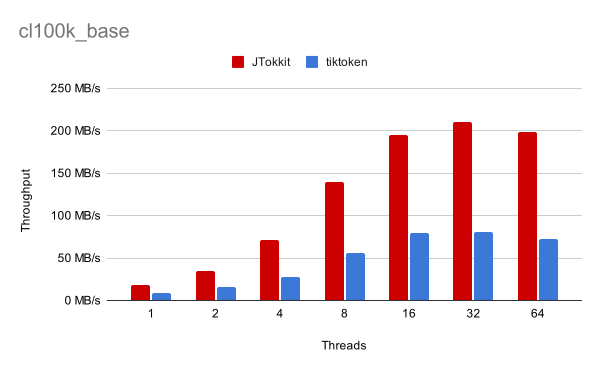
For details on the benchmark, see the benchmark directory.
🛠️ Installation
You can install JTokkit by adding the following dependency to your Maven project:
<dependency>
    <groupId>com.knuddels</groupId>
    <artifactId>jtokkit</artifactId>
    <version>1.1.0</version>
</dependency>
Or alternatively using Gradle:
dependencies {
    implementation 'com.knuddels:jtokkit:1.1.0'
}
🔰 Getting Started
To use JTokkit, simply create a new EncodingRegistry and use getEncoding to
retrieve the encoding you want to use. You can then use the encode and
decode methods to encode and decode text.
EncodingRegistry registry = Encodings.newDefaultEncodingRegistry();
Encoding enc = registry.getEncoding(EncodingType.CL100K_BASE);
IntArrayList encoded = enc.encode("This is a sample sentence.");
// encoded = [2028, 374, 264, 6205, 11914, 13]

String decoded = enc.decode(encoded);
// decoded = "This is a sample sentence."

// Or get the tokenizer based on the model type
Encoding secondEnc = registry.getEncodingForModel(ModelType.TEXT_EMBEDDING_ADA_002);
// enc == secondEnc
The EncodingRegistry and Encoding classes are thread-safe and can be freely
shared among components.
➰ Extending JTokkit
You may want to extend JTokkit to support custom encodings. To do so, you have two options:
- Implement the
Encodinginterface and register it with theEncodingRegistry
EncodingRegistry registry = Encodings.newDefaultEncodingRegistry();
Encoding customEncoding = new CustomEncoding();
registry.registerEncoding(customEncoding);
- Add new parameters for use with the existing BPE algorithm
EncodingRegistry registry = Encodings.newDefaultEncodingRegistry();
GptBytePairEncodingParams params = new GptBytePairEncodingParams(
        "custom-name",
        Pattern.compile("some custom pattern"),
        encodingMap,
        specialTokenEncodingMap
);
registry.registerGptBytePairEncoding(params);
Afterwards you can use the custom encodings alongside the default ones and access
them by using registry.getEncoding("custom-name"). See the JavaDoc for more
details.
📄 License
JTokkit is licensed under the MIT License. See the LICENSE file for more information.
