DeepfakeHTTP







What are people using it for?
|
Get started | Usage | Usage Examples | How does it work? | Features | Optional Headers | CLI | Cheatsheet
Get started
- Download the latest release of
df.jar - Copy-paste the content of the dump example to the file
dump.txt:GET /api/customer/123 HTTP/1.1 HTTP/1.1 200 OK Content-Type: application/json { "id": 123, "fname": "John", "lname": "Doe", "email": ["john@example.com", "johndoe@example.com"] } - Start the server from command line:
java -jar df.jar --dump dump.txt - Use a browser to check whether the server is running:
http://localhost:8080/api/customer/123
- Get response:
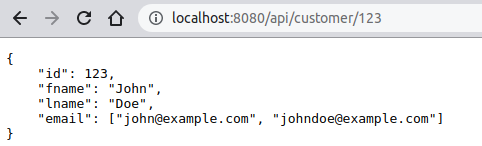
For more examples see the cheatsheet.
Also take look at REST version of the Spring PetClinic built with DeepfakeHTTP.
Usage
java -jar df.jar [OPTIONS] [FLAGS] [COMMANDS]

OPTIONS:
   --host <host>            host name, default: localhost
   --port <number>          HTTP TCP port number, default: 8080
   --port-ssl <number>      HTTPS TCP port number, default: 8443
   --dump <file|url>...     dump text file(s)/URL(s)
   --db <file|url>          json/yaml/csv memory file to populate templates
   --db-export <file>       export memory to json file
   --db-path <path>         serve live memory file at specified context
   --dir <dir>              forward unmatched requests to specified directory
   --js <file|url>...       JavaScript file(s) for script engine context
   --openapi-path <path>    serve built-in OpenAPI client at specified context
   --openapi-title <text>   provide custom OpenAPI specification title
   --collect <file>         collect live request/response to file
   --format <json|yaml>     output format for --print-* commands, default: json
   --status <number>        status code for non-matching requests, default: 404
   --max-log-body <number>  max body bytes in console log, default: unlimited

FLAGS:
   --no-log                 disable request/response console logging
   --no-log-request-info    disable request info in console logging
   --no-log-headers         disable request/response headers in console logging
   --no-log-body            disable request/response body in console logging
   --no-cors                disable CORS headers
   --no-etag                disable 'ETag' header
   --no-server              disable 'Server' header
   --no-watch               disable watch files for changes
   --no-color               disable ANSI color output for --print-* commands
   --no-pretty              disable prettyprint for --print-* commands
   --no-template            disable template processing
   --no-wildcard            disable wildcard processing
   --no-bak                 disable backup old memory file before overwrite
   --strict-json            enable strict JSON comparison
   --redirect               enable redirect HTTP to HTTPS
   --db-export-on-exit      export memory only on server close event

COMMANDS:
   --help                   print help message
   --print-info             print dump files statistics to stdout as json/yaml
   --print-requests         print dump requests to stdout as json/yaml
   --print-openapi          print OpenAPI specification to stdout as json/yaml
Usage Examples
Start server on dump file:java -jar df.jar --dump dump.txtStart server with built-in OpenAPI client:
java -jar df.jar --openapi-path /api --dump dump.txt
more examples…
Start server on few dump files:
java -jar df.jar --dump dump1.txt dump2.txt dump3.txtStart server with built-in OpenAPI client with custom title:
java -jar df.jar --openapi-path /api --openapi-title 'My REST API v18.2.1' --dump dump.txt
even more examples…
Collect live request/response to file:
java -jar df.jar --collect /home/john/live.txt --dump dump.txtSpecify JSON data file to populate templates:
java -jar df.jar --data /home/john/data.json --dump dump.txtPrint dump files statistics to stdout as JSON:
java -jar df.jar --print-info --dump dump.txtPrint dump requests to stdout as JSON:
java -jar df.jar --print-requests --dump dump.txtPrint OpenAPI specification to stdout as JSON:
java -jar df.jar --print-openapi --dump dump.txt
Prerequisites
- Java 15 or above
How does it work?
- Got the client's request.
- Search the dump for corresponded entry (request-response pair) by matching all specified request's parts:
method, URI, headers, and body. - If the entry was found, the server sends the appropriate response to the client.
- If the entry was not found, the server sends a status
404.
Features
✓ no dependencies
✓ no installation
✓ no configs
✓ crossplatform
✓ single-file executable
✓ command-line interface
more features…
✓ fully asynchronous
✓ HTTP message formats RFC 7230
✓ multiple entries per dump
✓ multiple request/response entries per dump
✓ extracts responses from HTTP dumps
✓ self-hosted built-in OpenAPI client
✓ exportable persistent memory
✓ persistent data
✓ CGI, XGI and JavaScript handlers
✓
GET, HEAD, POST, PUT, DELETE etc.✓ multi-line and multi-value headers RFC 7230
✓ openAPI-styled templates in paths
✓ wildcards (
* and ? with escape / ) in query string and header values✓ templates in URI, headers, body
✓ body fetching from external sources like URLs, local files, and data URI
✓ per entry user-defined request/response delays
✓ comments
# in dumps✓ live request/response collection
✓ watching dump files for changes
✓
ETag support✓ CORS support
✓ live request/response logging
✓ TLS(SSL) connections and HTTP to HTTPS redirect
✓ customizable OpenAPI client path
✓ latest OpenAPI specification
v3.0.3 support✓ colorized console output
✓ disabling color via command line or
NO_COLOR environment variableLICENSE
The DeepfakeHTTP is released under the MIT license.
APPENDIX A.
Command line options
| Option | Default | Description |
|---|---|---|
--host <host name>
|
localhost |
host name, default: localhostSee Also: --port <number>--port-ssl <number>--redirect
|
--port <number>
|
8080 |
HTTP TCP port number, default: 8080See Also: --port-ssl <number>--redirect--host <host name>
|
--port-ssl <number>
|
8443 |
HTTPS TCP port number, default: 8443Create TLS(SSL) connection based on built-in self-signed certificate See Also: --port <number>--redirect--host <host name>
|
--dump <file|url>...
|
Dump text file(s)/URL(s) | |
--db <file|url>...
|
JSON/YAML/CSV memory file to populate templates See Also: --db-export <file>--db-path <path>--no-bak--js <file|url>...X-Handler-JS
| |
--db-export <file>
|
Export memory to JSON file See Also: --db <file|url>...--db-path <path>--no-bak
| |
--db-path <path>
|
Serve live memory file at specified context. With this option you can view or export the memory state in JSON format. See Also: --db <file|url>...--db-export <file>--no-bak
| |
--dir <dir>
|
Forward unmatched requests to specified directory. See Also: --dump <file|url>... | |
--js <file|url>...
|
JavaScript file(s) for script engine context. See Also: X-Handler-JS--db <file|url>...
| |
--openapi-path <path>
|
Serve built-in OpenAPI client at specified context See Also: --openapi-title <text>--print-openapiX-OpenAPI-SummaryX-OpenAPI-DescriptionX-OpenAPI-TagsX-OpenAPI-Parameters
| |
--openapi-title <text>
|
Provide custom OpenAPI specification title See Also: --openapi-path <path>--print-openapiX-OpenAPI-SummaryX-OpenAPI-DescriptionX-OpenAPI-TagsX-OpenAPI-Parameters
| |
--collect <file>
|
Collect live request/response to file | |
--format <json|yaml>
|
json |
Output format for --print-* commands, default: json
|
--status <number>
|
404 |
Status code for non-matching requests, default: 404
|
--max-log-body <number>
|
Max body bytes in console log, default: unlimited See Also: --no-log--no-log-body--no-log-headers
| |
--no-log
|
Disable request/response console logging See Also: --no-log-request-info--no-log-body--max-log-body <number>--no-log-headers
| |
--no-log-request-info
|
Disable request info in console logging See Also: --no-log--no-log-body--max-log-body <number>--no-log-headers
| |
--no-log-headers
|
Disable request/response headers in console logging See Also: --no-log--no-log-request-info--no-log-body--max-log-body <number>
| |
--no-log-body
|
Disable request/response body in console logging See Also: --max-log-body <number>--no-log--no-log-request-info--no-log-headers
| |
--no-cors
|
Disable CORS headers | |
--no-etag
|
Disable ETag header
| |
--no-server
|
Disable Server header
| |
--no-watch
|
Disable watch files for changes | |
--no-color
|
Disable ANSI color output for --print-* commandsANSI color output also can be disabled via NO_COLOR environment variable.See Also: --no-pretty
| |
--no-pretty
|
Disable prettyprint for --print-* commandsSee Also: --no-color
| |
--no-template
|
Disable template processing | |
--no-wildcard
|
Disable wildcard processing. By default wildcard processing is enabled. The asterisk * represents one or more characters, the question mark ? represents a single character, and / represents escape character.
| |
--no-bak
|
Disable backup old memory file before overwrite. The memory file is overwritten every time the server shuts down. See Also: --db <file|url>...--db-export <file>--db-path <path>
| |
--strict-json
|
Enable strict (byte by byte) JSON comparison | |
--redirect
|
Enable redirect HTTP to HTTPS See Also: --port <number>--port-ssl <number>--host <host name>
| |
--help
|
Print help message | |
--print-info
|
Print dump files statistics to stdout as json/yaml See Also: --format <json|yaml>--no-color--no-pretty
| |
--print-requests
|
Print dump requests to stdout as json/yaml See Also: --format <json|yaml>--no-color--no-pretty
| |
--print-openapi
|
Print OpenAPI specification to stdout as json/yaml See Also: --openapi-path <path>--openapi-title <text>--format <json|yaml>--no-color--no-pretty
|
APPENDIX B.
Optional REQUEST / RESPONSE headers
| Header | Description |
|---|---|
X-Delay 

|
Request or response delay (in milliseconds). Examples:Two seconds request delay: Two seconds response delay: |
X-Content-Source
|
The URL of the externally hosted content. The content from the URL will be sent as the response body. Supported protocols: http:, https:, file:, data:.If the URL provides its own content type and there is no Content-Type header in the dump, the original Content-Type header received from the URL will be sent along with other response headers.
This header is useful when you want to send content hosted on a remote server or just send binary data as a response body. Examples: Get a response body from a remote server: Get a response body from a file: Get a response body from a data URI: |
X-OpenAPI-Summary
|
OpenAPI request summary text. Example:
|
X-OpenAPI-Description
|
OpenAPI request description text. Example:
|
X-OpenAPI-Tags
|
OpenAPI request comma-separated tag list. Example:
|
X-OpenAPI-Parameters
|
OpenAPI request parameters information. Example:
|
X-Forward-To
|
Forward client request to specified origin. Acts as a forward proxy. Example: |
X-Handler-CGI
|
CGI (Common Gateway Interface) program. Example:
|
X-Handler-XGI
|
XGI (Extended Gateway Interface) program. XGI program is very similar to CGI, but unlike CGI, the XGI program reads from stdin not only the body of the request but also the first line and the headers. In response XGI program writes status line, headers and response body into stdout. All CGI environment variables are also available to XGI program. Example:
|
X-Handler-JS
|
JavaScript response handler function. The JavaScript functions are taken from the context files listed in the --js <file|url>... option.The following objects are provided as handler function parameters:
X-Handler-JS header allows you to modify persistent data.Examples: JavaScript function modify memory data:
|
NOTE:
1. Optional request headers will not be sent to the server engine.
2. Optional response headers will not be sent to clients.