miniJVM



DeepWiki miniJVM Documentation
Build iOS and Android apps in Java with a cross-platform, lightweight Java Virtual Machine. Run the same Java code on mobile and desktop with small binaries and a low memory footprint.
- Features
- Architecture
- Build for iOS/Android
- Build for Windows/Linux/macOS
- How to debug source
- Using miniJVM in a project
- Documentation
- License
Features
- Builds on iOS, Android, mingw-w64 (32/64-bit), MSVC (32/64-bit), macOS, and Linux
- No external dependencies
- Minimal memory footprint
- Small binaries and an embeddable JVM
- Minimal bootstrap class library (not a full JDK 8 implementation)
- Supports Java source compilation (Janino)
- JIT support
- Low-latency Java garbage collection
- Remote debugging via JDWP
- Option to translate miniJVM classes to C for faster execution
iOS/Android Platform Extended Features
- OpenGL ES 3.0
- Swing-like GUI library with HTML-style XML layout
- Audio/video playback and capture
- Photo capture from camera or album
- Save and load files on the device
- Desktop-compatible API so apps can run on desktop as well
miniJVM on the Web
miniJVM on the web, built by Starcommander. Source Web demo
miniJVM GUI Demos


Architecture
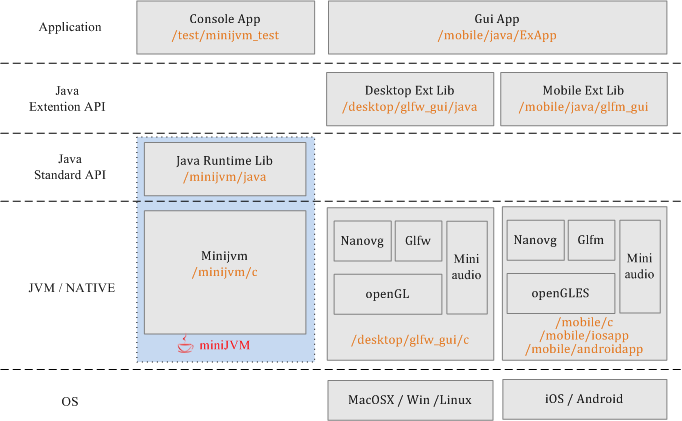
Changelog
- 2026.03 Added a profiling performance monitoring page to observe real-time execution time for each JVM method call.
- 2023.09 Reworked GLFW and GLFM graphics JNI bindings; moved GUI Java classes to the
xguipackage. - 2022.11 Added documentation.
- 2021.03 Added the
j2cmodule, which converts miniJVM Java source to C and builds native apps for desktop and mobile. - 2020.12 Added build scripts and released v2.1.
- 2020.10 Refactored source and removed binaries from the repository.
- 2020.10 Added HTTPS support.
- 2020.03 Added XML layout for the GUI system; fixed JDWP debugging for JetBrains IDEs.
- 2019.12 Integrated the cross-platform AWTK UI system - see awtk-minijvm.
- 2019.12 Enabled JIT based on the SLJIT project.
- 2019.10 JIT in development.
- 2018.12 Optimized performance.
- 2017.09 Project started.
Build for iOS/Android
Write Java code once and run it on iOS, Android, macOS, Windows, and Linux. The required JARs are not prebuilt, so build them first. Preferred IDEs: Eclipse, NetBeans, or JetBrains IntelliJ IDEA.
Run /binary/build_jar.sh or /binary/build_jar.bat to generate JARs. Alternatively:
- Build the Maven project in
/minijvm/java, then copy the output to /mobile/assets/resfiles/minijvm_rt.jar - Build the Maven project in
/mobile/java/glfm_gui, then copy the output to /mobile/assets/resfiles/glfm_gui.jar - Build the Maven project in
/mobile/java/ExApp, then copy the output to /mobile/assets/resfiles/ExApp.jar - Optionally modify /mobile/java/ExApp/src/main/java/test/MyApp.java; add resources to /mobile/java/ExApp/src/main/resource/res/ (audio, images, etc.); configure /mobile/java/ExApp/src/main/config.txt for icon, version, boot class, and other app settings.
- Build the Maven project in
In Xcode, open /mobile/iosapp; configure your developer account in Signing & Capabilities; build and install to a device; then verify the app before running it (Settings -> General -> Device Management -> {developer account} -> Verify App -> Trust).
In Android Studio, open /mobile/androidapp and build/install to an Android device.
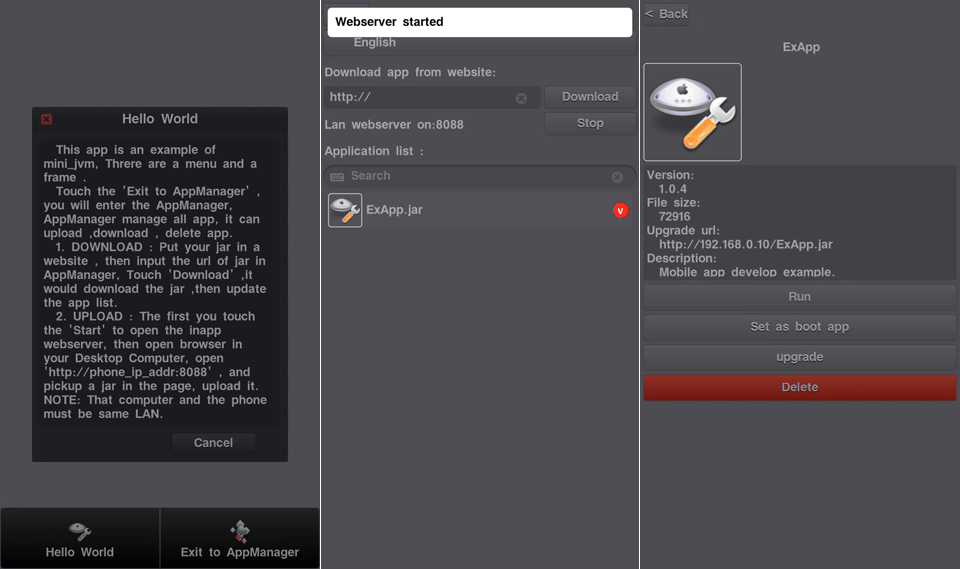
AppManager starts and runs:
Build for Windows/Linux/macOS
Run /binary/build_jar.sh or /binary/build_jar.bat to generate JARs. Alternatively:
- Build Java bootstrap classes in /minijvm/java; build the JAR with Maven and copy it to
/binary/lib/minijvm_rt.jar - Build GUI classes in /desktop/glfw_gui/java; build the JAR with Maven and copy it to
/binary/libex/glfw_gui.jar - Build console test classes in /test/minijvm_test; build the JAR with Maven and copy it to
/binary/libex/minijvm_test.jar - Build GUI test app classes in /mobile/java/ExApp; build the JAR with Maven and copy it to
/binary/{platform}/apps/ExApp.jar
- Build Java bootstrap classes in /minijvm/java; build the JAR with Maven and copy it to
Run /binary/build_mac_linux.sh, /binary/build_wini686.bat, or /binary/build_winx64.bat to generate binaries. Alternatively:
- Build the GUI JNI C dynamic library in
/desktop/glfw_gui/cwith CMake - Build miniJVM in
/minijvm/cwith CMake
- Build the GUI JNI C dynamic library in
Run the test script:
/binary/{platform}/test.shortest.bat.
How to Debug Source
Most Java IDEs support remote debugging. The IDE connects to miniJVM's debug port over TCP and starts a debugging session. miniJVM provides two options: enable debugging, and suspend on startup (wait for the IDE to attach before executing bytecode). Configure both options before initializing the VM.
These options are defined in jvm.h:
struct _MiniJVM {
    ...
    s32 jdwp_enable; // 0: disable Java debug, 1: enable Java debug and disable JIT
    s32 jdwp_suspend_on_start;
    ...
};
Enable miniJVM debug mode. Desktop: Run
mini_jvmwith-Xdebug, add parameter if needed-Xjdwp:transport=dt_socket,server=y,suspend=n,address=5005, or set it in source before building./minijvm/c/main.c:jvm->jdwp_enable = 1;iOS/Android: set it in source before building./mobile/c/glfmapp/main.c:jvm->jdwp_enable = 1;For device debugging, check the device IP address in Settings -> Wi-Fi -> (i).Run the VM with JARs, for example:
mini_jvm.exe -Xdebug -bootclasspath ../lib/minijvm_rt.jar -cp ../libex/glfw_gui.jar org.mini.glfw.GlfwMainOpen a project in your IDE, for example:
/mobile/java/ExAppIntelliJ IDEA: Run -> Edit Configurations -> + Remote; Transport: Socket; Debugger mode: Attach; host/port of yourmini_jvm, for example127.0.0.1:5005or192.168.0.32:5005. Eclipse: configure similarly. NetBeans: Debug -> Attach Debugger; Connector: SocketAttach; host/port of yourmini_jvm, for examplelocalhost:5005; Timeout:10000.Set breakpoints, pause the VM, and inspect variables.
Profiling
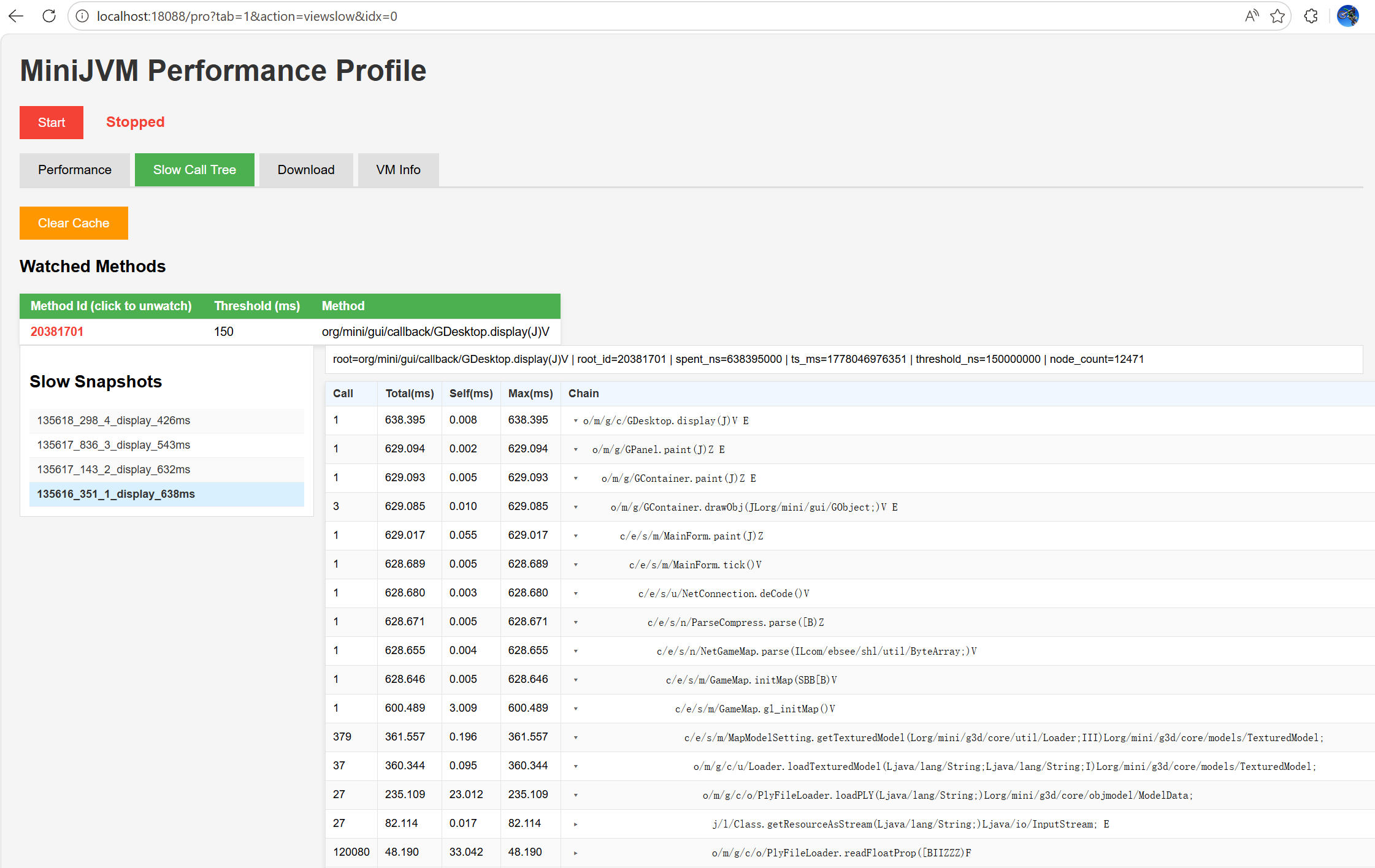
Use the built-in profiling page to monitor method execution cost in real time. The following methods also apply to all platforms, including iOS and Android devices or emulators.
Enable profiling in
jvm.h:#define _JVM_DEBUG_METHOD_PROFILE 1Rebuild miniJVM.
Run miniJVM, then open
Settings -> Developer Options -> Enable LAN Web Server.Your browser opens automatically at http://localhost:18088/.
On this web page:
- You can upload plugin apps.
- You can click VM infomation (VM Information) to open the profiling page.
Profiling Page Features
- View the top 200 methods by execution time.
- Click a method to set a call-time threshold. If a call exceeds this threshold, miniJVM saves a call snapshot.
- Open SlowCallTree to inspect saved snapshots and expand the call stack.
- Dump the current heap memory, download the dump file, and open it in VisualVM to analyze memory usage.
- View runtime VM information, including garbage collector activity; data refreshes every 5 seconds.
Projects Based on miniJVM
- Awtk-minijvm: AWTK cross-platform native UI bound to miniJVM.
- LWJGUI-Mobile: Java LWJGL UI library.
- BiBiX: Java instant messenger.
- miniJVM web demo: miniJVM web demo.
Referenced Projects and Technologies
- Oracle CLDC: CLDC API reference.
- OpenJDK: Java API reference.
- Miniz: Reads JAR files.
- Glfm: Cross-platform (Android/iOS) GUI.
- Nanovg: GUI rendering.
- Stb: GUI TrueType fonts and images.
- Glad: OpenGL/GLES header replacement.
- Glfw: Cross-platform desktop GUI.
- Dirent: Linux-style file and directory APIs on Windows VC.
- Tinycthread: Cross-platform threads.
- JRegex: Java string regex matching.
- Janino: Compiles Java source files.
- MiniAudio: Java audio playback and capture.
- Sljit: Platform-independent low-level JIT compiler.
- Mbedtls: HTTPS support via mbedtls.
- Avian: Java API reference.
Recommended Development IDEs
- C / ObjC: JetBrains CLion, Xcode, Visual Studio
- Swift: Xcode
- Java: JetBrains IntelliJ IDEA, NetBeans
- Android: Android Studio
Using miniJVM in a Project
Copy C sources from /minijvm/c into your project, and copy the built minijvm_rt.jar into your project's resource folder.
#include "jvm/jvm.h"

int main(int argc, char **argv) {
    char *bootclasspath = "../../binary/lib/minijvm_rt.jar";
    char *classpath = "../../binary/libex/minijvm_test.jar;./";
    char *main_name = "test.Foo3";

    s32 ret = 1;
    MiniJVM *jvm = jvm_create();
    if (jvm != NULL) {
        jvm->jdwp_enable = 0; // set to 1 to enable Java remote debugging
        jvm->jdwp_suspend_on_start = 0;
        jvm->max_heap_size = 25 * 1024 * 1024;

        ret = jvm_init(jvm, bootclasspath, classpath);
        if (ret) {
            printf("[ERROR] minijvm init error.\n");
        } else {
            ret = call_main(jvm, main_name, NULL);
        }
        jvm_destroy(jvm);
    }
    return ret;
}
Third-Party Libraries
Janino Java Compiler
- Project: Janino
- Janino is a very small and very fast Java compiler.
- Janino can compile source files to class files like
javac, and it can also compile a Java expression, a block, a class body, one.javafile, or multiple.javafiles in memory, then load and execute the generated bytecode directly in the same JVM. Janino is not a full Java compiler; see limitations, for example:
List<String> list = new ArrayList();
list.add("abc");
String s = (String) list.get(0); // cannot omit the (String) cast.
- Download JARs:
- janino.jar
- commons-compiler.jar
# compile /binary/res/BpDeepTest.java
mini_jvm -bootclasspath ../lib/minijvm_rt.jar -cp ../libex/janino.jar:../libex/commons-compiler.jar org.codehaus.janino.Compiler ../res/BpDeepTest.java
LuaJ
- Project: LuaJ
- miniJVM adaptation: Luaj minijvm
- LuaJ is a lightweight, fast, Java-centric Lua interpreter for JME and JSE. It includes string, table, package, math, io, os, debug, coroutine, and luajava libraries, plus JSR-223 bindings, full metatag support, weak tables, and direct Lua-to-Java bytecode compilation.
- Download JAR:
- luaj.jar
mini_jvm -bootclasspath ../lib/minijvm_rt.jar -cp ../libex/luaj.jar Sample
Screenshots
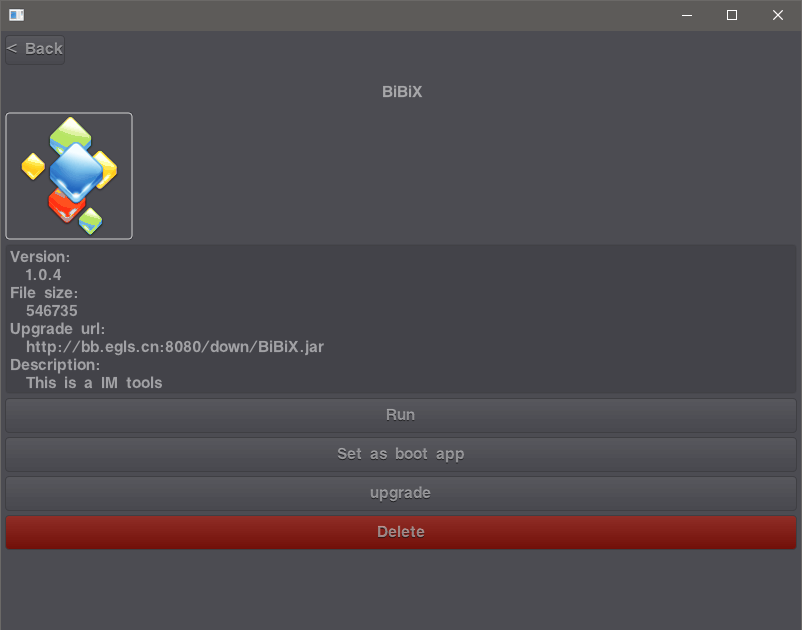
Windows mini_jvm GUI
 |
macOS mini_jvm GUI
 |
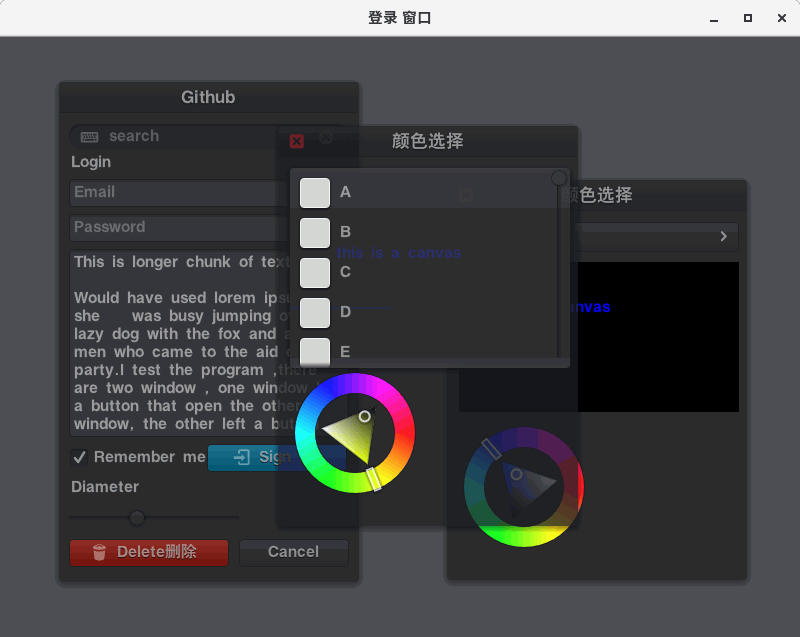
Linux mini_jvm GUI
 |
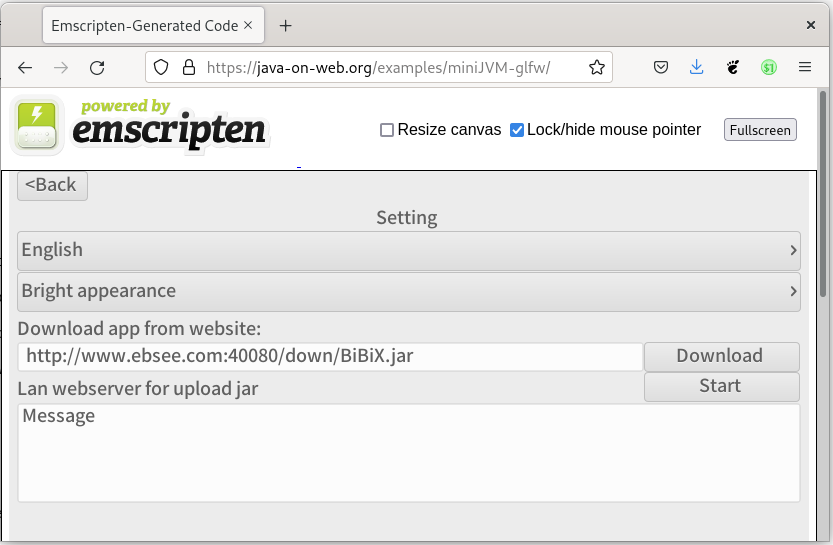
Web mini_jvm GUI
 |
Directory Structure
.
├── binary              miniJVM binaries for builds (win32/win64/mac/linux)
├── desktop
│   ├── awtk_gui        open-source AWTK GUI JNI bindings
│   └── glfw_gui        desktop OpenGL, GLFW, miniaudio, native module
├── j2c                 tools to translate miniJVM Java source to C
│   ├── app
│   └── translator
├── minijvm             core source
│   ├── c               miniJVM C source
│   └── java            miniJVM runtime library
├── mobile
│   ├── androidapp      Android launcher
│   ├── assets          app resources (fonts, JARs, images, audio, etc.)
│   ├── c               mobile native libs: OpenGLES, GLFM framework, GUI JNI, glfmapp
│   ├── iosapp          iOS launcher
│   └── java            mobile Java libs, GUI, AppManager, example app
├── doc
└── test                miniJVM test cases
License
License: MIT
Gust, digitalgust@163.com
