SeparatedEditText
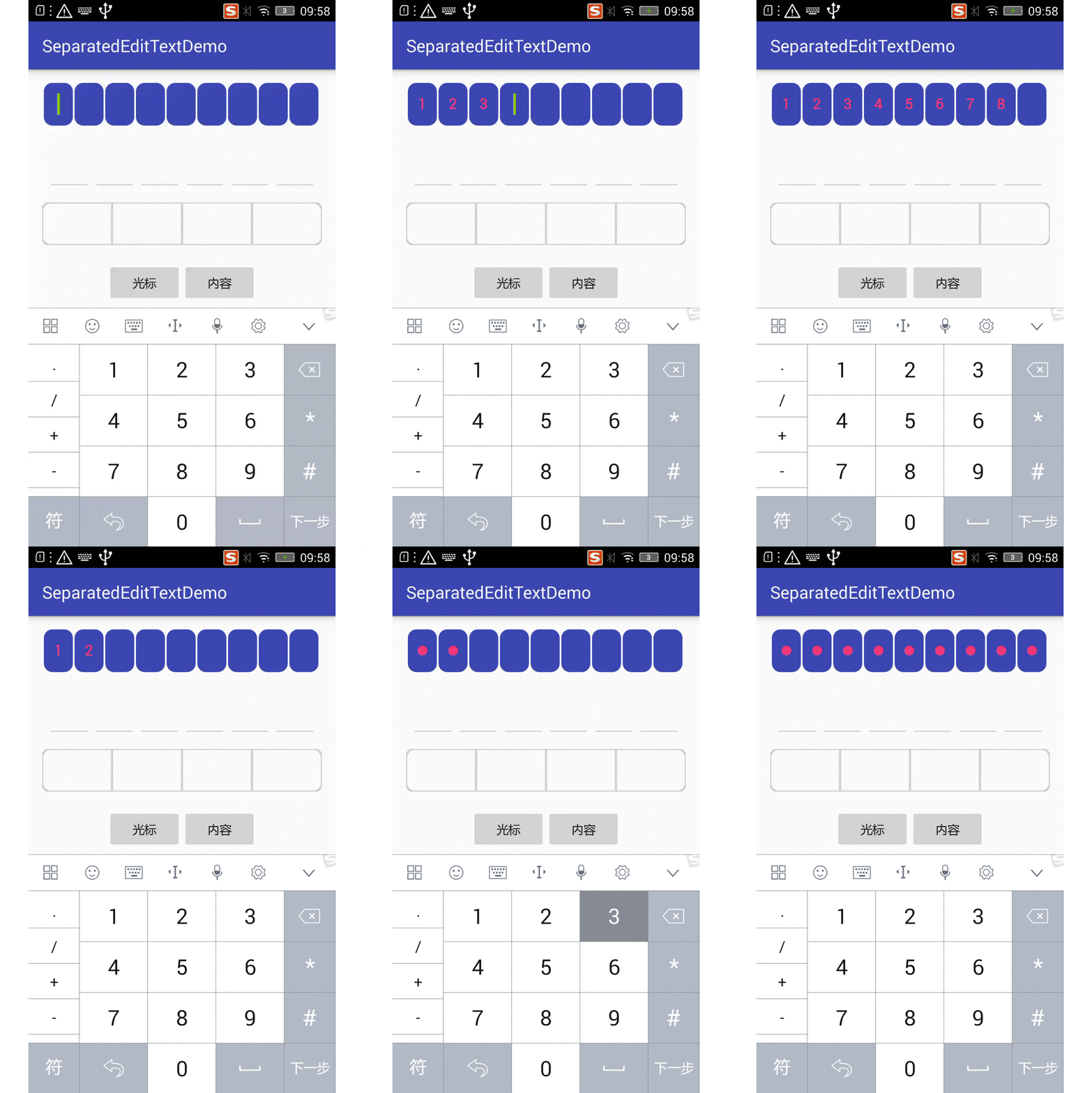
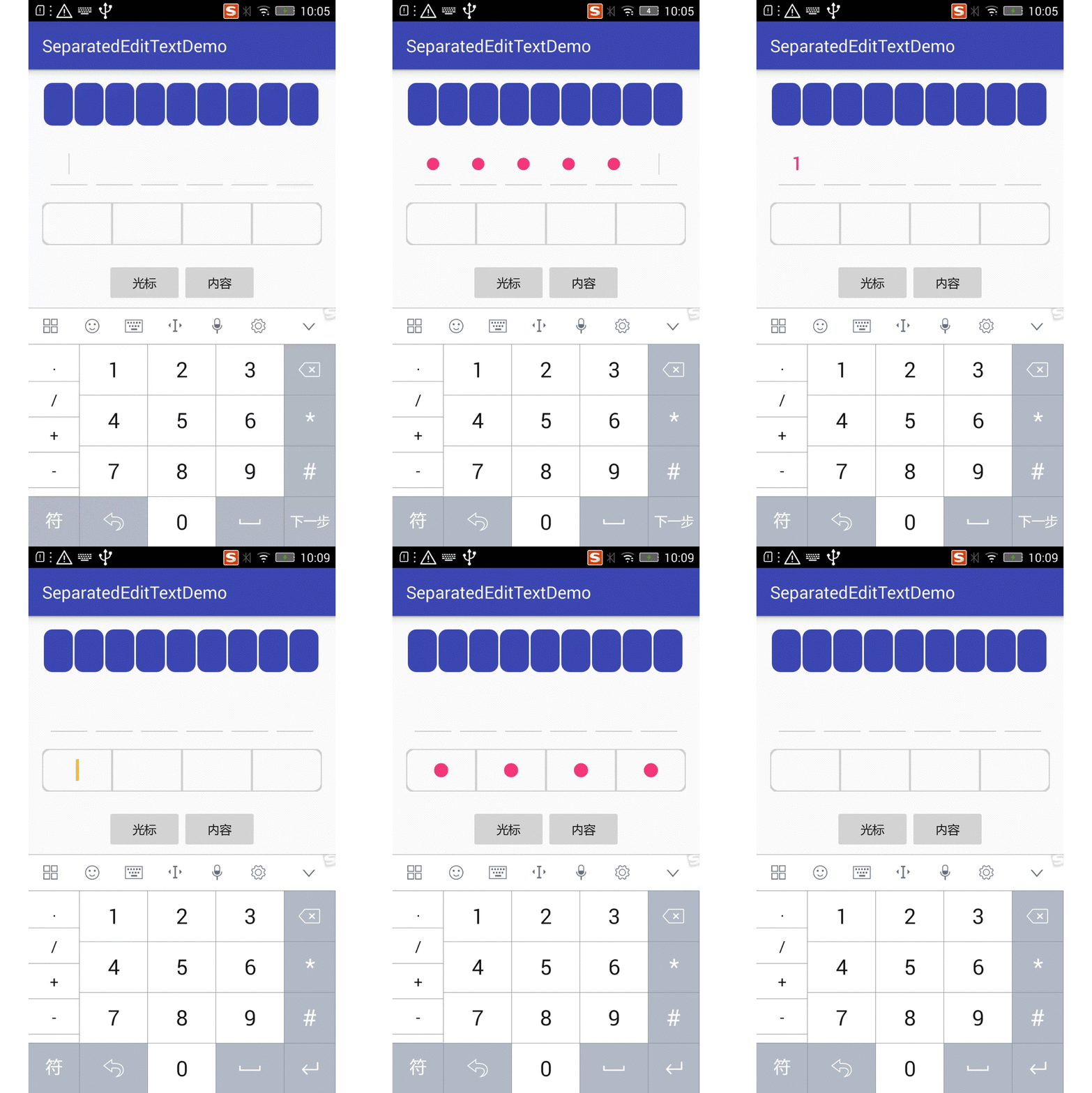
Introduction: 仿支付宝密码输入框、微信密码输入框,美团外卖验证码输入框等。有实心,空心以及下划线形式。可控制文本是否显示。
Tags:
仿支付宝密码输入框、微信密码输入框,美团外卖验证码输入框等。有实心,空心以及下划线形式。可控制文本是否显示,支持高亮。
screenshot
升级日志
- v1.3.3
- 新增实心高亮模式,支持块状高亮和边界高亮
- 支持错误高亮
- v1.3.2
- 新增 showKeyboard 属性(是否自动弹出键盘) 默认为 true
- v1.3.1
- 支持高亮显示及粘贴功能
如何安装
- 配置根目录的 build.gradle
allprojects {
    repositories {
        ...
        maven { url "https://jitpack.io" }
    }
}
- 配置 app module 的 build.gradle
dependencies {
    implementation 'com.github.WGwangguan:SeparatedEditText:Tag'
}
如何使用
- 布局文件
在布局文件中添加 SeparatedEditText 并设置相关自定义属性
// 实心输入框
    <com.kenny.separatededittext.SeparatedEditText
        android:id="@+id/edit_solid"
        android:layout_width="match_parent"
        android:layout_height="50dp"
        android:inputType="number"
        app:blockColor="@color/colorPrimary"
        app:blockSpacing="2dp"
        app:corner="10dp"
        app:maxLength="9"
        app:cursorWidth="3dp"
        app:cursorDuration="1000"
        app:cursorColor="@android:color/holo_green_light"
        app:separateType="@integer/type_solid"
        app:textColor="@color/colorAccent" />

// 下划线输入框
<com.kenny.separatededittext.SeparatedEditText
        android:id="@+id/edit_underline"
        android:layout_width="match_parent"
        android:layout_height="50dp"
        android:layout_marginTop="20dp"
        android:inputType="number"
        app:blockSpacing="10dp"
        app:borderColor="@color/lightGrey"
        app:separateType="@integer/type_underline"
        app:textColor="@color/colorAccent" />

//空心输入框
<com.kenny.separatededittext.SeparatedEditText
        android:id="@+id/edit_hollow"
        android:layout_width="match_parent"
        android:layout_height="50dp"
        android:layout_marginTop="20dp"
        android:inputType="number"
        app:borderColor="@color/lightGrey"
        app:corner="10dp"
        app:cursorColor="@android:color/holo_orange_light"
        app:cursorWidth="3dp"
        app:maxLength="4"
        app:separateType="@integer/type_hollow"
        app:textColor="@color/colorAccent" />
注:需给控件设置相应宽高。
- Java 代码
可以通过代码设置所有相关的自定义属性
public void handleContent(View v) {
        solid.setPassword(!showContent);
        hollow.setPassword(!showContent);
        underline.setPassword(!showContent);
        showContent = !showContent;
    }

public void handleCursor(View v) {
        solid.setShowCursor(!showCursor);
        hollow.setShowCursor(!showCursor);
        underline.setShowCursor(!showCursor);
        showCursor = !showCursor;
    }
可配置属性
SeparatedEditText
| 属性名 | 属性说明 |
|---|---|
| password | 设置是否是密码样式,true 则显示小圆点 |
| showCursor | 设置是否显示游标 |
| separateType | 设置显示样式:type_hollow、type_solid、type_underline |
| maxLength | 设置显示框框个数 |
| corner | 设置圆角 dp |
| borderColor | 设置边框颜色 |
| borderWidth | 设置边框粗细 dp |
| blockColor | 设置框框实心部分颜色,type_solid 适用 |
| blockSpacing | 设置框框间隙,type_solid、type_underline 适用 |
| textColor | 设置文本绘制颜色 |
| cursorColor | 设置游标显示颜色 |
| cursorWidth | 设置进游标宽度 |
| cursorDuration | 设置游标闪烁时长 毫秒 |
| highLightEnable | 设置是否开启高亮 type_solid、type_underline 适用 |
| highLightBefore | 设置仅待输入位高亮亦或是待输入位及之前高亮 type_solid、type_underline 适用 |
| highlightColor | 设置高亮颜色 type_solid、type_underline 适用 |
| showKeyboard | 设置是否自动显示键盘 |
| highlightStyle | 设置高亮的样式 style_solid、style_border 仅支持 type_solid |
| errorColor | 设置错误颜色 |
LICENSE
Copyright 2017 WGwangguan

Licensed under the Apache License, Version 2.0 (the "License");
you may not use this file except in compliance with the License.
You may obtain a copy of the License at

   http://www.apache.org/licenses/LICENSE-2.0

Unless required by applicable law or agreed to in writing, software
distributed under the License is distributed on an "AS IS" BASIS,
WITHOUT WARRANTIES OR CONDITIONS OF ANY KIND, either express or implied.
See the License for the specific language governing permissions and
limitations under the License.
