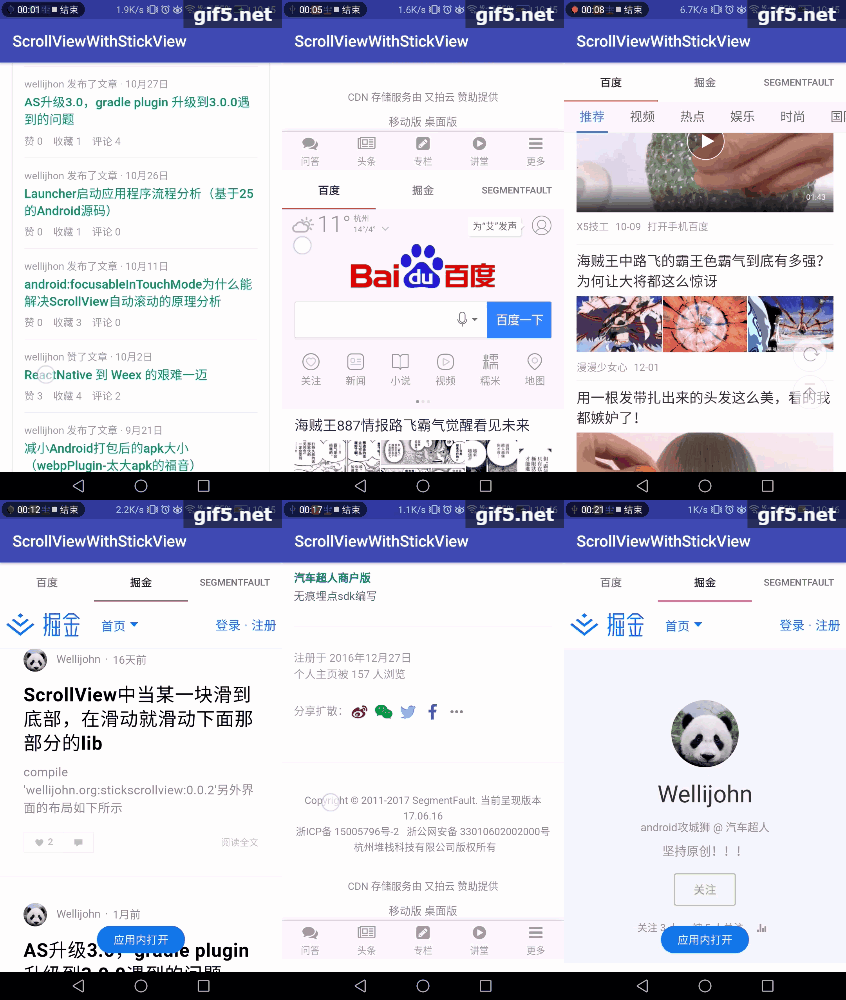
StickScrollView
Tags:
前言,一天在点外卖的时候,注意到饿了么列表页的滑动效果不错,但是觉得其中的手势滑动还是挺复杂的,正好又碰到了在熟悉 Touch 事件的理解当中,所以就抽空对着饿了么的列表页面尝试写写这个效果,同时增加了双列表的联动效果 ** 在实现上述效果之后,用了下 appbarlayout,觉得也能实现上述滑动的效果,不需要更改什么代码,体验上更好,具体可以看 AndroidWidgetActivity,在这里面就是 CollapsingToolbarLayout 和 appbarlayout 的使用,完成上述的效果,可以简单看下实现的效果图,如果你们觉得满足需求了就不需要继续往下看了,如果想了解下手势点击原理的话,欢迎往下看提点意见:**

1.先贴一个实现的效果图

2.引入
allprojects {
 repositories {
    jcenter()
    maven { url "https://jitpack.io" }
 }
}

dependencies {
    com.github.WelliJohn:StickScrollView:1.1.7
}
3.界面的布局说明
    <wellijohn.org.scrollviewwithstickheader.ScrollViewWithStickHeader
        android:id="@+id/stick_scroll_view"
        android:layout_width="match_parent"
        android:layout_height="wrap_content">

        <LinearLayout
            android:id="@+id/ll"
            android:layout_width="match_parent"
            android:layout_height="match_parent"
            android:descendantFocusability="blocksDescendants"
            android:focusableInTouchMode="true"
            android:orientation="vertical">
            //这里是 header 部分,可以随便自定义
            </LinearLayout>

            <LinearLayout
                android:id="@+id/ll_stick_list"
                android:layout_width="match_parent"
                android:layout_height="wrap_content"
                android:orientation="vertical">

                <android.support.design.widget.TabLayout
                    android:id="@+id/order_manager_tabs"
                    android:layout_width="match_parent"
                    android:layout_height="50dp"
                    android:background="#FFFFFF"
                    tools:tabGravity="fill"
                    tools:tabMode="fixed" />

                <android.support.v4.view.ViewPager
                    android:id="@+id/vp"
                    android:layout_width="match_parent"
                    android:layout_height="wrap_content" />
            </LinearLayout>
        </LinearLayout>
    </wellijohn.org.scrollviewwithstickheader.ScrollViewWithStickHeader>
比如我们看到的仿饿了么的列表页界面,我们就需要在 ViewPager 设置 Fragment,fragment 中是左右两个列表,看下 fragment 的 xml 设置:
<?xml version="1.0" encoding="utf-8"?>
<LinearLayout xmlns:android="http://schemas.android.com/apk/res/android"
    android:id="@+id/ll"
    android:layout_width="match_parent"
    android:layout_height="match_parent"
    android:orientation="horizontal">

    <wellijohn.org.scrollviewwithstickheader.ChildRecyclerView
        android:id="@+id/child_recyclerview"
        android:layout_width="0dp"
        android:layout_height="wrap_content"
        android:layout_weight="1"
        android:background="#EEEEEE" />

    <wellijohn.org.scrollviewwithstickheader.ChildRecyclerView//LinearLayoutManager 需要继承 NoSlideLinearLayoutManager,GridLayoutManager 需要继承 NoSlideGridLayoutManager。
        android:id="@+id/child_recyclerview_right"
        android:layout_width="0dp"
        android:layout_height="wrap_content"
        android:background="#FFFFFF"
        android:layout_weight="3" />
</LinearLayout>
4.java 代码必要设置
mStickScrollView.setContentView(mLLStickList);//这个是必须的,mLLStickList 就是你想到这个布局再滑动就是下面列表滑动的部分了。
mStickScrollView.setSuspensionView(mViewBottom);//这个是底部的悬浮布局,如果没有可以不设置
5.注意事项
- ScrollViewWithStickHeader 内部目前支持放置 ViewPager,ScrollView,RecyclerView,WebView
- ScrollView,RecyclerView,WebView 需要对应使用 ChildScrollView,ChildRecyclerView,ChildWebView
- 我们在使用的时候,需要调用 mStickScrollView.setContentView(mContentView);mLLStickList 就是我们需要 StickHeader+列表的部分,如果你没有 StickHeader 的话,那么直接设置列表进来也可以,总之,你想滑动到哪个位置接下来滑动就是单纯下面的部分滑动,那你就把下面的 View 整体设置为 mContentView。刚刚那个的 ContentView 是 id 为 ll_stick_list 的 View。
- 另外在这里 ScrollViewWithStickHeader 增加 autoscroll 属性,默认是关闭的,如果 autoscroll:true 的话,在我们手指放开的时候,contentView 会判断是否自动滑动到顶部还是隐藏不见。
- 暂不支持 weight 的使用,因为 weight 会进行二次绘制,所以如果要实现底部 bottom 的话,请用 RelativeiLayout
- 如果是用 RecyclerView 的话,LinearLayoutManager 需要继承 NoSlideLinearLayoutManager,GridLayoutManager 需要继承 NoSlideGridLayoutManager,new NoSlideLinearLayoutManager(context)。