Captcha
Introduction: Android 滑块验证码控件
Tags:
Android 滑块拼图验证码控件
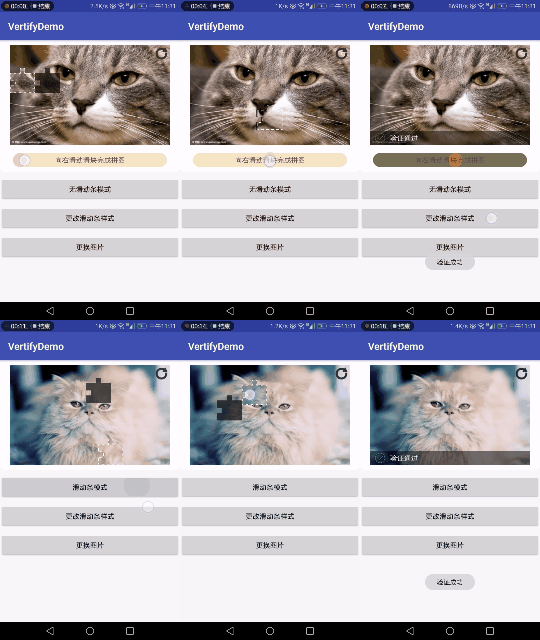
Feature
1.简单,实用,只需一两句代码即可使用
2.采用策略模式为使用者开放自定义拼图样式策略,对拼图样式(拼图形状、视觉效果)进行定制
3.自选模式,无滑动条模式(手触移动),有滑动条模式
4.通过监听器回调用户可获得验证通过时间和验证失败的次数以对这些情况进行进一步处理(如对帐号进行封锁,禁止部分操作)提高安全性
5.支持加载网络图片
Method
| 方法名 | 描述 | 版本限制 |
|---|---|---|
| setMode(int mode) | 设置验证模式(默认为 MODE_BAR) | 1.0.8 开始 |
| setMaxFailedCount(int count) | 设置最大验证失败次数(默认为 5 次) | 1.0.8 开始 |
| setBitmap(Bitmap bitmap) | 设置图片 | 1.0.8 开始 |
| setBitmap(int drawableId) | 设置图片 | 1.1.1 开始 |
| setBitmap(String imgUrl) | 设置图片 | 1.1.2 开始 |
| setBlockSize(int blockSize) | 设置滑块图片大小,单位 px(默认 50dp) | 1.0.8 开始 |
| setCaptchaStrategy(CaptchaStrategy strategy) | 设置验证策略 | 1.0.5 开始 |
| setSeekBarStyle(int progressDrawable, int thumbDrawable) | 设置滑动条样式 | 1.0.5 开始 |
| setCaptchaListener(CaptchaListener listener) | 设置验证回调 | 1.0.0 开始 |
Attributes(captcha 布局文件中调用)
| 属性名 | 类型 | 描述 |
|---|---|---|
| mode | enum | mode_bar:带滑动条 mode_nonbar:不带滑动条 |
| src | reference | 图片 |
| progressDrawable | reference | 滑动条 progress 样式 |
| thumbDrawable | reference | 滑动条触动点样式 |
| max_fail_count | integer | 最大验证失败次数 |
| blockSize | dimension | 缺块大小 |
Version Update
| 版本号 | 描述 |
|---|---|
| v1.0.5 | 可用基本功能 |
| v1.0.8 | 添加可定制属性,查看 Method |
| v1.0.9 | 对回调 CaptchaListener 返回参数修改,以让使用者自定义图片底部阴影文本 |
| v1.1.0 | 修复重写 CaptchaStrategy 类编译时报错 |
| v1.1.1 | 1.优化体验 2.添加刷新按钮,取消原来验证失败重置的设定,改为用刷新按钮重置 |
| v1.1.2 | 添加支持网络图片 |
Usage
1.在 app 的 build.gradle 添加依赖
compile 'com.luozm.captcha:captcha:1.1.2'
2.将 Captcha 添加至布局
<com.luozm.captcha.Captcha
        android:id="@+id/captCha"
        android:layout_width="match_parent"
        android:layout_height="wrap_content"
        app:src="@mipmap/cat"/>
3.添加 Java 代码
   captcha = (Captcha) findViewById(R.id.captCha);
   captcha.setBitmap(url);
   captcha.setCaptchaListener(new Captcha.CaptchaListener() {
            @Override
            public String onAccess(long time) {
                Toast.makeText(MainActivity.this,"验证成功",Toast.LENGTH_SHORT).show();
                return "验证通过,耗时"+time+"毫秒";
            }

            @Override
            public String onFailed(int failedCount) {
                Toast.makeText(MainActivity.this,"验证失败",Toast.LENGTH_SHORT).show();
                return "验证失败,已失败"+failedCount+"次";
            }

            @Override
            public String onMaxFailed() {
                Toast.makeText(MainActivity.this,"验证超过次数,你的帐号被封锁",Toast.LENGTH_SHORT).show();
                  return "验证失败,帐号已封锁";
            }
        });
4.(可选)自定义拼图样式
1.编写策略类,继承 CaptchaStrategy 类,重写策略方法,具体可参考 DefaultCaptchaStrategy 类
public abstract class CaptchaStrategy {

  protected Context mContext;

  public CaptchaStrategy(Context ctx) {
      this.mContext = ctx;
  }

  protected Context getContext() {
      return mContext;
  }

  /**
   * 定义拼图缺块的形状
   *
   * @param blockSize 单位 dp,注意转化为 px,缺块的大小,注意 Path 的边界不要超出此大小
   * @return path of the shape
   */
  public abstract Path getBlockShape(int blockSize);

  /**
   * 根据整张拼图的宽高和拼图缺块大小定义拼图缺块的位置
   *
   * @param width  picture width
   * @param height picture height
   * @return position info of the block
   */
  public abstract PositionInfo getBlockPostionInfo(int width, int height, int blockSize);

  /**
   * 定义滑块图片的位置信息(只有设置为无滑动条模式有用并建议重写)
   *
   * @param width  picture width
   * @param height picture height
   * @return position info of the block
   */
  public PositionInfo getPositionInfoForSwipeBlock(int width, int height, int blockSize){
      return getBlockPostionInfo(width,height,blockSize);
  }

  /**
   * 定义拼图缺失部分阴影的 Paint
   */
  public abstract Paint getBlockShadowPaint();

  /**
   * 获得拼图缺块图片的 Paint
   */
  public abstract Paint getBlockBitmapPaint();

  /**
   * 装饰滑块图片,在绘制图片后执行,即绘制滑块前景
   * @params canvas
   * @params shape   缺块的形状
   */
  public void decoreateSwipeBlockBitmap(Canvas canvas, Path shape) {

  }
}
2.添加 Java 代码
captCha.setCaptchaStrategy(new XXXCaptchaStrategy(context));
5.(可选)自定义滑块条
与 Seekbar 自定义样式一样
<com.luozm.captcha.Captcha
        android:id="@+id/captCha"
        android:layout_width="match_parent"
        android:layout_height="wrap_content"
        app:progressDrawable="@drawable/progress"
        app:thumbDrawable="@drawable/thumb"
        app:src="@mipmap/cat"/>
captcha.setSeekBarStyle(R.drawable.po_seekbar,R.drawable.thumb);
博文地址
http://blog.csdn.net/sdfsdfdfa/article/details/79120665
使用者须知
若使用过程中发现 bug 或想提出修改建议,请 Issues 留言或者自行修复并提交 Pull request。我会在最快时间内处理。万分感谢!
