WheelView
English | 简体中文


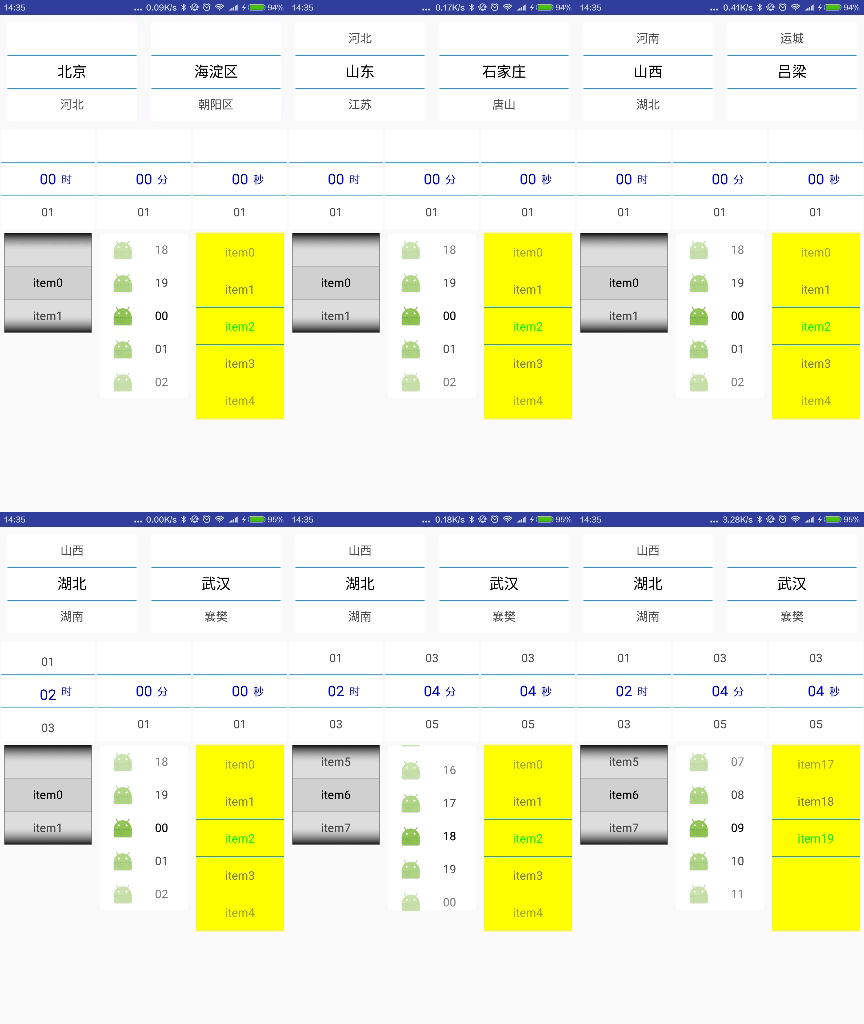
A wheel picker for Android, built on ListView, with customizable styles.
Features
- Customizable wheel style
- Two skins: Common and Holo
- Two item templates: text, and image with text
- Loop scrolling
- Extra text next to the selected item
- Configurable number of visible items
- Linked wheels (e.g. province / city)
- Works inside scrolling containers (NestedScrollView)
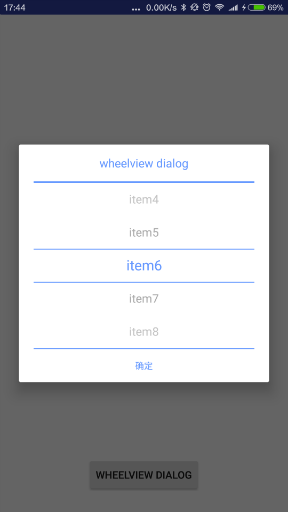
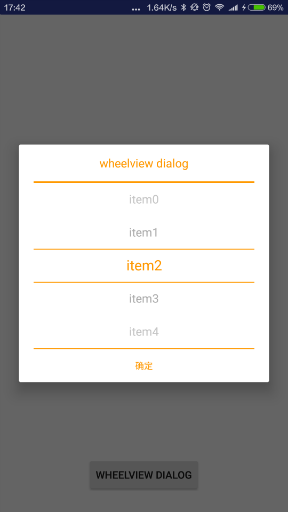
- Wheel dialog
- Click events on the selected item
ScreenShot
Usage
Gradle:
- Add the JitPack repository to
settings.gradle:
dependencyResolutionManagement {
    repositories {
        google()
        mavenCentral()
        maven { url = 'https://jitpack.io' }
    }
}
- Add the dependency to your module's
build.gradle:
implementation 'com.github.venshine:WheelView:2.1.0'
Gradle Kotlin DSL:
// settings.gradle.kts
dependencyResolutionManagement {
    repositories {
        google()
        mavenCentral()
        maven("https://jitpack.io")
    }
}

// build.gradle.kts
implementation("com.github.venshine:WheelView:2.1.0")
Since 2.0.0 the library is published via JitPack. The old coordinate
com.wx.wheelview:wheelviewcan no longer be downloaded. The color fields ofWheelViewStyle(backgroundColor,holoBorderColor,textColor,selectedTextColor) are nowInteger.nullmeans the default color, soColor.WHITEnow works. Since 2.0.2, when switching the main wheel changes the data of a linked sub wheel, the sub wheel goes back to its first item (it used to keep its position).
Demo
The library is written in Java and can be called directly from both Java and Kotlin. It adds no Kotlin dependency to your project.
Kotlin:
class MainActivity : AppCompatActivity() {
    override fun onCreate(savedInstanceState: Bundle?) {
        super.onCreate(savedInstanceState)
        setContentView(R.layout.activity_main)

        val wheelView = findViewById<WheelView<String>>(R.id.wheelview)
        wheelView.setWheelAdapter(ArrayWheelAdapter(this)) // text adapter
        wheelView.skin = WheelView.Skin.Holo // Holo skin
        wheelView.setWheelData(listOf("item0", "item1", "item2", "item3", "item4")) // data
        wheelView.style = WheelView.WheelViewStyle().apply {
            selectedTextColor = Color.BLACK
            holoBorderColor = Color.LTGRAY // divider color
            selectedBackgroundColor = Color.parseColor("#f2f2f2") // selected item background
            textScale = 0.85f // shrink unselected items step by step
        }
        wheelView.setOnWheelItemSelectedListener { position, item ->
            Log.d("WheelView", "selected $position: $item")
        }
    }
}
Linked wheels (province / city):
val cities = hashMapOf(
    "Zhejiang" to listOf("Hangzhou", "Ningbo", "Wenzhou"),
    "Jiangsu" to listOf("Nanjing", "Suzhou", "Wuxi"),
)
val provinceWheel = findViewById<WheelView<String>>(R.id.province_wheelview)
provinceWheel.setWheelAdapter(ArrayWheelAdapter(this))
provinceWheel.setWheelData(listOf("Zhejiang", "Jiangsu"))
val cityWheel = findViewById<WheelView<String>>(R.id.city_wheelview)
cityWheel.setWheelAdapter(ArrayWheelAdapter(this))
cityWheel.setWheelData(cities.getValue("Zhejiang"))
provinceWheel.join(cityWheel)
provinceWheel.joinDatas(cities) // keys are the display text of the main wheel items
Wheel dialog:
WheelViewDialog<String>(this)
    .setTitle("Please select")
    .setItems(listOf("item0", "item1", "item2", "item3", "item4"))
    .setButtonText("OK")
    .setOnDialogItemClickListener { position, item -> Log.d("WheelView", "$position: $item") }
    .show()
A wheel created in code with
WheelView(context)must be added to the view hierarchy withaddViewbefore it is displayed. The wheel height is always item height × wheel size (setWheelSize), andlayout_heighthas no effect. For a different height, extendBaseWheelAdapterwith your own item layout.
Java:
public class MainActivity extends Activity {
    @Override
    protected void onCreate(Bundle savedInstanceState) {
        super.onCreate(savedInstanceState);
        setContentView(R.layout.activity_main);

        WheelView<String> wheelView = findViewById(R.id.wheelview);
        wheelView.setWheelAdapter(new ArrayWheelAdapter<>(this)); // text adapter
        wheelView.setSkin(WheelView.Skin.Common); // Common skin
        wheelView.setWheelData(Arrays.asList("item0", "item1", "item2", "item3", "item4")); // data
    }
}
XML:
<com.wx.wheelview.widget.WheelView
    android:id="@+id/wheelview"
    android:layout_width="match_parent"
    android:layout_height="wrap_content" />
Methods:
| method | description |
|:--- |:---|
| void setWheelAdapter(BaseWheelAdapter
WheelViewStyle:
| field | description |
|:--- |:---|
| Integer backgroundColor | Background color; null uses the skin default |
| Integer holoBorderColor | Divider color of the Holo skin |
| int holoBorderWidth | Divider width of the Holo skin in px, default 3 |
| Integer textColor | Text color |
| Integer selectedTextColor | Text color of the selected item |
| Integer selectedBackgroundColor | Background color of the selected item, for the Common and Holo skins |
| int textSize | Text size in dp, default 16 |
| int selectedTextSize | Text size of the selected item in dp |
| float textAlpha | Alpha of unselected items (0f ~ 1f); items fade further away from the selection, default 0.7 |
| float textScale | Scale of unselected items (0f ~ 1f), applied once more for each step away from the selection; no scaling by default |
| float selectedTextZoom | Zoom factor of the selected text, used when selectedTextSize is not set |
| boolean selectedTextBold | Bold text for the selected item |
History
- 1.0.0(2016-03-24)
- First release
- 1.1.0(2016-03-28)
- Linked wheels
- 1.2.3(2016-04-14)
- Works inside scrolling containers
- 1.3.0(2016-04-15)
- Wheel dialog
- 1.3.1(2016-04-18)
- Click events on the selected item
- For 2.0.0 and later, see Releases
About
- Email: venshine.cn@gmail.com
License
Copyright (C) 2016 venshine.cn@gmail.com

Licensed under the Apache License, Version 2.0 (the "License");
you may not use this file except in compliance with the License.
You may obtain a copy of the License at

http://www.apache.org/licenses/LICENSE-2.0

Unless required by applicable law or agreed to in writing, software
distributed under the License is distributed on an "AS IS" BASIS,
WITHOUT WARRANTIES OR CONDITIONS OF ANY KIND, either express or implied.
See the License for the specific language governing permissions and
limitations under the License.