MutiChannelPackup
Android 多渠道打包,有网页版,Gradle 版,Python 版、BAT 脚本、Jar 版…看大家的喜好选择
- META-INF 渠道识别型:网页版、Python 版、BAT 脚本、Jar 版、
- Manifest 渠道识别型:Gradle 版
META-INF 渠道识别详情请查看美团 team 博客 点击查看
##功能描述
- 支持修改 manifest 渠道配置
- 支持在 apk 的 META-INFO 目录下生成渠道文件
- APK 不需要重新签名
- 现只对 umeng 渠道统计做了支持
- 不需要第二次签名
- 对包无损害
##功能更新中
- 支持更多的第三方渠道统计工具
- 编写 windowns bat 脚本
- 添加网页版用户体系、权限和数据库配置
- ……
##网页版
- META-INF 渠道识别
- 使用简单,非技术小白也可以用
- 功能相对强大(设计中…)
1、在 android 中获取渠道名:
    /**
     * 友盟配置
     */
    private void umengConfig() {
        String channel = getChannelFromApk(this, "channel-");
        if (StringUtils.isEmpty(channel)) {
            channel = "paojiao";
        }
        if ( Constants.DEBUG ) {
            Toast.makeText(IApplication.this, "当前渠道:" + channel, Toast.LENGTH_SHORT).show();
        }
        AnalyticsConfig.setChannel(channel);
    }

    /**
     * 从 apk 中获取版本信息
     * @param context
     * @param channelPrefix 渠道前缀
     * @return
     */
    public static String getChannelFromApk(Context context, String channelPrefix) {
        //从 apk 包中获取
        ApplicationInfo appinfo = context.getApplicationInfo();
        String sourceDir = appinfo.sourceDir;
        //默认放在 meta-inf/里, 所以需要再拼接一下
        String key = "META-INF/" + channelPrefix;
        String ret = "";
        ZipFile zipfile = null;
        try {
            zipfile = new ZipFile(sourceDir);
            Enumeration<?> entries = zipfile.entries();
            while (entries.hasMoreElements()) {
                ZipEntry entry = ((ZipEntry) entries.nextElement());
                String entryName = entry.getName();
                if (entryName.startsWith(key)) {
                    ret = entryName;
                    break;
                }
            }
        } catch (IOException e) {
            e.printStackTrace();
        } finally {
            if (zipfile != null) {
                try {
                    zipfile.close();
                } catch (IOException e) {
                    e.printStackTrace();
                }
            }
        }
        String[] split = ret.split(channelPrefix);
        String channel = "";
        if (split != null && split.length >= 2) {
            channel = ret.substring(key.length());
        }
        return channel;
    }
2、在 build-config.properties 中配置渠道识别前缀(可选)
3、把 AndroidChannelBuild.war 上传到 Java 服务 CHANNEL_VALUE 器上
4、输入http://www.xxx.yyy/AndroidChannelBuild/
5、上传文件、填写渠道前缀(可选)、输入渠道名称
6、下载打包完成的渠道包
###部分截图
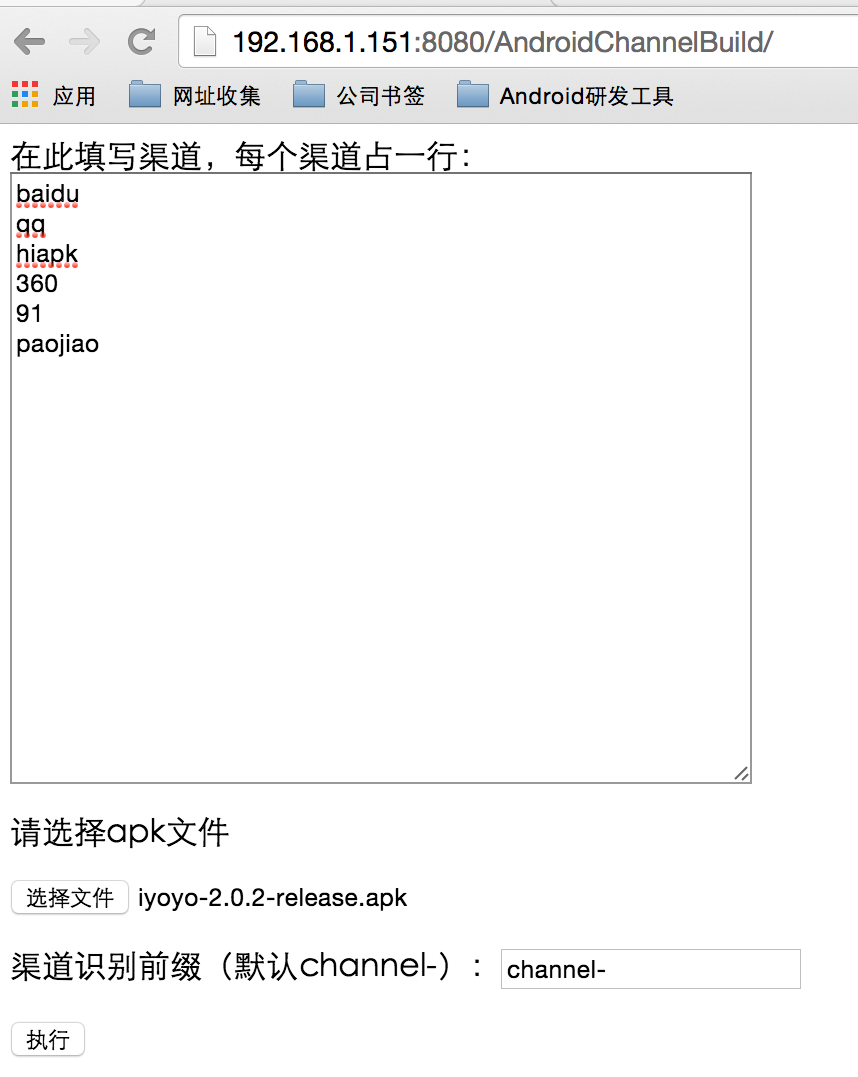
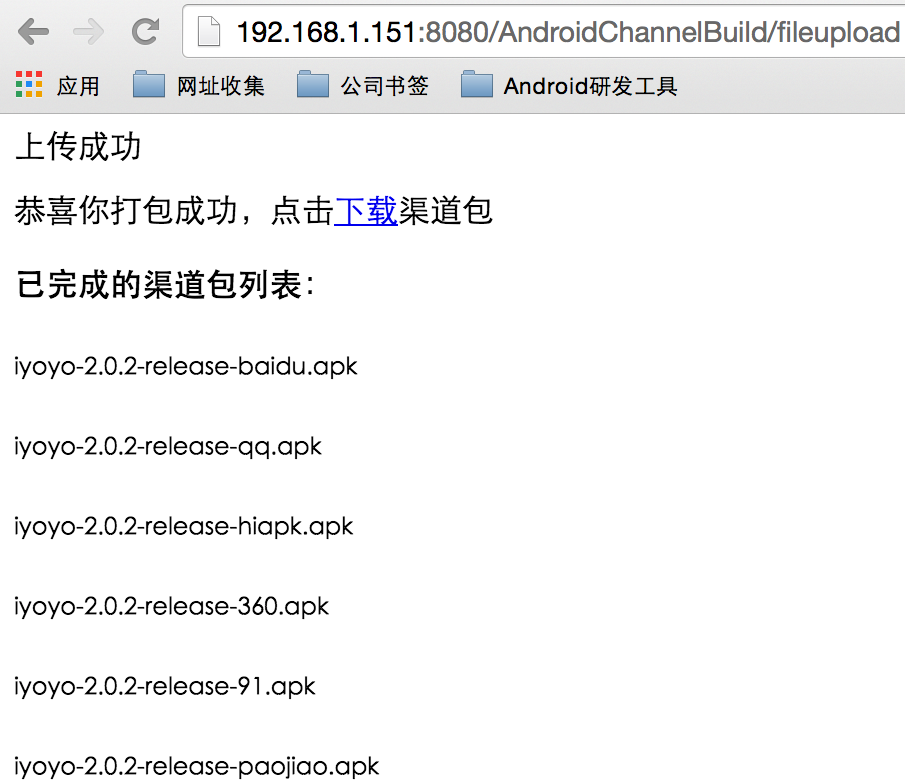
##Gradle 版
- 支持 manifest 渠道配置
- 使用简单不易出错
###manifest 渠道配置 网络上有好多人都是通过添加
android {
    productFlavors {
        xiaomi {}
        360 {}
        baidu {}
        wandoujia {}
    }

    productFlavors.all {
        flavor -> flavor.manifestPlaceholders = [CHANNEL_VALUE: name]
    }
}
代码实现的多渠道打包,这样有个问题,我们项目渠道号经常变,每个版本都有不同的渠道号,不停的在增加导致 gradle 文件就非常长。我今天特别为这个事情纠结了一上午发现还可以这么写:
productFlavors {
        for (int i = 0 ; i < channelArray.size(); i++) {
            def channel = channelArray[i]
            "${channel}"{
                manifestPlaceholders = [CHANNEL_VALUE: channel]
            }
        }
    }
让我格外的惊喜,这里分享给大家
###使用方法 1、添加 channels.properties 渠道信息配置文件
#默认渠道
channel.default=paojiao
#全部渠道列表
channel.list=baidu,360,hiapk....
2、在 module build.gradle 引入 channels.gradle 配置文件
apply from: "https://raw.githubusercontent.com/MutiChannelPackup/gradle-build/master/channels.gradle"
或者将 channels.gradle 下载到本地引入
apply from: "../channels.gradle"
3、在 manifest 中添加
<meta-data android:name="UMENG_CHANNEL" android:value="${CHANNEL_VALUE}" />
<meta-data android:name="JPUSH_CHANNEL" android:value="${CHANNEL_VALUE}" />
...
4、执行打包./gradlew assembleRelease 或通过 android studio->generate signed apk 打包
5、在 module 目录下可以看到所有的渠道包
##Python 版
- 支持 META-INF 渠道识别
- 极速生成渠道包
- 使用简单不易出错
###使用方法 1、在 android 中获取渠道名:
    /**
     * 友盟配置
     */
    private void umengConfig() {
        String channel = getChannelFromApk(this, "channel-");
        if (StringUtils.isEmpty(channel)) {
            channel = "paojiao";
        }
        if ( Constants.DEBUG ) {
            Toast.makeText(IApplication.this, "当前渠道:" + channel, Toast.LENGTH_SHORT).show();
        }
        AnalyticsConfig.setChannel(channel);
    }

    /**
     * 从 apk 中获取版本信息
     * @param context
     * @param channelPrefix 渠道前缀
     * @return
     */
    public static String getChannelFromApk(Context context, String channelPrefix) {
        //从 apk 包中获取
        ApplicationInfo appinfo = context.getApplicationInfo();
        String sourceDir = appinfo.sourceDir;
        //默认放在 meta-inf/里, 所以需要再拼接一下
        String key = "META-INF/" + channelPrefix;
        String ret = "";
        ZipFile zipfile = null;
        try {
            zipfile = new ZipFile(sourceDir);
            Enumeration<?> entries = zipfile.entries();
            while (entries.hasMoreElements()) {
                ZipEntry entry = ((ZipEntry) entries.nextElement());
                String entryName = entry.getName();
                if (entryName.startsWith(key)) {
                    ret = entryName;
                    break;
                }
            }
        } catch (IOException e) {
            e.printStackTrace();
        } finally {
            if (zipfile != null) {
                try {
                    zipfile.close();
                } catch (IOException e) {
                    e.printStackTrace();
                }
            }
        }
        String[] split = ret.split(channelPrefix);
        String channel = "";
        if (split != null && split.length >= 2) {
            channel = ret.substring(key.length());
        }
        return channel;
    }
2、配置 channels-config.ini 文件
[Build-Config]
#配置 apk 路径
apk.path = /Users/pengjianbo/Documents/dev/android_dev/workspace/GradleBuildChannels/app/demo.apk
#配置渠道识别前缀
channel.prefix = channel-
#配置渠道列表
channel.list = baidu,qq,360,paojiao
3、执行 build-channels-script.py 脚本
python build-channels-script.py
4、可以看到生成了一个 apks_{apk file name}的文件夹
##Jar 版
- 支持 META-INF 渠道识别
- 极速生成渠道包
- 使用简单不易出错
###使用方法 1、在 android 中获取渠道名:
    /**
     * 友盟配置
     */
    private void umengConfig() {
        String channel = getChannelFromApk(this, "channel-");
        if (StringUtils.isEmpty(channel)) {
            channel = "paojiao";
        }
        if ( Constants.DEBUG ) {
            Toast.makeText(IApplication.this, "当前渠道:" + channel, Toast.LENGTH_SHORT).show();
        }
        AnalyticsConfig.setChannel(channel);
    }

    /**
     * 从 apk 中获取版本信息
     * @param context
     * @param channelPrefix 渠道前缀
     * @return
     */
    public static String getChannelFromApk(Context context, String channelPrefix) {
        //从 apk 包中获取
        ApplicationInfo appinfo = context.getApplicationInfo();
        String sourceDir = appinfo.sourceDir;
        //默认放在 meta-inf/里, 所以需要再拼接一下
        String key = "META-INF/" + channelPrefix;
        String ret = "";
        ZipFile zipfile = null;
        try {
            zipfile = new ZipFile(sourceDir);
            Enumeration<?> entries = zipfile.entries();
            while (entries.hasMoreElements()) {
                ZipEntry entry = ((ZipEntry) entries.nextElement());
                String entryName = entry.getName();
                if (entryName.startsWith(key)) {
                    ret = entryName;
                    break;
                }
            }
        } catch (IOException e) {
            e.printStackTrace();
        } finally {
            if (zipfile != null) {
                try {
                    zipfile.close();
                } catch (IOException e) {
                    e.printStackTrace();
                }
            }
        }
        String[] split = ret.split(channelPrefix);
        String channel = "";
        if (split != null && split.length >= 2) {
            channel = ret.substring(key.length());
        }
        return channel;
    }
2、配置 build-config.properties 文件
#配置 apk 路径
apk.path = /Users/pengjianbo/Documents/dev/android_dev/workspace/GradleBuildChannels/app/demo.apk
#配置渠道识别前缀
channel.prefix = channel-
#配置渠道列表
channel.list = baidu,qq,360,paojiao
3、执行 JarBuild.jar
java -jar JarBuild.jar
4、可以看到在 apk.path 文件夹下生成了所有渠道包
#BAT 版 Upcoming...
License
Licensed under the Apache License, Version 2.0 (the "License");
you may not use this file except in compliance with the License.
You may obtain a copy of the License at

   http://www.apache.org/licenses/LICENSE-2.0

Unless required by applicable law or agreed to in writing, software
distributed under the License is distributed on an "AS IS" BASIS,
WITHOUT WARRANTIES OR CONDITIONS OF ANY KIND, either express or implied.
See the License for the specific language governing permissions and
limitations under the License.
