JoyStick

An Android Library for JoyStick View & Composable. Customizable, small, lightweight, and modern.

🚀 Modernization & v2.0.0 (BREAKING CHANGE)
This library has been completely modernized to Kotlin and Jetpack Compose:
- Written in Kotlin: All source code is converted to Kotlin.
- Jetpack Compose Support: Introduced the new
JoystickComposable function. - Legacy View Deprecation: The legacy View-based
JoyStickclass is deprecated, but remains available in Kotlin for backward compatibility. - Modern Build System: Upgraded to Gradle 9.1.0, AGP 9.0.1, Kotlin 2.3.20, and uses Version Catalogs (
libs.versions.toml). - Increased Min SDK: The minimum SDK has been bumped to 21 to support Jetpack Compose.
🎨 Jetpack Compose Usage
The new Joystick composable is highly customizable, supports custom sizing, custom color styling, and custom images via Compose Painters.
Basic Setup
import androidx.compose.foundation.layout.size
import androidx.compose.runtime.getValue
import androidx.compose.runtime.setValue
import androidx.compose.runtime.mutableStateOf
import androidx.compose.runtime.remember
import androidx.compose.ui.Modifier
import androidx.compose.ui.unit.dp
import com.erz.joysticklibrary.Joystick
import com.erz.joysticklibrary.JoystickDirection

var angle by remember { mutableStateOf(0.0) }
var power by remember { mutableStateOf(0.0) }
var direction by remember { mutableStateOf(JoystickDirection.CENTER) }

Joystick(
    modifier = Modifier.size(150.dp),
    onMove = { newAngle, newPower, newDirection ->
        angle = newAngle
        power = newPower
        direction = newDirection
    }
)
Advanced Customs & Painters
import androidx.compose.ui.graphics.Color
import androidx.compose.ui.res.painterResource

Joystick(
    modifier = Modifier.size(200.dp),
    type = JoystickType.FOUR_AXIS,          // Snap to 4 directions
    stayPut = true,                         // Button stays where dragged
    radiusScale = 0.30f,                    // Scale button size (0.25f - 0.50f)

    // Sized by Colors
    padColor = Color(0x33FFFFFF),
    buttonColor = Color.Red,

    // OR Customize with Painters (Bitmaps or Vector drawables)
    padPainter = painterResource(id = R.drawable.custom_pad),
    buttonPainter = painterResource(id = R.drawable.custom_button),

    onMove = { angle, power, direction ->
        /* Handle movement */
    },
    onTap = {
        /* Handle tap event */
    },
    onDoubleTap = {
        /* Handle double tap event */
    }
)
Axis Types (JoystickType)
JoystickType.EIGHT_AXIS(Default, 8 directions)JoystickType.FOUR_AXIS(4 directions: Left, Up, Right, Down)JoystickType.TWO_AXIS_LEFT_RIGHT(Restricted to Left/Right)JoystickType.TWO_AXIS_UP_DOWN(Restricted to Up/Down)
Directions (JoystickDirection)
JoystickDirection.CENTER(-1)JoystickDirection.LEFT(0)JoystickDirection.LEFT_UP(1)JoystickDirection.UP(2)JoystickDirection.UP_RIGHT(3)JoystickDirection.RIGHT(4)JoystickDirection.RIGHT_DOWN(5)JoystickDirection.DOWN(6)JoystickDirection.DOWN_LEFT(7)
⚠️ Legacy View Usage (DEPRECATED)
The old XML/View-based custom view JoyStick is deprecated. If you are migrating a legacy project, you can continue to use it. It has been converted to Kotlin:
<com.erz.joysticklibrary.JoyStick
    android:id="@+id/joyStick"
    android:layout_width="200dp"
    android:layout_height="200dp"
    app:padColor="#55ffffff"
    app:buttonColor="#55ff0000"
    app:stayPut="true"
    app:percentage="25"
    app:backgroundDrawable="@drawable/pad"
    app:buttonDrawable="@drawable/button"/>
In your Activity/Fragment:
val joyStick = findViewById<JoyStick>(R.id.joyStick)
joyStick.setListener(object : JoyStick.JoyStickListener {
    override fun onMove(joyStick: JoyStick?, angle: Double, power: Double, direction: Int) {
        // Handle move
    }
    override fun onTap() {}
    override fun onDoubleTap() {}
})
📱 Demo Application
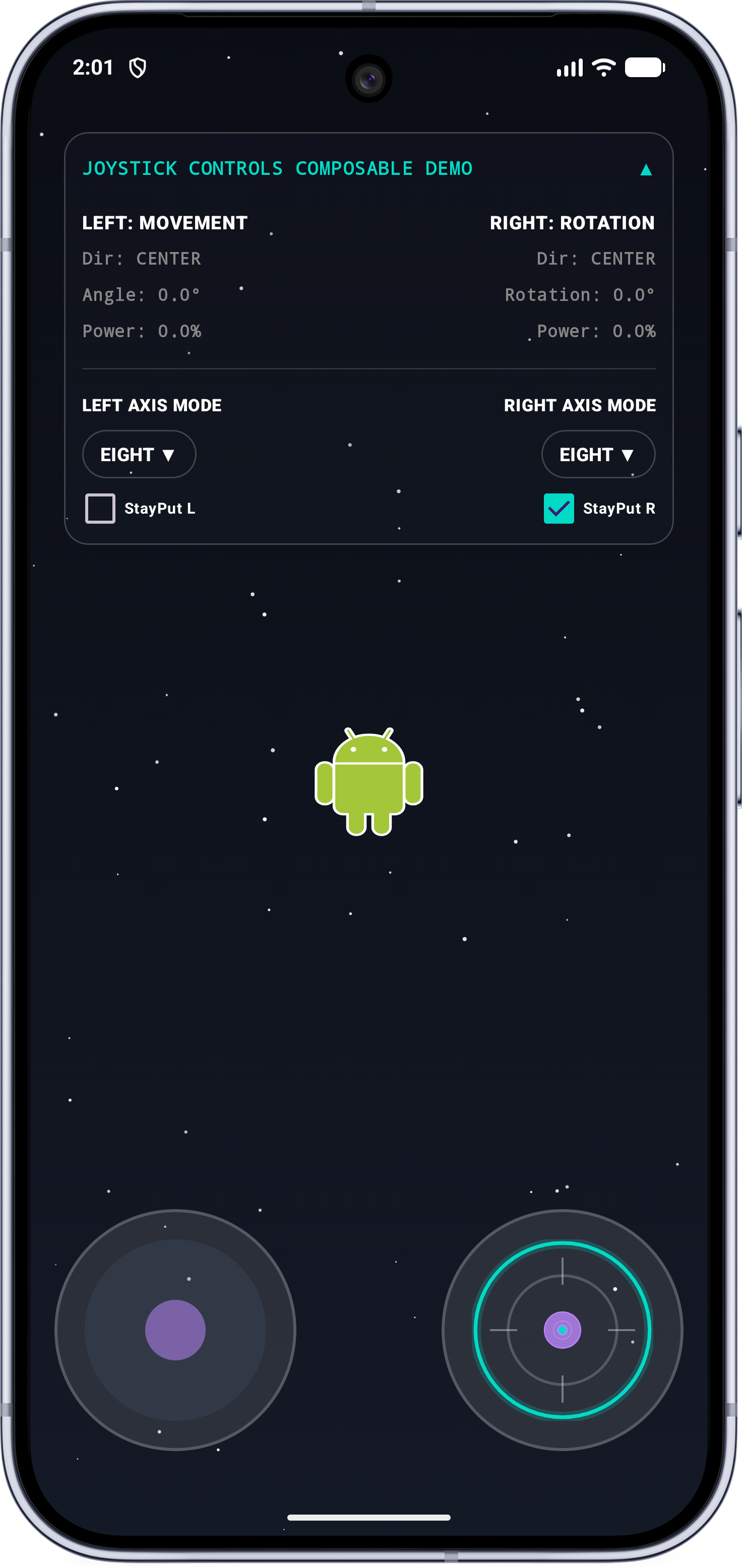
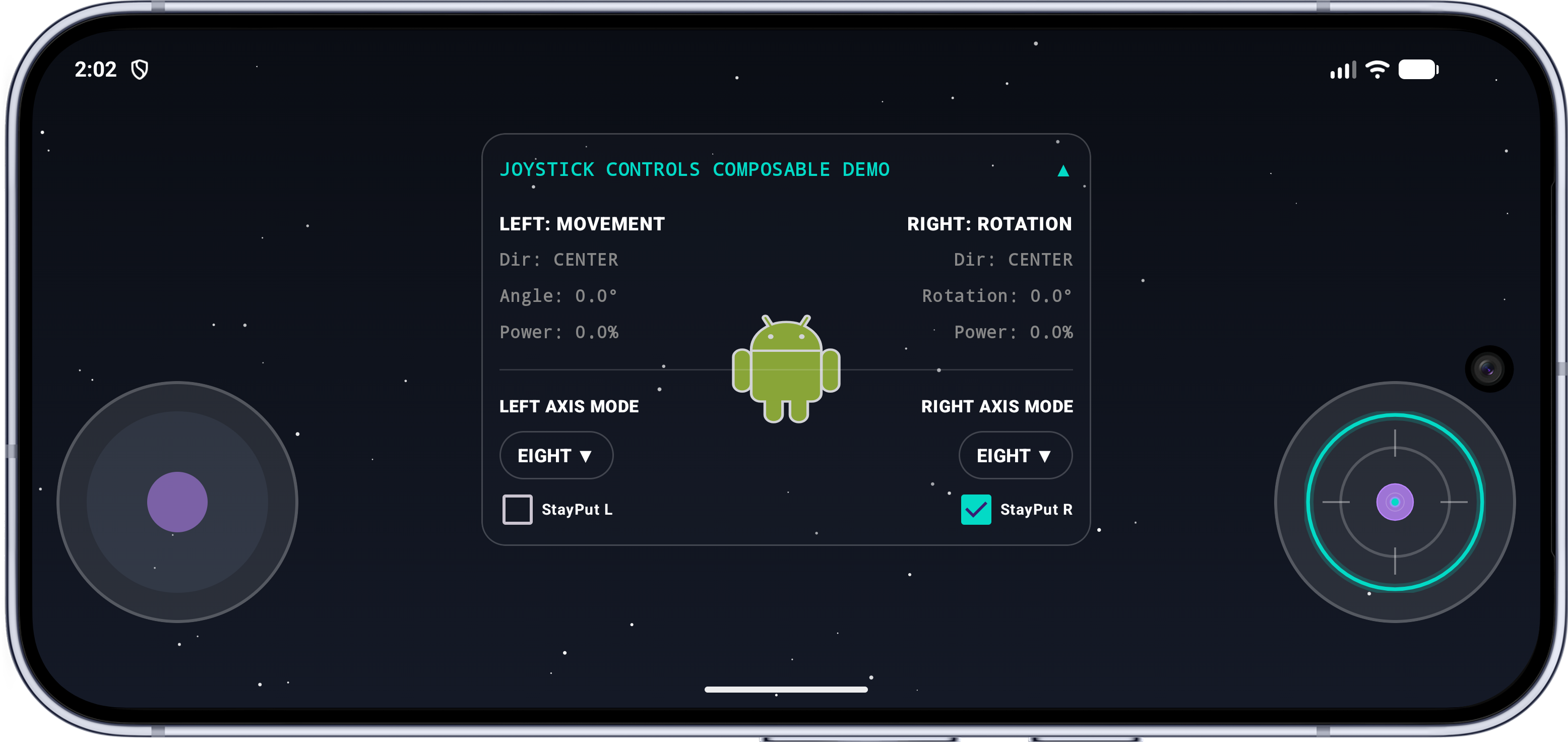
The repository includes a fully featured demo app that showcases the capabilities of both the Jetpack Compose Joystick and legacy JoyStick configurations:
- Dual Joystick Controls:
- Left Joystick: Controls the movement of a Droid character inside a scrollable starfield.
- Right Joystick: Controls the rotation and aiming of the Droid.
- Action Triggers:
- Single Tap: Fire a single projectile from the Droid.
- Double Tap: Fire a rapid-fire burst of projectiles.
- Dynamic Configuration (HUD):
- Toggle between different axis limits (
JoystickType): EIGHT_AXIS, FOUR_AXIS, TWO_AXIS_LEFT_RIGHT, TWO_AXIS_UP_DOWN. - Enable or disable
stayPutbehavior for each joystick independently. - Real-time display of coordinate angle, power, and directional state.
- Toggle between different axis limits (
- Haptic Feedback: Custom haptic feedback responses for tap and double-tap events.
Screenshots
| Portrait | Landscape |
|---|---|
 |
 |
Installing and Running the Demo
To run the demo application locally:
- Clone the Repository:
git clone https://github.com/erz05/JoyStick.git cd JoyStick - Open in Android Studio:
- Open Android Studio and select File > Open.
- Navigate to the cloned
JoyStickdirectory and click Open.
- Build & Run:
- Let Gradle sync complete.
- Select the
apprun configuration from the dropdown at the top. - Click the Run button to build and install it on your connected Android device or emulator.
📦 Installation
To include the library in your Gradle project:
1. Add the JitPack Repository
In your settings.gradle.kts (or project-level build.gradle.kts):
dependencyResolutionManagement {
    repositories {
        google()
        mavenCentral()
        maven { url = uri("https://jitpack.io") }
    }
}
2. Version Catalog (libs.versions.toml)
[libraries]
joystick = { module = "com.github.erz05:JoyStick", version = "2.0.0" }
Module Build Script (build.gradle.kts)
dependencies {
    implementation(libs.joystick)
    // Or if importing as a local project module:
    // implementation(project(":joysticklibrary"))
}
📄 License
Copyright 2015 erz05

Licensed under the Apache License, Version 2.0 (the "License");
you may not use this file except in compliance with the License.
You may obtain a copy of the License at

   http://www.apache.org/licenses/LICENSE-2.0

Unless required by applicable law or agreed to in writing, software
distributed under the License is distributed on an "AS IS" BASIS,
WITHOUT WARRANTIES OR CONDITIONS OF ANY KIND, either express or implied.
See the License for the specific language governing permissions and
limitations under the License.
