SectorProgressView
Introduction: 一个圆形的进度显示控件,用圆中扇形的角度大小来表示进度信息
Tags:
进度条-

Demo
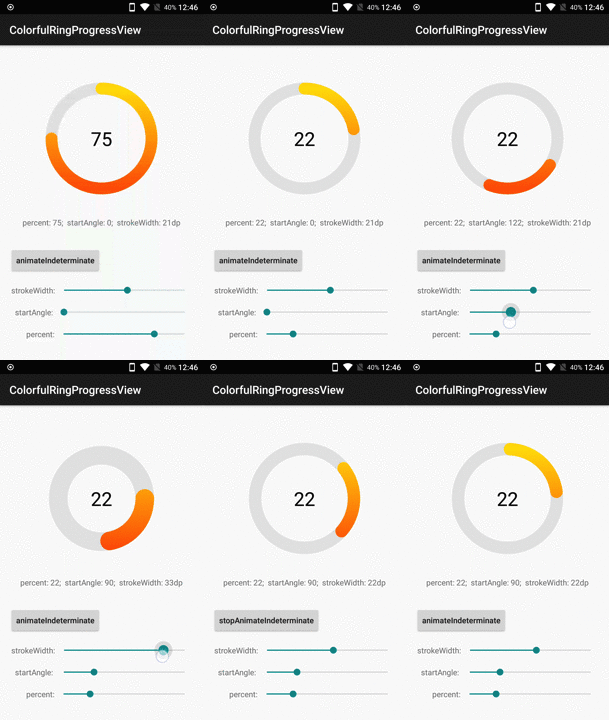
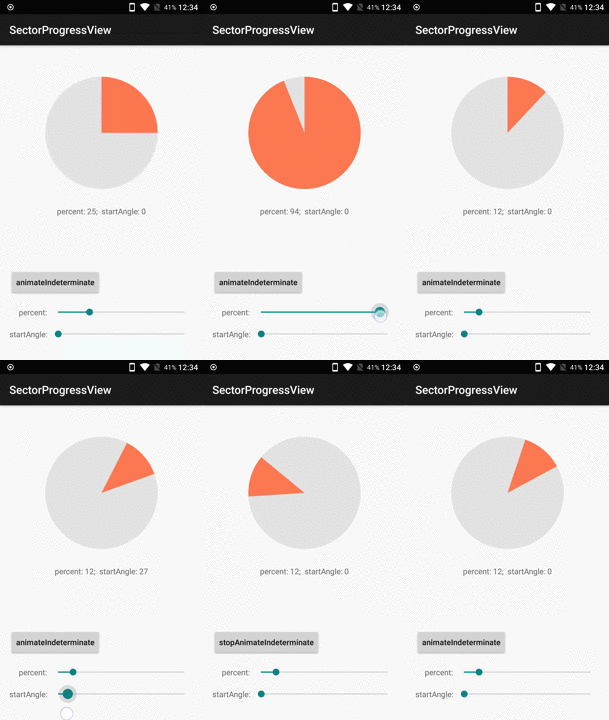
How to use:
The ColorfulRingProgressView
- Define views in xml
<com.timqi.sectorprogressview.ColorfulRingProgressView
        xmlns:app="http://schemas.android.com/apk/res-auto"
        android:id="@+id/crpv"
        android:layout_width="match_parent"
        android:layout_height="match_parent"
        app:bgColor="#e1e1e1"      // The Backgroud Color of Ring
        app:fgColorEnd="#ff4800"   // defaul color, red
        app:fgColorStart="#ffe400" // defaul color, yellow
        app:percent="75"           // Current percent. "100" is full
        app:startAngle="0"         // Start Angle of the foreground sector
        app:strokeWidth="21dp"     // Width of the Ring
        />
- parameters description

- You can custom view using java code
crpv = (ColorfulRingProgressView) findViewById(R.id.crpv);
crpv.setPercent(75);
crpv.setStartAngle(0);
crpv.setBgColor(0xffe1e1e1);
crpv.setFgColorStart(0xffffe400);
crpv.setFgColorEnd(0xffff4800);
crpv.setStrokeWidthDp(21);
The SectorProgressView
- Define views in xml
<com.timqi.sectorprogressview.SectorProgressView
        xmlns:app="http://schemas.android.com/apk/res-auto"
        android:id="@+id/spv"
        app:bgColor="#e5e5e5"   // The Backgroud Color of Circle
        app:fgColor="#ff765c"   // The Foregroud Color of Circle
        app:percent="25"        // Current percent. "100" is full
        app:startAngle="0"      // Start Angle of the foreground sector
        />
- You can custom view using java code
spv = (SectorProgressView) findViewById(R.id.spv);
spv.setPercent(25);
spv.setStartAngle(0);
spv.setBgColor(0xffe5e5e5);
spv.setFgColor(0xffff765c);
Indeterminate status
This library add a API for indeterminate status of SectorProgressView and ColorfulRingProgressView. Config your angle or percent params and invoke animateIndeterminate
animateIndeterminate()

// if you want custom the duration or TimeInterpolator
animateIndeterminate(int durationOneCircle, TimeInterpolator interpolator)

// to stop animate
stopAnimateIndeterminate()
download demo apk to have a taste.
Integration
- Using gradle. Add the dependency in your app.gradle
dependencies {
    compile 'com.timqi.sectorprogressview:library:2.0.1'
}
- Or you can Clone the repo from github. If you are using Android Studio. Select
File -> New -> Import Moduleand navigate the source directory to thelibraryfolder is OK!
Author
License
Copyright 2017 Tim Qi

Licensed under the Apache License, Version 2.0 (the "License");
you may not use this file except in compliance with the License.
You may obtain a copy of the License at

   http://www.apache.org/licenses/LICENSE-2.0

Unless required by applicable law or agreed to in writing, software
distributed under the License is distributed on an "AS IS" BASIS,
WITHOUT WARRANTIES OR CONDITIONS OF ANY KIND, either express or implied.
See the License for the specific language governing permissions and
limitations under the License.
