DebugLog
Create a simple and more understandable Android logs.
#Why?
android.util.Log is the most usable library of the Android. But, when the app released on the market, some important information is clearly forgotten by the developer. All logs are disabled by DebugLog when the app is released.
And plus, it provides more understandable DDMS logs for developers.
#Usage
#####Traditional android.util.Log usage:
public static final String TAG = "MyApp or MyClass name";

void myFunc(){
    android.util.Log.i(TAG, "my message");
}
Generally, this logs location forgotten after first day:) if the location hasn't been defined in log message. Add LibDebugLog as a library to your project and you are good to go.
#####DebugLog usage:
void myFunc(){
    DebugLog.e("simple log from myFunc()");
}
no tags, and no any information. Just write your logs.
It shows useful data;


##Android Studio if you use Android Studio, all logs are disabled by DebugLog when the build variant is set 'release'
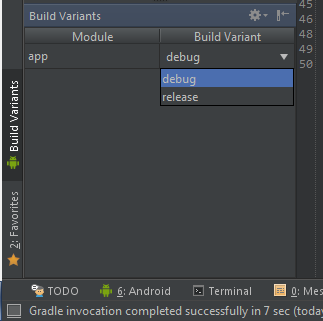
##Eclipse if you use Eclipse, all logs are disabled by DebugLog when the generated new signed apk.
#Add Your Project ##Gradle
repositories {
    maven {
        url "https://jitpack.io"
    }
}
dependencies {
    compile 'com.github.MustafaFerhan:DebugLog:v1.0'
}
##Maven
<repository>
    <id>jitpack.io</id>
    <url>https://jitpack.io</url>
</repository>
<dependency>
    <groupId>com.github.MustafaFerhan</groupId>
    <artifactId>DebugLog</artifactId>
    <version>v1.0</version>
</dependency>
#Contributing
Want to contribute? You are welcome!
#Licence #####The Unlicense Anyone is free to copy, modify, publish, use, compile, sell, or distribute this software, either in source code form or as a compiled binary, for any purpose, commercial or non-commercial, and by any means.
For more information, please refer to http://unlicense.org/
