matrosdms
Your documents. Your folders. Your rules.
A privacy-first, open-source Document Management System that combines the familiarity of folders with the power of smart tagging.


📸 Overview
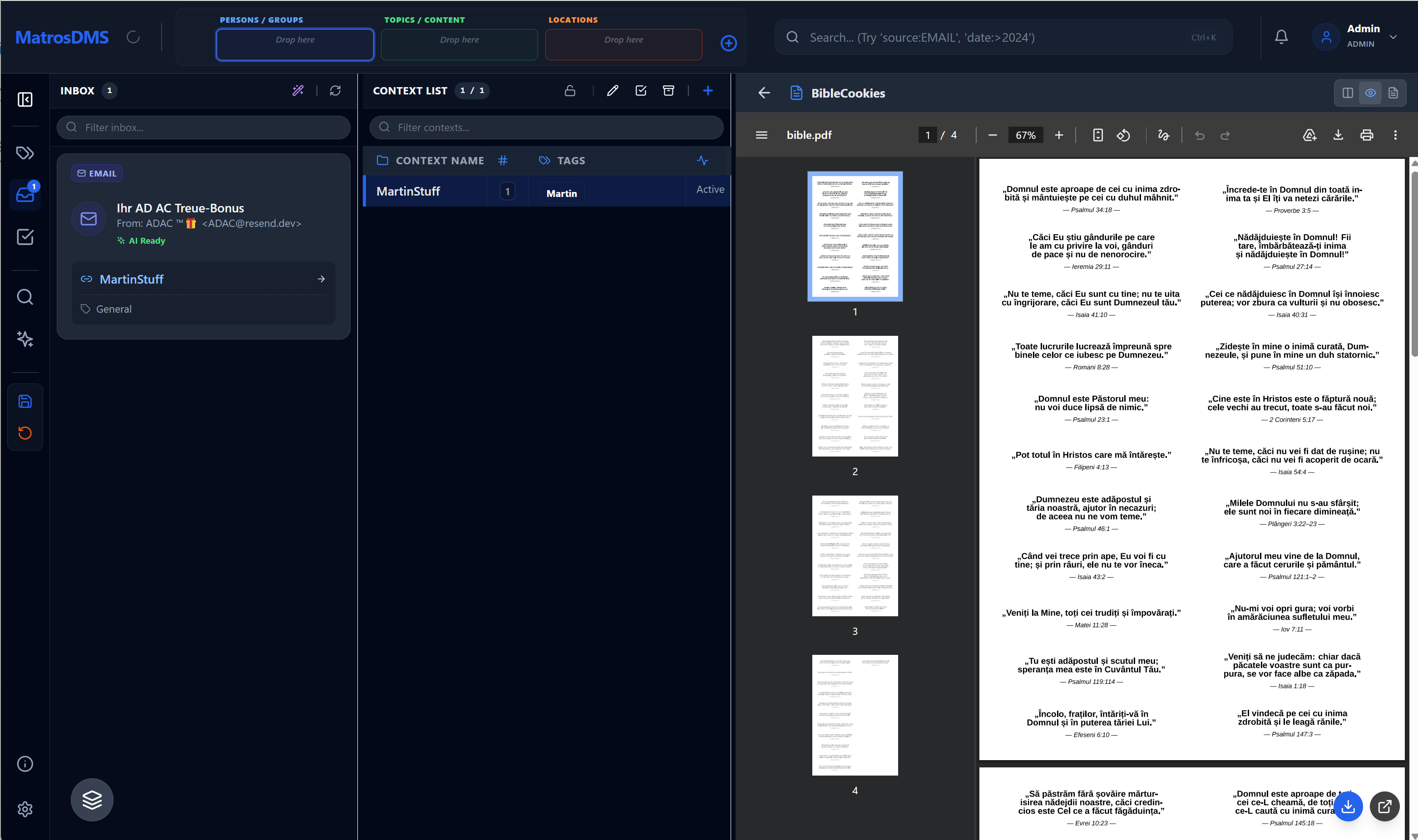 MatrosDMS interface showing hierarchical context navigation and document timeline
🤔 Why MatrosDMS?
MatrosDMS organizes documents the way you think — using Who, What, and Where. Pick a context once, drop files in, and everything is automatically tagged and searchable. No per-file labeling. Just a clean timeline for every combination.
100% Local. Zero Cloud. Full Control.
✨ Key Features
📂 Hierarchical Context Navigation
Select your context using three drop zones — everything you add inherits these tags automatically:
┌─────────────────────┬─────────────────────┬─────────────────────┐
│  PERSONS / GROUPS   │  TOPICS / CONTENT   │     LOCATIONS       │
│  ┌─────────┐        │                     │                     │
│  │ Mihaela ✕│       │     Drop here       │     Drop here       │
│  └─────────┘        │                     │                     │
└─────────────────────┴─────────────────────┴─────────────────────┘
Example: Select Mihaela → Tax Report → Tax Office
📁 Mihaela • Tax Report • Tax Office
├── 📄 Tax Return 2024          [kind:Form]        2025-02-28
├── 📄 Assessment Notice        [kind:Letter]      2025-06-15
├── 📄 Payment Confirmation     [kind:Receipt]     2025-07-01
└── 📄 Refund Statement         [kind:Letter]      2025-08-20
Each combination creates a unique context with its own timeline. The hierarchical tags let you drill down from thousands of documents to exactly what you need.
🧭 Context = Who + What + Where
MatrosDMS models daily life using three intuitive, hierarchical dimensions. Pick a context once; anything you drop there inherits it — no need to label each file individually.
- WHO: People or groups affected (e.g., Family → Smith → Mr. Smith)
- WHAT: The object or topic (e.g., Finance → Pension Fund)
- WHERE: The counterparty or place (e.g., Employers → Google)
Example (daily life):
WHO:   Family Smith → Mr. Smith
WHAT:  Pension fund of his employer
WHERE: Google (as the employer)
Result: A single, precise context. Drop emails or documents into it and they automatically carry these tags and appear in the context’s timeline.
📆 Timeline & Lifecycle
Every context maintains a clear, chronological timeline of all related documents and events. You can track lifecycle states for long-running topics and close them when done.
- Lifecycle examples: Loans or contracts can move through states such as Draft → Active → Closed.
- Clarity over time: Closing a lifecycle preserves the full history while keeping your active workstream tidy.
⏰ Reminders That Actually Work
- Set a reminder on a folder: "Cancel this contract before December 2025"
- Set a reminder on a document: "Pay this invoice by Friday"
Never miss a deadline again.
🔍 Find Anything, Instantly
- Full-Text Search: Powered by Apache Lucene. Search inside PDFs, scanned documents (OCR), and emails.
- MQL (Matros Query Language):
who:Martin where:Amazon kind:Invoice→ All of Martin's Amazon invoices. - Smart Filters: Click through dimensions to drill down visually.
🔍 Smart Classification
- Heuristic Engine: Fast, rule-based document sorting and classification.
- Future: Local AI: Planned integration with Ollama for enhanced classification.
- All processing happens locally. Nothing ever leaves your machine.
🔐 Encrypted at Rest
- AES-256-CTR encryption for all stored files.
- Argon2id key derivation — your password protects everything.
- Even if your disk is stolen, your documents are safe.
📧 Email Archiving
- Drop and done: Simply drop
.emlfiles into the system - Self-contained: Emails become fully searchable, taggable documents
- Automatic processing: Attachments are extracted and stored separately
- Built-in SMTP: Receive emails directly if configured
Quick Start: Thunderbird
Use Thunderbird to forward emails straight into MatrosDMS.
- In Thunderbird: Account Settings → Outgoing Server (SMTP) → Add
- Enter your MatrosDMS SMTP host/port (see Settings → Email in MatrosDMS)
- Save and select this SMTP for the account you want to use
- Forward/Redirect any email to your MatrosDMS address — it appears in the Inbox, with attachments extracted and indexed
⚡ Smart Workflow
┌─────────────┐     ┌─────────────┐     ┌─────────────┐     ┌─────────────┐
│   INBOX     │ ──▶ │  PROCESSING │ ──▶ │   ARCHIVE   │ ──▶ │   SEARCH    │
│ Scan/Upload │     │  AI / Rules │     │  Encrypted  │     │  Full-Text  │
│   Email     │     │  Suggest    │     │  Indexed    │     │  MQL Query  │
└─────────────┘     └─────────────┘     └─────────────┘     └─────────────┘
- Drop documents into the Inbox (scan folder, web upload, or email).
- Review AI-suggested labels (or apply them manually).
- Archive — the document is encrypted, indexed, and filed.
- Search — find it in milliseconds, years later.
🛠️ Tech Stack
Modern architecture. No legacy baggage.
| Layer | Technology |
|---|---|
| Backend | Java 25, Spring Boot 3.5, Hibernate Search 7 (Lucene) |
| Frontend | Vue 3, TypeScript, Vite, Tailwind CSS, TanStack Query |
| Database | Embedded H2 + Flyway migrations |
| Security | Bouncy Castle (AES-256-CTR, Argon2id) |
| Apache James (SMTP/IMAP) | |
| OCR/Parse | Apache Tika, Tesseract |
👉 View Full Tech Stack & Architecture
� Deployment Options
MatrosDMS can be deployed in multiple ways to fit your environment:
📦 Portable Desktop App
- Windows Standalone: Download
.exe— no Java installation required - Cross-Platform JAR: Requires Java 25+
🐳 Container Deployment
# Docker
docker run -p 8080:8080 -v ./data:/app/data mschwehl/matrosdms

# Docker Compose
docker-compose up -d
☸️ Kubernetes/Helm
# Helm chart available
helm repo add matrosdms https://charts.matrosdms.org
helm install my-dms matrosdms/matrosdms
💻 Development Build
# Clone and build from source
git clone https://github.com/matrosdms/matrosdms.git
cd matrosdms


# Complete build (all components + Windows installer)
|       Goal       |            Command            |                    Description                    |
|------------------|-------------------------------|---------------------------------------------------|
| **Backend Loop** | `mvn install`                 | Fastest (15s). Builds backend only. Skips UI/CLI. |
| **Full Stack**   | `mvn install -Pwith-frontend` | Builds server + frontend. Embeds UI in JAR.       |
| **Release**      | `mvn install -Prelease`       | Builds everything (Server, UI, CLI).              |
| **Format Code**  | `mvn spotless:apply -Pformat` | Auto-formats Java code to Eclipse style.          |

details in the [Development Guide](doc/development.md).

---

## 🤝 Contributing

Contributions are welcome! Please read the contributing guidelines and check out the [Development Guide](doc/development.md).

```bash
# Format code before committing
mvn spotless:apply -Pformat
📄 License
MatrosDMS is free for personal use.
⭐ Star us on GitHub if MatrosDMS helps you stay organized!